Full Detailed Guide To LinkedIn API in 2026: Types & Uses
LinkedIn has become the go-to platform for professionals, marketers, and recruiters. If you’ve ever wanted to tap into this network programmatically, the LinkedIn API is your key. In this updated guide for 2026, we’ll cover what the LinkedIn API is, the different types available, and how you can use them to automate workflows, enrich data, and build smarter tools. Whether you’re a developer, a marketer, or a recruiter, this guide is built for you.
What Is the LinkedIn API?
Picture LinkedIn as a massive, bustling networking event with millions of professionals mingling, swapping business cards, and sharing industry insights. Now, imagine you could sneak into that event with a magic key that lets you pull data, automate tasks, or even build your own app to make sense of it all. That’s the LinkedIn API in a nutshell.
The LinkedIn API (Application Programming Interface) is a set of tools that lets developers interact with LinkedIn’s data and features programmatically. Want to fetch user profiles, post updates, run ads, or track learning progress? The API is your backstage pass. It’s like having a superpower to connect your app, website, or tool to LinkedIn’s vast ecosystem. In 2026, LinkedIn’s APIs are more powerful than ever, but you’ll need to know the lay of the land to use them effectively. Let’s break down the types you should have on your radar.


LinkedIn Official APIs | Multiple Themes
Types of LinkedIn APIs to Know About in 2026:
LinkedIn offers a suite of APIs, each designed for specific use cases. Think of them as different tools in a toolbox; each one has a unique job. Here’s the lowdown on the key APIs you’ll want to know about.
a. LinkedIn Marketing API
This one’s for the marketing mavens out there. The Marketing API lets you manage and analyze LinkedIn campaigns like a pro. You can create sponsored content, track performance, and even optimize your ad spend all programmatically. Imagine automating your ad campaigns while you sip coffee. Sweet, right?
b. LinkedIn Learning API
If you’re in the e-learning space, this API is your jam. It lets you access LinkedIn Learning’s massive library of courses, track user progress, and integrate learning data into your platform. Perfect for companies building training programs or apps that help professionals upskill.
c. LinkedIn Profile API
Want to pull user profile data like job titles, skills, or work history? The Profile API is your go-to. It’s great for building tools that personalize user experiences or enrich CRM systems with fresh, reliable data straight from LinkedIn profiles.
d. LinkedIn Sales Navigator API
Sales pros, this one’s for you. The Sales Navigator API helps you tap into LinkedIn’s premium sales tool to find leads, track accounts, and build relationships. It’s like having a virtual sales assistant who never sleeps.
e. LinkedIn Ads API
Similar to the Marketing API but laser-focused on ads, this API lets you create, manage, and measure LinkedIn business ad campaigns. From targeting specific audiences to tracking clicks, it’s a must for advertisers who want to scale their efforts.
f. LinkedIn Messaging API
Ever wished you could automate LinkedIn messages or integrate them into your app? The Messaging API lets you send and receive messages programmatically, making it a game-changer for building communication tools or chatbots.
g. LinkedIn Search API
Search is the heart of LinkedIn’s discovery process, and this API lets you harness it. You can search for people, companies, or jobs based on keywords, locations, or other filters. In short, it works for you as LinkedIn SEO, helping you reach your desired results. It’s perfect for recruitment tools or market research apps.
h. LinkedIn Recruiter API
Recruiters, rejoice! This API integrates with LinkedIn Recruiter to streamline hiring. You can search for candidates, manage job postings, and even track applicant pipelines all without leaving your own platform.
i. LinkedIn Conversion API
Tracking conversions is key to understanding campaign success. The Conversion API lets you measure actions like sign-ups or purchases driven by LinkedIn ads, helping you prove ROI and fine-tune your strategy.
j. LinkedIn Feed API
Want to pull posts, articles, or updates from LinkedIn’s feed? The Feed API lets you access and share content, making it ideal for building social media dashboards or content curation tools.
You can add them to your website and include them as part of your LinkedIn content strategy.
Each one opens up a world of possibilities, but what can you actually do with them? Let’s explore.
What You Can Do With the LinkedIn API?
The LinkedIn official API is like a Swiss Army knife for developers and businesses. Here are some cool ways you can put it to work:
1. Run Ad Campaigns Automatically
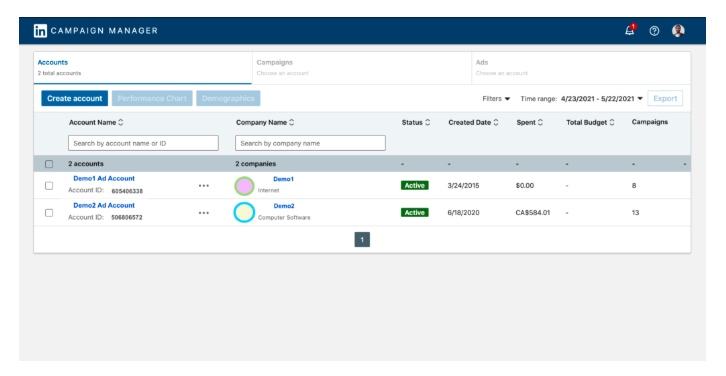
Tired of manually tweaking ad campaigns? With the Ads and Marketing APIs, you can automate everything from creating ads to targeting specific demographics. For example, you could build a tool that adjusts your ad budget based on performance in real-time. More clicks, less stress.
2. Enrich CRM Data
Your CRM is only as good as its data. Use the Profile API to pull fresh details from LinkedIn profiles, like job changes or new skills, and keep your customer records up to date. I once worked with a sales team that used this to spot when leads got promoted, and it was a game-changer for their outreach.
3. Build Recruitment Tools
The Recruiter and Search APIs are a recruiter’s best friend. You can create tools to find candidates with specific skills, automate job postings, or even build a custom dashboard to manage your hiring pipeline. Imagine cutting your time-to-hire in half!
4. Track Learning Progress
If you’re building an e-learning platform, the Learning API lets you integrate LinkedIn Learning’s courses and track user progress. You could create a tool that recommends courses based on a user’s job role or skills gap, super handy for HR teams.
5. Search LinkedIn
The Search API lets you build apps that tap into LinkedIn’s powerful search engine. Whether it’s finding leads, researching competitors, or scouting talent, you can create custom search tools tailored to your needs.
The possibilities are endless, but it’s not all smooth sailing. Let’s talk about the bumps in the road developers often face. Common Issues Developers Face While Using LinkedIn API
Building with the LinkedIn API is awesome, but it’s not without its quirks. Here are two common issues developers run into and how to dodge them:
6. Access Denied Errors
Ever get that dreaded “403 Forbidden” error? It’s like LinkedIn’s saying, “Nope, you’re not invited to this party.” This usually happens when you don’t have the right permissions or your app hasn’t been approved for certain APIs. To avoid this, double-check your API access level (LinkedIn’s Partner Program is strict!), ensure your app is properly authenticated, and test with a sandbox environment first.

7. Token Expiration
API tokens are like milk; they expire. If your access token runs out, your app stops working, and you’re left scrambling. To prevent this, implement refresh token logic in your code to automatically grab a new token before the old one goes bad. Also, keep an eye on LinkedIn’s rate limits to avoid getting throttled.
These hiccups can be annoying, but with a little prep, you can keep your project humming along.
Risks Of Scraping LinkedIn Data Instead Of Using The Official APIs
Some businesses rely on scraping tools to fetch LinkedIn content, unaware of the numerous risks involved. Here’s why scraping is not a safe or sustainable option:
- Account Blocks: LinkedIn actively monitors and blocks accounts involved in scraping, which can disrupt your content strategy and harm your online reputation.
- Legal Issues: Scraping violates LinkedIn’s terms of service and can lead to legal actions, fines, or other penalties.
- Inconsistent and Inaccurate Data: Scraped content is often incomplete, outdated, or incorrectly formatted, leading to a poor user experience.
- Security Risks: Scraping tools expose your data to unauthorized access, leaving your system vulnerable to breaches or cyberattacks.
Tagembed eliminates these risks by using the official API, providing a secure and reliable way to display LinkedIn content.
Why Does Official API Matter When Embedding LinkedIn Posts?
The Tagembed Widget stands apart from other tools because it leverages the official LinkedIn API, ensuring security, compliance, and accuracy. Here’s why this makes a significant difference:
1. Data Security:
The official API ensures that all data transferred between LinkedIn and Tagembed is encrypted and protected from unauthorized access. Thus, you can rest assured that your content is being handled securely.
2. Compliance With LinkedIn’s Terms of Service:
Unlike scraping, which violates LinkedIn’s terms of service, the API works within LinkedIn’s official guidelines. This eliminates the risk of account bans, legal complications, or reputational damage to your business.
3. Reliable and Accurate Data:
Scraping tools often deliver incomplete or outdated content, leading to campaign inconsistencies. The API, on the other hand, ensures that your widget reflects accurate, real-time updates.
4. Optimized Performance:
Scraped data can cause glitches, slow performance, or formatting issues. The official API streamlines the integration process, providing a smooth and seamless user experience.
How to Use the LinkedIn API Without Coding?
Not a coder? No problem! You don’t need to write a single line of code to tap into the LinkedIn API’s power. Here’s how non-techies can get in on the action:
- Use No-Code Platforms: Tools like Zapier or Integromat (now Make) let you connect the LinkedIn API to other apps without coding. For example, you could set up a Zap to automatically add new LinkedIn leads to your CRM or send messages when someone views your profile.
- Leverage Third-Party Tools: Platforms like Tagembed provide you with the LinkedIn API, which enables you to collect and embed LinkedIn posts on your website. It provides you with a dedicated LinkedIn widget that smoothly displays all the LinkedIn content, without hampering the speed and quality of the website.
- Hire a Developer: If you’ve got a big idea but no coding skills, consider hiring a freelancer from platforms like Upwork to build a custom integration for you – especially if you’re working on tools related to technical leadership interview questions or hiring workflows. Just make sure they’re familiar with LinkedIn’s APIs.
The Tagembed LinkedIn Official APIs Advantages:
At Tagembed, we prioritize security, reliability, and ease of use. This is one of the best tools we offer to help you create engaging and professional content displays. With features like real-time updates, advanced customization, and compliance with official APIs, you can trust Tagembed to deliver the best results for your business.
With the Tagembed Widget, you don’t need to worry about the drawbacks of scraping or other unreliable methods. Here’s what makes this widget a valuable addition to your marketing toolkit:
- Seamless Integration: The widget is easy to set up and embed LinkedIn posts into your website or social walls. You can connect to your LinkedIn account and display content with just a few clicks.
- Customizable Design: The widget is fully customizable, allowing you to tailor the look and feel of your display to match your branding. From fonts and colors to layouts, you have complete creative control.
- Real-Time Updates: Your widget syncs with LinkedIn in real-time, ensuring your content is always fresh, relevant, and engaging for your audience.
- Engage Your Audience: Showcasing LinkedIn content, such as thought leadership posts, testimonials, or campaign highlights, helps build trust and credibility with your audience.
The Tagembed Widget adds significant value to your content marketing strategy, whether you’re a small business, an enterprise, or a personal brand.
Conclusion
At Tagembed, we are driven by a mission to deliver exceptional social media aggregation solutions that empower businesses to thrive in their digital initiatives. Integrating the LinkedIn official API into the LinkedIn Widget is a testament to our commitment to excellence.
This integration aligns with our promise to continually enhance our platform, helping businesses connect with their audiences in meaningful ways while adhering to the highest data privacy and performance standards.
When you choose Tagembed, you’re choosing a partner committed to driving innovation while safeguarding the integrity and security of your content.
Frequently Asked Questions
No, the LinkedIn API is not entirely free. The usages and access are categorized according to different pricing plans. Basic data is available on a free plan with limited use. For broader data access, such as detailed profiles or marketing tools, approval as a partner is typically required, and some integrations (e.g., LinkedIn Learning API) necessitate site licenses or partnership fees. Third-party alternatives or unofficial APIs may introduce their own pricing, but official usage remains free at the core level, subject to rate limits and compliance.
Login to the LinkedIn Developer portal. Then, click “My Apps” present on the top of the page, from the given choices select Create App. Provides the needed app details and also add your company page. For Self-Serve, complete all the steps provided and then click the Create App button at the bottom of the page.
LinkedIn API rate limit is 429 responses. It refers to the maximum number of API calls made in a 24-hour period.
No, Direct use of the LinkedIn API without explicit approval from LinkedIn is not possible. You need to participate in LinkedIn partner program.
Embed social feed from Facebook, YouTube, Instagram, Twitter on your website, like a PRO
Invalid Email Address Multiple Themes
