How To Use LinkedIn Video Posts To Drive More Traffic To Your Website
If you think LinkedIn video posts are just for reach or brand awareness, you’re missing a big opportunity.
Used smartly, LinkedIn video posts can become a consistent traffic driver to your website. We’re talking product demos that spark curiosity, thought leadership clips that build trust, and testimonials that make visitors click through.
But here’s what you should know: your video shouldn’t just perform well in the feed. It should live longer and work harder on your website, too. That’s why embedding LinkedIn videos directly into your blogs, landing pages, and product pages has become crucial.
In this blog, we’ll break down how to use LinkedIn video posts to pull more visitors to your site, both from LinkedIn and on your website. Sounds interesting? Read on to learn more.


LinkedIn Official APIs | Multiple Themes
Types of LinkedIn Video Posts That Perform Best
Video posts on LinkedIn can be of various types. From motivational leadership videos to behind-the-scenes office fun videos, each one serves a different purpose when added correctly on the website. Let’s talk about some of the most popular video post types on LinkedIn —

a.) Thought Leadership Clips
This is where you speak to your audience, not at them. Share strong opinions, quick takes, or short rants about trends in your industry. Keep it under 60 seconds. You’re not here to teach, you’re here to make people think.
b.) Product Demos & Tutorials
No one wants another salesy LinkedIn video post. But if you show how your product actually solves a problem in under two minutes? You’ve got gold. Bonus if you include real-life use cases or results.
c.) Customer Testimonials & Case Studies
People trust people. A 30-second quote from a happy client > a 5-minute pitch deck. Keep your video posts on LinkedIn authentic. No scripts. Just raw, on-camera praise paired with impact numbers or short “before-and-after” proof.
d.) Behind-the-Scenes & Culture Clips
Want to attract top talent and build trust with customers? Show your humans. Office laughs, event prep, even casual team huddles, this is the content that builds community, not just clicks.
How LinkedIn’s Algorithm Promotes Video Content
LinkedIn’s algorithms clearly favor the content that manages to keep users engaged. Moreover, videos directly uploaded to LinkedIn are more favored in the feed as compared to YouTube links.
The longer someone watches, comments, or reacts, the wider your video posts on LinkedIn spread. It’s not just about views; it’s about watch time and interaction as well. So, your aim should be to spark meaningful conversations, not just hop onto something trendy. When your video sparks real engagement, the algorithm rewards you by showing it to more people, even second and third-degree connections. Showcasing such videos on the website helps people stay on it for longer.
Best Practices for Creating Engaging LinkedIn Videos
Here are some best practices that you should follow to create engaging LinkedIn video posts —
1. Keep it short, hook fast
People on LinkedIn scroll fast, so you’ve only got maybe 2 seconds to attract them and stop at your post. Start strong with a bold question, call out a pain point, or maybe drop an unexpected fact. It is quite ideal to keep your videos under 90 seconds so people actually watch them till the end.
2. Always use captions
Most LinkedIn users scroll in silent mode. In fact, around 80% of social media users usually scroll on mute. Thus, captions/subtitles become a crucial part of any LinkedIn video post. Make sure to add clean, easy-to-read subtitles in your video so that your message lands loudly, even with sound.
3. Drive action with subtle CTAs
Avoid the hard sell. Instead of saying “Buy now” or “Click here,” invite your viewers into the story. Say something like, “Want to see how we did it? Link’s below.” Make the next step feel natural, not pushy.
4. Post when people care
The LinkedIn audience is the most active during the weekdays, usually in the mornings. However, it’s not right to just guess the post timings. Check your analytics and experiment with your post timings until you find the best time to post videos on LinkedIn. Moreover, show up consistently and drop content regularly, as people often find active profiles credible.
5. Show real people, not just products
Stock clips and flashy edits can feel cold. Instead, spotlight your team, clients, or yourself. Let people see who’s behind the brand. LinkedIn favors real, human content because people do too.
6. You don’t need a studio
Your phone camera is good enough. What really counts is clear sound, good lighting, and a confident message. Raw, honest videos often perform better than overproduced ones because they feel genuine.
Optimizing Your Video Post Description and CTA
Here’s how to optimize your video post description and CTA —
– Start with a compelling hook
Your first sentence should stop the scroll. Think bold, direct, and benefit-driven. Make your audience curious enough to hit play, “We turned one product video into $25K in sales. Here’s how”.
– Add links with purpose
If you’re driving traffic, drop your website link in the first two lines. Want to track performance? Use UTM parameters to see exactly where clicks are coming from. Don’t just link, measure the impact.
– Use hashtags that actually help
Go for 3–5 relevant hashtags. Mix niche and broad ones like #LinkedInMarketing + #B2BGrowth. It boosts discoverability without looking spammy. And avoid vague tags like #video or #content, they do nothing.
– End with a soft CTA
Your CTA should invite action, not demand it. Try, “Curious how this could work for your brand?” or “Want the full playbook? Let’s chat.” Make it sound like a conversation, not a sales pitch.
Embedding LinkedIn Video Posts on Your Website
Want to get more out of your video posts on LinkedIn? Don’t just post content and let it die on the feed. Embedding LinkedIn video posts on your website is a smart way to extend their shelf life and reach the right audience even after the post stops trending.
One way to embed your LinkedIn posts on your website is to manually grab the post’s embed code and paste it into your site’s HTML.
But let’s be honest, no one wants to mess with code every time. That’s where social media aggregators such as Tagembed come in handy. They let you pull in your LinkedIn video feed dynamically and showcase it on your website using a LinkedIn feed widget.
Why use a LinkedIn video widget?
- Show real-time, auto-updated video content
- Keep your site dynamic and engaging
- Boost SEO with fresh, scrollable content
- Reduce bounce rate with interactive content
- Build social proof using real-time video activity
Embed LinkedIn Video Post On Website
Collect, Moderate, and Display LinkedIn Company Post On Website
Try For FreeWith tools such as Tagembed, you can create a LinkedIn video post wall in minutes. No dev required, just connect your account, customize the look, and embed LinkedIn post anywhere on your site. Keep your videos working for you 24/7.
Using LinkedIn Video in Landing Pages and Blog Content
Don’t think of adding LinkedIn video posts to your website as just a nice touch. It certainly works as a nice move to hold attention.
Moreover, when your website visitors see a real person talking, be it the founder, a customer, or a product expert, they are more likely to stick around and invest. Videos add warmth, credibility and clarity, all in under a minute.
Here are a few high-impact website spots where you should be embedding your LinkedIn content:
- Hero sections – Add a short, punchy intro video
- Blog intros – Set the stage with a relevant video insight
- Product pages – Show real use cases and testimonials
- About pages – Humanize your brand with team videos
- Pricing sections – Use video to explain plans or ROI
Use tools like Tagembed to pull your latest LinkedIn video posts directly onto your site, no manual updates needed. It’s a simple way to turn passive readers into engaged viewers.
Measuring Performance: Analytics & Traffic Tracking
Publishing LinkedIn video posts is only half the game. The real win is to know and understand what is working and what’s not. That’s where data plays a crucial role.
Key LinkedIn video metrics to watch:
- Views & watch time – How many people stopped scrolling?
- Engagement rate – Are they liking, commenting, or sharing it?
- Click-throughs – Did viewers take the next step?
- Audience insights – Who’s watching? Are they your ICP?
Track LinkedIn traffic with Google Analytics
Don’t just rely on LinkedIn’s built-in metrics use analytics tools like google analytics. Set up UTM parameters on every link you share. That way, when someone clicks from your video post to your site, you’ll see it clearly in Google Analytics under Acquisition > Campaigns.
Pro tip: Create separate UTMs for organic posts vs. paid campaigns to track ROI better.
Real-World Examples of Brands Driving Traffic with LinkedIn Video
Watching brands dominate on LinkedIn with video isn’t theory, it’s happening right now. These examples show how real companies turn views into visits and leads with LinkedIn video posts.
1. Salesforce’s LinkedIn Live Success
Salesforce launched an 11‑episode LinkedIn Live series and pulled in over 600,000 organic views, with a 3% engagement rate, well above industry benchmarks. By using authentic product demos and live Q&A segments, they kept audiences glued and drove interested professionals to their site.
2. Johnson & Johnson – “Road to a Vaccine” Live Series
Johnson & Johnson hosted a LinkedIn Live series chronicling their vaccine development journey. New episodes drew over a million views, with users watching nearly a million minutes per episode. Their strategy combined storytelling, live engagement, and expert perspective, driving professional interest and trust.
3. Automation Anywhere – Live Product Launch Broadcast
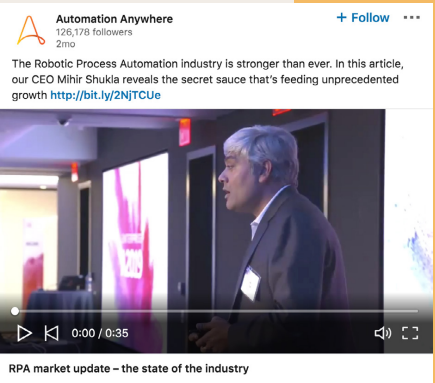
During a major product launch, Automation Anywhere turned to LinkedIn Live. Within two minutes, their livestream logged 400+ comments—and 78% of viewers came via LinkedIn. This real-time interaction translated into meaningful site traffic and qualified leads.
Why you should replicate these brand’s strategies:
- Bite-size formats and native uploads make viewers stop expanding their network and click through.
- Thought leadership and behind‑the‑scenes storytelling lead to higher dwell time and link clicks.
- Video drives 5× more engagement than regular posts, and 80% of B2B leads come through LinkedIn itself.
Conclusion
With the right LinkedIn video post, smart posting, and a little consistency, you can turn casual viewers into high-intent visitors.
Moreover, to keep your LinkedIn video posts working for you beyond the feed, embed them directly on your site with Tagembed. It’s fast, easy, and keeps your content fresh.
Ready to get engagement and traffic? Try Tagembed’s LinkedIn video widget today.
Embed social feed from Facebook, YouTube, Instagram, Twitter on your website, like a PRO
Invalid Email Address Multiple Themes
