Having a static website nowadays is like having a Walkman in the Spotify era, nostalgic, but “out of tune.” One can consider the importance of having a good website, as 75% of consumers consider a brand credible based on its website. Today’s shoppers aren’t satisfied with bare minimum websites; they expect a captivating, interactive experience. Brands are rising to the challenge, creating websites that aren’t just beautiful but are functional and contribute to the business growth. Hence, you may have noticed that brands have added Shoppable Instagram to their websites. It is not only helping them to make their website interactive, but it is also contributing to sales.
How can you add a Shoppable Instagram Feed to your website? What are the benefits of using it? This blog discusses all.


| Multiple Themes |
What Is a Shoppable Instagram Feed?
A shoppable Instagram feed allows brands to tag products in their posts, enabling users to shop directly from the images. By integrating product links, it creates a seamless shopping experience, increasing conversions and engagement right from the platform.
It is a feature that allows businesses to make their Instagram posts shoppable. So, when customers get to see a post, they can identify the product and make a purchase.
5 Easy Steps To Make Your Instagram Feed Shoppable
Tagembed makes it easy for you to embed an Instagram Shoppable feed on your website. All you need to do is follow the steps mentioned below:
1: Sign Up On Tagembed For Free
Register on Tagembed by providing the required credentials and creating your Tagembed account.
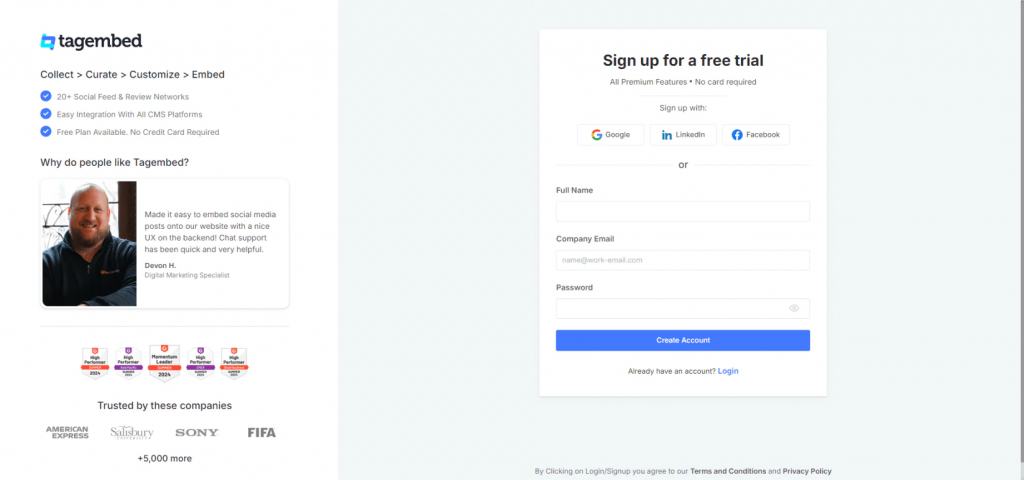
2: Set Up Your Tagembed Account
- On your window, you will now see a dialog box; click on “Shoppable feed on Websites.”

- On the pop-up box, select your industry so you get a personalized experience, provide the requested information, and click on the “Submit” button.
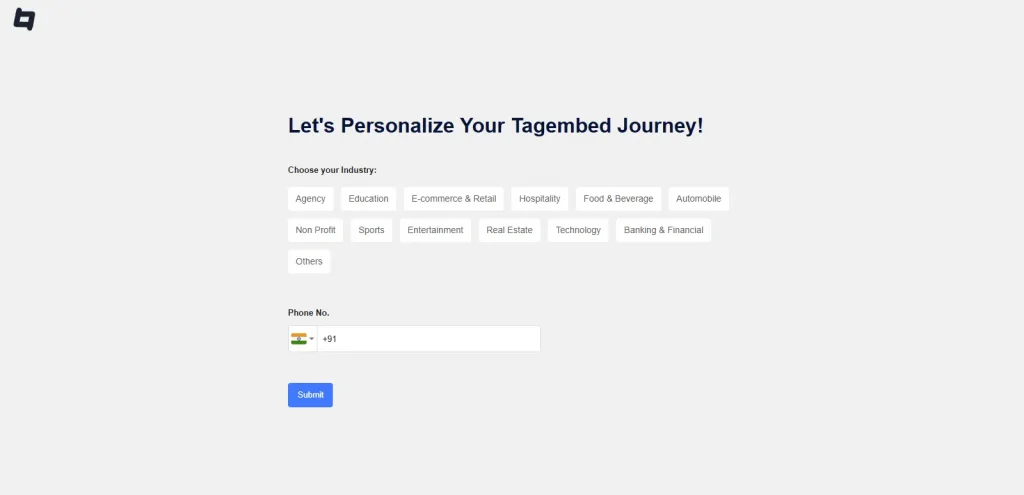
- Now, verify your email.
3: Establish Instagram Shoppable Feed
- The “Choose Source Network” window will now appear on your screen, consisting of various social media platforms as choices. From the given options, select “Instagram” as your source.
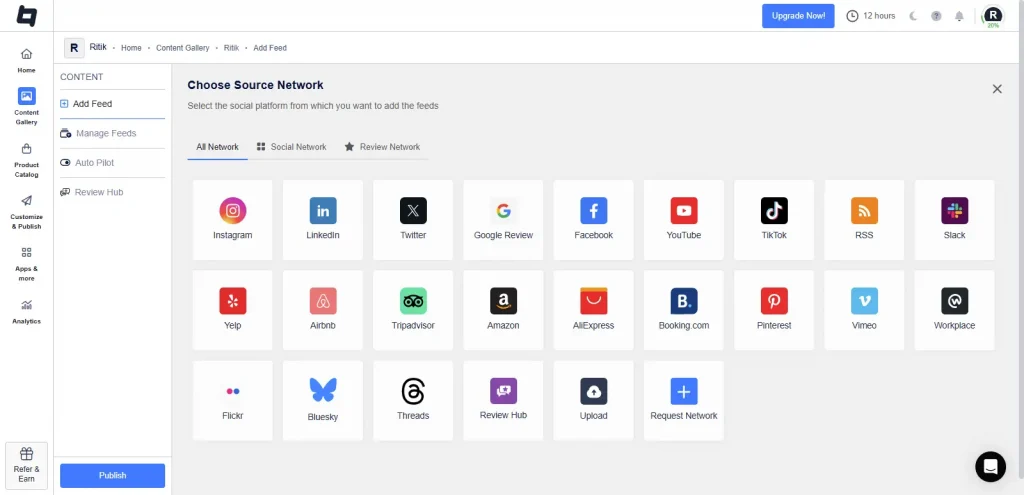
- Specify the feed type, Such as hashtags, my handle, stories, mentions, tagged, and reels.
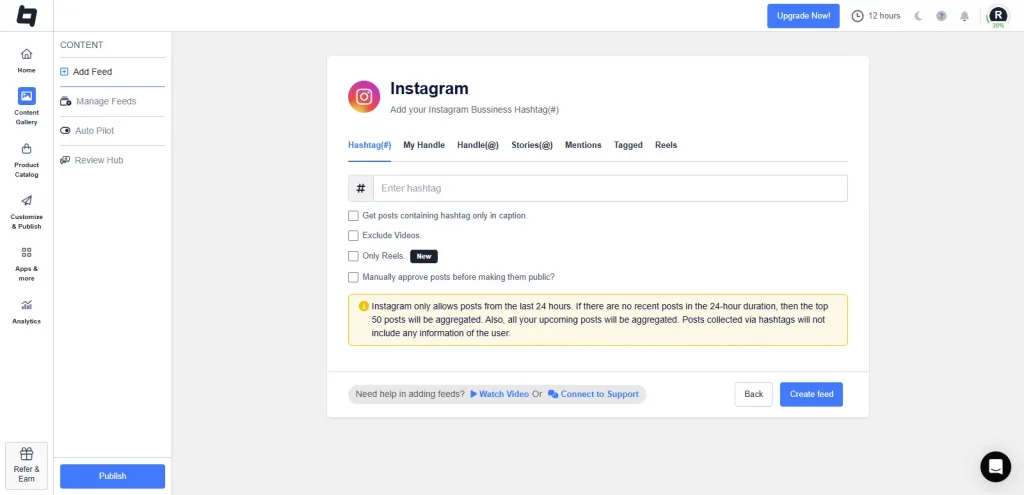
- Click on the tab of your desired content source, provide the needed information, and click on the “Create Feed” button.
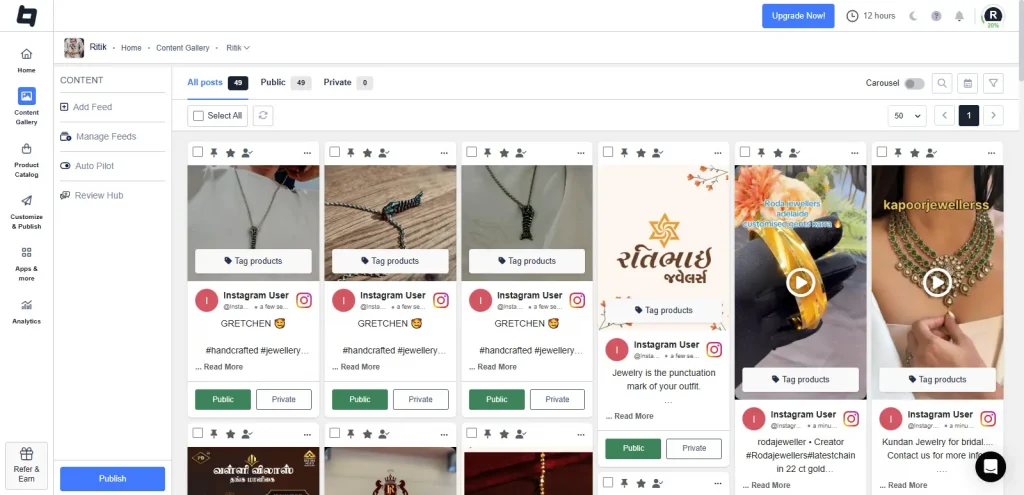
- You will now see the content fetched by Tagembed. You can make the posts public or private, as per your preference of what you want to show on the website.
4: Make Your Feed Shoppable
- The collected content will now appear on your screen.
- You will notice that each post will have a checkbox present at the top. Select the check box on the posts that you want to showcase. You also have the option to pin the post.
- Click on the “Tag Products.” Provide the required details, like searching for products and requesting rights.
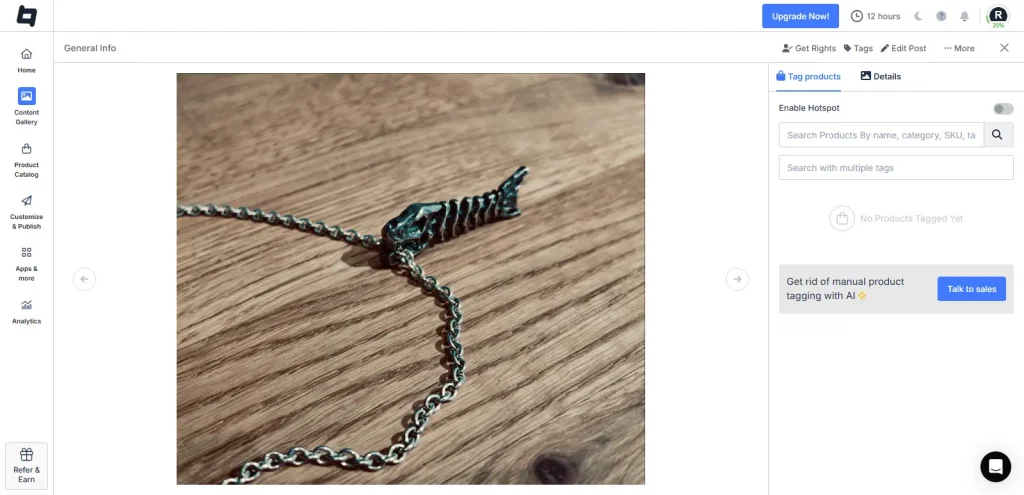
- Select the Product Catalog tag and sync it with your e-commerce marketplace.
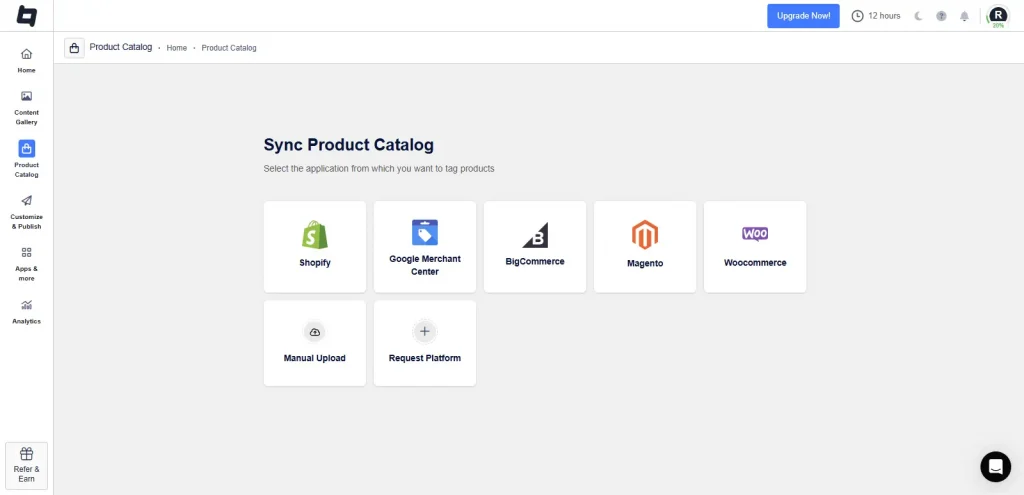
5: Embed the Feed on Your Website
- Click on the “Customize & Publish” button present on the left sidebar.
- On the pop-up that appears, select “Website” from the drop-down menu and give your feed a name.
- Click on the “Theme” tab to pick a layout, and the “Customization” tab to improve the look and feel of your feed. Use the “Product CTA” tab to add a CTA.
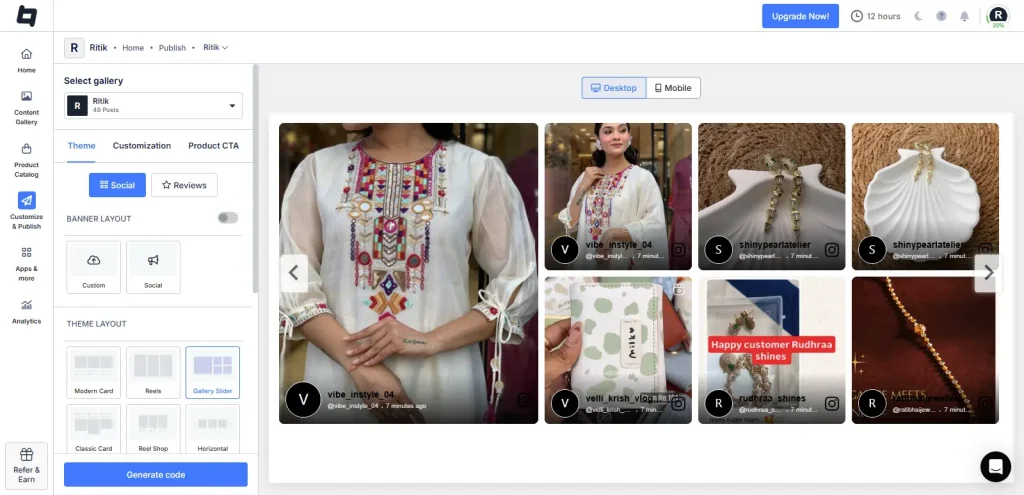
- Click on the “Generate Code” button.
- Select “Gallery Type” and adjust the dimensions of the feed if you want to.
- Copy the embed code and paste it into the backend of your website.
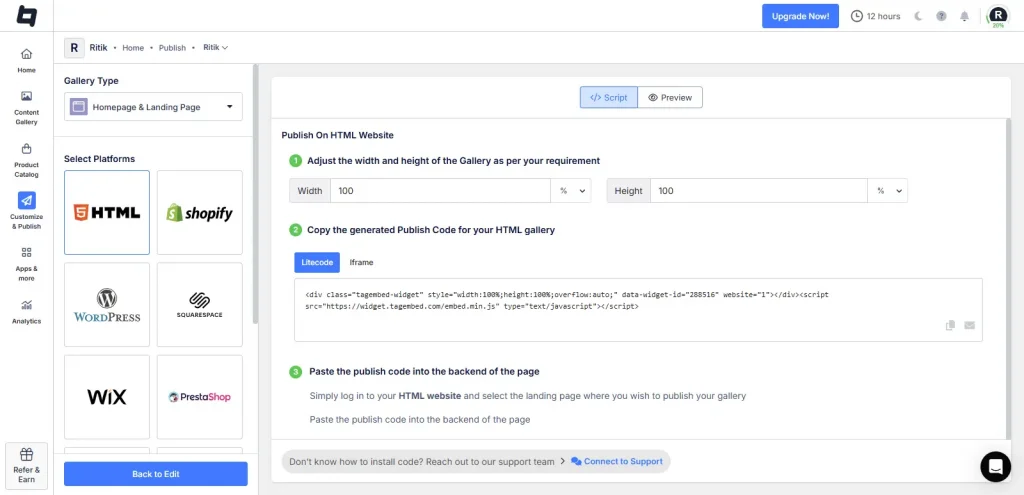
Your website will now have a Shoppable Instagram feed gallery, making your website more functional and making it easy for visitors to make a purchase.
| Multiple Themes |
Benefits of Instagram Shoppable Feed for Your Store:
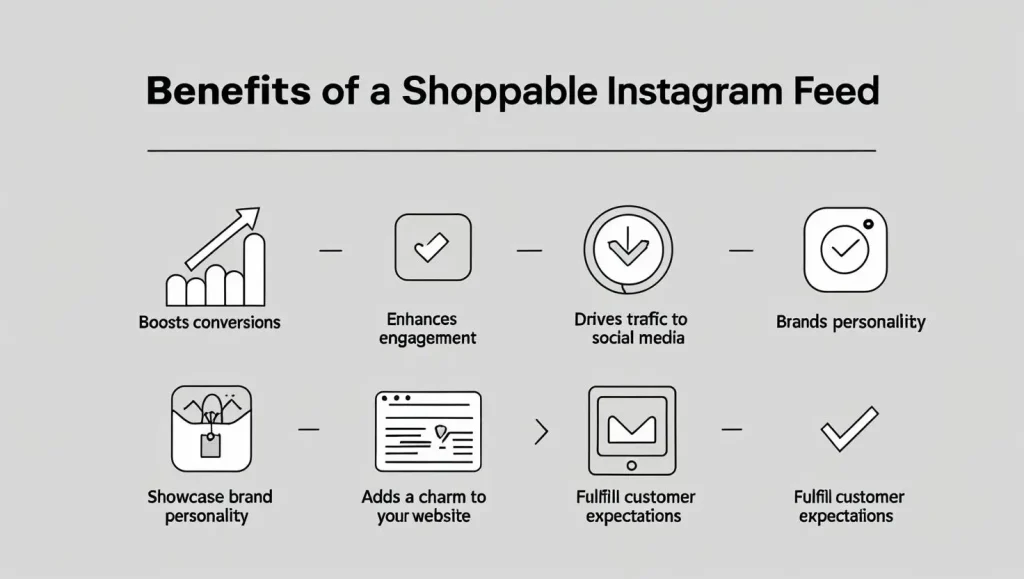
Many brands are opting to embed the Instagram Shoppable feed on their website. This might create a misconception in your mind that it is a trend; however, it is more than that. It is a strategic move that delivers measurable results. Here are the key benefits:
1. Boosts Conversions
Adding an Instagram shoppable feed can provide a great boost in conversion, as a study shows that shoppable content can increase conversion rate up to 30%. When customers visit your website and have the option to add a product directly to their cart, it streamlines their purchase journey. It eliminates the hassle of searching for the product and adding it to the cart to make a purchase, making it an effective ecommerce marketing plan.
2. Enhances Engagement
A visually appealing feed keeps visitors on your site longer, increasing the likelihood of purchases. Website visitors usually stay on more interactive sites. Interactive elements like tagged products encourage clicks and exploration. This decreases the bounce rate; all these elements also contribute to increasing the search engine ranking of the website.
3. Drives Traffic To Social Media
A Shoppable Instagram Feed bridges the gap between your website visitors and your Instagram presence. Website visitors can go through your Instagram feed, which helps you get more views on Instagram. And if they like your content, they can follow your account, allowing you to get more followers.
4. Showcases Brand Personality
Your Instagram feed reflects your brand’s vibe, whether it’s bold, minimalist, or quirky. Embedding it on your website reinforces your identity and creates an experience where audiences can recognize and identify with the brand.
5. Adds a Charm To the Website
Like we mentioned above, having a static website in today’s world can be considered an outdated approach. Using the Instagram Shoppable feed, you can add an element of charm and functionality to your website. You can use posts from your Instagram profile or showcase user-generated content, all of which contribute to making your website stand out. A website with Instagram posts also falls under a visual marketing strategy, helping you attract audiences.
6. Fulfil Customer Expectations
Shoppers today expect convenience and instant gratification. A shoppable feed lets them go from inspiration (seeing a product on Instagram) to purchase (buying it on your site) in seconds. Moreover, it also builds a strong customer base, where consumers just have to visit your website to make a purchase, and also to learn about the product.
Why Choose Tagembed to Add an Instagram Shoppable Feed?
When it comes to integrating a Shoppable Instagram Feed, Tagembed stands out as a top choice. It provides various features that can come in handy for you to make your Instagram Shoppable feed on your website more effective. Alongside that, here are some of the major reasons why you should consider using Tagembed to embed an Instagram Shoppable feed on your website:
1. User-Friendly Interface:
Tagembed is an easy-to-use tool and has a user-friendly interface. This ease of use makes it marketers’ favourite. To embed an Instagram shoppable feed, you just need to follow a few steps; you don’t require any coding knowledge or experience.
2. Customizable Displays:
Instagram feed on website adds a great charm to the website, but you can uplift that charm with customizable displays. Different layout options from the tool allow you to showcase an Instagram Shoppable feed in an organized and beautiful manner.
3. Seamless Product Integration:
Tagembed allows you to sync product tags from your Instagram posts to your website. The product integration is seamless, ensuring a smooth shopping experience and making your brand stand out. Moreover, it also integrates with any social selling platforms, allowing you to make your website more engaging.
4. Real-Time Updates:
When you embed a post using a traditional method, i.e., copying the embed code of each post and pasting, you need to keep this for all new posts. On the other hand, when you add an Instagram feed to your website using Tagembed, it automatically updates your feed. There is no need to go through the whole process all over again. It also helps in keeping your website new and fresh, contributing to search engine ranking as well.
5. Analytics and Insights:
Tagembed provides detailed analytics to track how your shoppable feed performs. It helps you to understand your audience and, based on that, you can make your future strategies and plans.
6. Responsive Design:
Not all internet users access websites from desktops. Tagembed provides a responsive design to your shoppable Instagram feed, which means no matter what device customers use, they get to see the feed without any hindrances.
7. Affordable Plans:
Tagembed offers flexible pricing, including a free plan for small businesses, making it accessible for brands of all sizes.
Conclusion
There you have it, this was a simple way to embed an Instagram shoppable feed on a website. Using Tagembed, you can easily add a Shoppable Instagram feed to your website without any hassle. Utilizing Instagram Shoppable feed on your website is more than a trend; it is an effective way of converting your visitors into customers. So what are you waiting for? Follow the steps mentioned above to add an Instagram Shoppable feed to your website and reach your sales goals.
Frequently Asked Questions
To make your Instagram feed shoppable, all you need to do is sign up for Tagembed. Integrate your Instagram with the tool, and sync your product with the shoppable feed. Copy the embed code and paste it on the backend of your website.
A shoppable Instagram post is a type of content that enables customers to purchase the featured product directly within the app. Products are tagged on the content, and when pressed, they will link to a smoother purchase.
To create shoppable posts on Instagram, you need to link your business account to your product catalog and then use shopping tags on your posts.
Embed social feed from Facebook, YouTube, Instagram, Twitter on your website, like a PRO
Invalid Email Address Multiple Themes
