How To Add Twitter Feed To Squarespace With No-Code Solution
X, previously known as Twitter, has approximately 611 million monthly active users, according to Exploding Topics. Nearly 80% of X’s audience is economically active. Which brings us to the next point that economically active users are more likely to make a purchase, meaning the content you pull is relevant to people with disposable income.
Which is why adding a Twitter feed to website has become a relevant trend in the industry. In this blog, we will unveil different methods to embed Twitter feeds on website and advanced options in the Twitter widget. So, without wasting your time, let us get into it.


| Multiple Themes |
Different Ways To Add Twitter Feed On Squarespace Website
Here are some of the ways to display Twitter feed on a Squarespace website :
a.) Using Twitter’s Native Embed Code
Squarespace does not have a built-in Twitter feed block for direct Twitter integration. All thanks to the recent changes in the Twitter API. Right now, Twitter offers a free tool to generate an embed code for your profile, hashtag, or list.
Here is how you can do it:
- Edit Your Page/ Post
- Go to the page where you want to post on Twitter.
- Click Add Block (or an insert point) and select Embed.
- Use Twitter’s Embed Tool
- Visit https://publish.twitter.com/
- Enter the URL of the Twitter content you want to display (this could be your profile, a list, a specific hashtag, or a single post).
- Customize The Feed
- Adjust the display options such as color and size.
- Copy The Embed Code
- Click the copy code on the Twitter page.
- Paste into Squarespace
- In your Squarespace Embed block, click Code Snippet (or Code in the app).
- Paste the embed code.
- Save your changes.
Note: With this embedding option, you cannot automatically refresh your Twitter feeds. If you wish to change the Twitter feed on your website, you have to repeat the process.
Collect, moderate, and display Twitter feed to squarespace website
Using Third-Party Widget Tagembed (with steps)
Using a third-party tool like Tagembed is one of the best ways to add a Twitter feed on Squarespace website. Take a look at the steps:
1. Create a Tagembed Account
If you are a new user, create a Tagembed and get a for free. For the existing users, just log in to the platform,

a box will pop up with three options. Click on “Social feeds on websites.

Fill in all the needed information and verify your email address.
2. Collect The Feed
- A “Choose Source Network” dialog box will appear. Select “Twitter” as your content source.

- Select your preferred feed type from the following options.
- Handle
- Hashtag
- Mentions
- Advanced
Click on the “Create Feed” button.
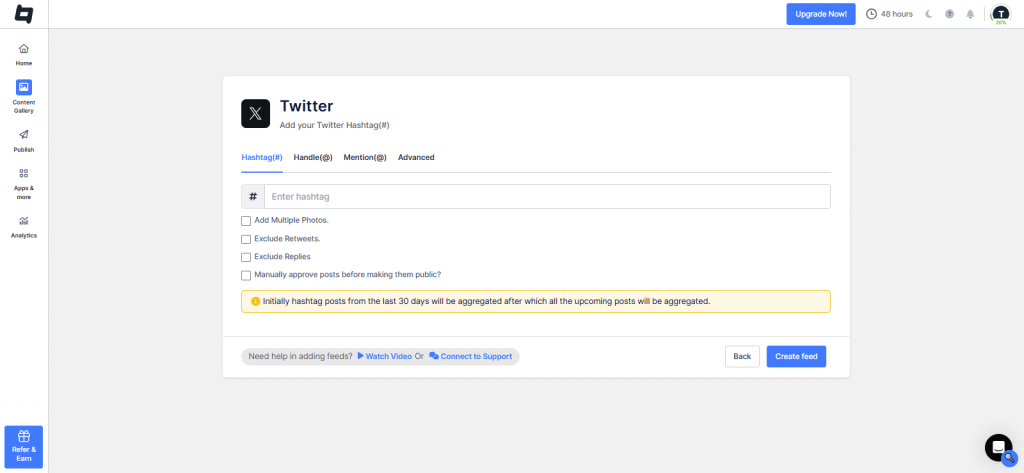
Here, your Twitter feed will be created. You can moderate the feed as per your requirements.
Click on the “Customization” tab to adjust fonts, color schemes, and more to enhance the gallery’s visual appeal.

3. Embed The Twitter Feed
- Click on the “Publish” option and choose “Website” from the dropdown menu, and give a name for your channel.

- From the “Theme” tab to choose a layout for your gallery. Click “Generate Code.” Select the appropriate “Gallery Type” and your website’s platform.

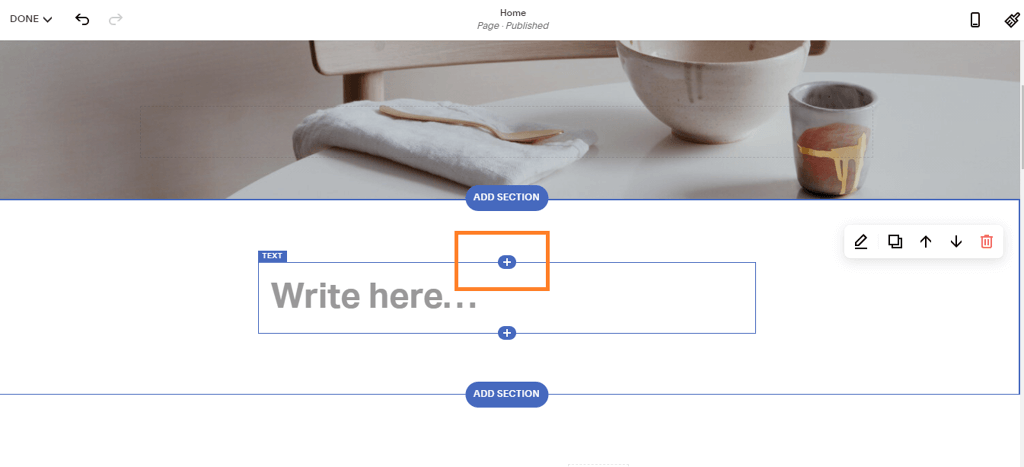
- Log into your Squarespace account and Open the page where you wish to Embed the Widget

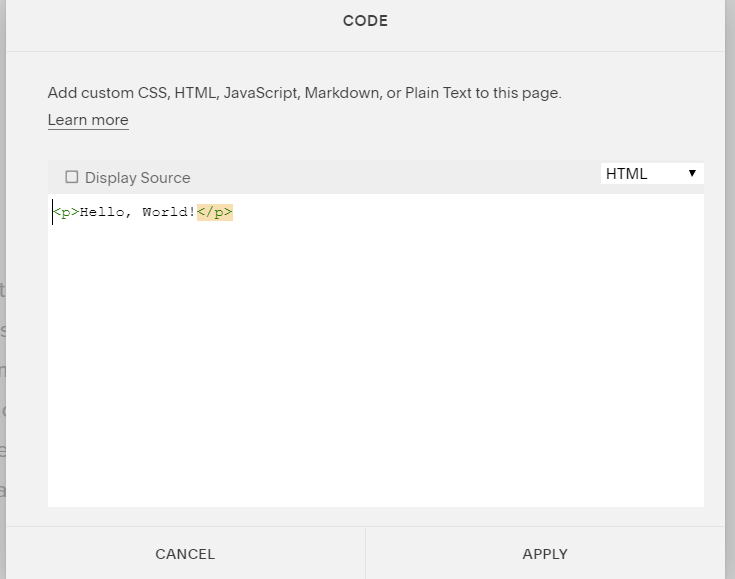
- Click on +Add/Edit Block and Select Code
- Paste the copied code and click on apply
Collect , Curate, add twitter feed to Squarespace website


Advanced Customization Options In The Widgets
Tagembed is one of the best social media aggregator platforms that lets the users embed Twitter feeds on their website. Along with Twitter, Tagembed can also aggregate content from platforms like Twitter, Instagram, TikTok, Bluesky and more. One of the most admirable features of Tagembed is its customization power.
Users can tailor every aspect of their Twitter feed on Squarespace website. Let us take a look at the customization feature of Tagembed.
a.) Multiple Layouts and Themes
Tagembed offers a variety of layouts and themes so that users can present their Twitter feed in a visually appealing manner. These layouts include: Carousel, Grid, List and more. this helps the users to manage and personalize the fundamental look of their Twitter feed on website.
b.) Font And Text Customization
Tagembed enables the users to change the font and text styling used in the widget. This helps the users to make sure that font and text goes well with the brand kit. Users can adjust the text size and alignment to improve the readability on the Twitter widget.
c.) Filtering and Moderation
Tagembed gives you full control over the content displayed in your Twitter widget, which makes sure that the content is brand appropriate. With the content moderation feature, you can remove the content that seems hateful and does not go with the brand identity.
d.) Custom CSS
Tagembed provides the ability to add custom CSS to customize the appearance of embedded social media feeds. This feature allows users with coding knowledge to fine-tune the design beyond the standard customization options offered within the platform.
Types of Twitter Themes and Layouts You Add To your Squarespace Website
Here are some of the Twitter feeds you can add to your Squarespace website.
1. Live Hashtag Feed
Twitter hashtag feed is one of the best ways to showcase the brand’s presence on a website. This helps the users to display their real-time stream of Twitter content that contains a specific hashtag. This Live Twitter Hashtag feed highlights campaign events or specific trending topics related to the brand.
2. Twitter carousel Feed
With the Twitter Carousel feed, users can showcase Tweets on their website in a rotating format. This allows the visitors to see multiple posts at a time in a limited space. This helps to keep the website clean and dynamic.
3. Twitter news card
Another great Twitter feed type users can employ on their website is Twitter News Card. This Twitter news card feed helps users to embed tweets in a news-style card layout, ideal for highlighting breaking updates, announcements, or industry news directly on your site.
4. Twitter Grid Feed
Twitter Grid, as a feed type, helps to showcase Twitter feeds in a clean manner. With its multi-column grid layout, it enables more content visibility at once while maintaining an organized and modern look.
5. Twitter Masonry Feed
Twitter Masonry is another Twitter feed that showcases tweets in a stylish layout where posts fit together like a puzzle piece, optimizing space. This creates a visually appealing grid. This feed type is perfect for showcasing a variety of tweet types without a strict uniform structure.
6. Twitter Photo widget
The Twitter Photo widget helps to highlight tweets containing images in a clean, image-focused widget. This is ideal for brands and creators wanting to emphasize visual content from their Twitter feed to make their website more engaging and vibrant.
7. Twitter Slider Feed
With the Twitter Slider, users can showcase tweets in a sleek, auto-scrolling slider format. Visitors can browse posts horizontally without overwhelming the page. This makes it an interactive way to keep content fresh and engaging.
8. Twitter Sidebar Feed
Twitter Sidebar feed is another stylish and great way to showcase a vertical Twitter feed in your website’s sidebar for quick access to real-time updates. It keeps users informed while they navigate your site without taking up the main content area.
9. Twitter Single Post Slider Feed
Twitter Single Photo Post Slider feed helps users feature one tweet at a time in a rotating slider. This draws focus to each post, making it ideal for announcements, testimonials, or spotlighting key updates and increasing Twitter engagement..
10. Twitter Vivid Feed
With Twitter Vivid Feed, you can display tweets with vibrant, eye-catching designs and animations. The vivid layout enhances the visual appeal of your Twitter feed, making it stand out and attract attention on any webpage.
The Final Notes
Integrating a Twitter feed into your Squarespace website can significantly enhance user engagement and provide real time content to your audience. With various options available, from carousel to grid layouts to live hashtag feeds, there is a style to fit every brand’s needs and aesthetic. Using the Twitter feeds on Squarespace websites you do keep your website fresh and connect users more effectively, drive intentional interaction and social proof.
Embed social feed from Facebook, YouTube, Instagram, Twitter on your website, like a PRO
Invalid Email Address Multiple Themes
