Instagram is constantly changing its algorithm and is incorporating and working on several new features. Many Instagram features come and go, but if there’s one feature that still rules the platforms, it is Instagram Stories. It took Instagram by storm a while ago, completely changing how users view the content.
Over 70% of Instagram users watch stories every day. If you have posted something on your story, it is worth getting enough views compared to posting it on your feed. Being better at Instagram is all about being consistent in the game, but how do you actually improve what you’re doing?
You’ve probably read many things about Instagram post ideas, but now it is time to pour out Instagram story hacks. We bet these Instagram story hacks will make you the best storyteller in the town.
Let’s Begin!


| Multiple Themes |
Why Master Instagram Story Hacks?
To put it simply, Instagram stories are a great way to engage your audience, build a stronger relationship with your audience, and provide them with valuable content. By mastering Instagram story hacks, you engage them creatively. Stories act as a sort of slideshow; you just need to present them in a few seconds, and you’re done.
The benefits of mastering Instagram stories hacks go beyond getting your brand in front of the right target audience. In fact, a survey confirms that 50% of Instagram users have visited a website to make a purchase after watching stories.
Instagram hacks for story are ideal for talking to your customers and showing off your brand’s voice and personality. By mastering the art of Instagram stories, your followers will interact more by engaging in polls, quizzes, custom stickers, etc. Engagement in stories also impacts the Instagram story algorithm, resulting in more people seeing it.
20+ Amazing Instagram Story Hacks for 2025
Check out these Instagram stories hacks that will take your story ideas to the next level:
1. Add Location Tags
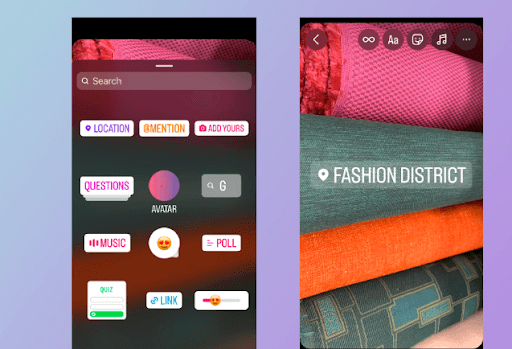
Adding location tags to your stories helps users discover content from local creators and brands. This can be helpful for brands who are trying to build a local following or community. Find location tags in the sticker menu and type the location in the search bar and you’re done. This Instagram hacks for stories will even keep your followers updated and foster engagement and interaction.
2. Share Discounts and Offers
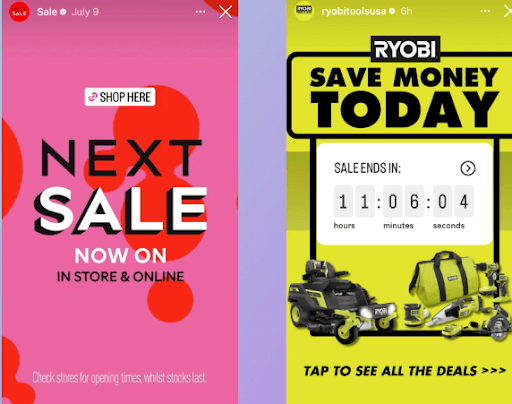
Use Instagram stories to advertise your brand’s upcoming promotions, sales, offers, and discounts. This hack will keep your followers updated about the latest offers and might improve your conversions. Sometimes, users miss out on the offers when posted, so try to add stories on the offers regularly so that they keep checking on them. Try to repost the stories of the users who have availed the offer to generate the buzz and excitement for the same. You can add various features, such as Sale GIFs, countdowns, etc, for a touch of creativity.
3. Make your Stories Shoppable
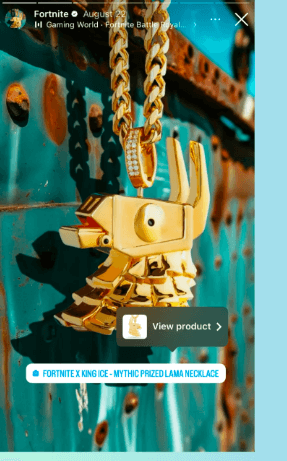
Shoppable Instagram has been a game changer for the brands and small businesses. Once you set up your Instagram store, simply add a product sticker to your story to make it shoppable. 44% of Instagram users say they shop on the platform weekly, so turn your store into a storefront and see the magic. When you tag products in your stories, followers can tap directly to purchase, leading to direct conversions. You can also use the link sticker to redirect the story viewers to your product page.
4. Add Yours and Templates

Choose to customize your own ‘Add Yours’ sticker or select from a public response. This Instagram story trick helps create a series of responses to your content. You must have seen these stickers in someone’s stories, which can be shared by anyone on the platform. You can use these ‘Add Yours Template’ to add text, GIFs, or images to your story.
5. Collage Layouts
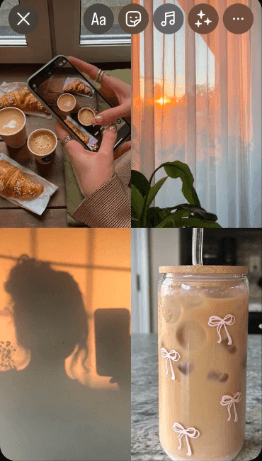
Instagram has a built-in layout feature that lets you share multiple images in various organized ways. It is the best solution if you have more than one picture or want to be creative with your collages. It aligns everything perfectly and is ideal for showing sequences engagingly. Simply open your story and go to the left side of the screen. Scroll down, tap the layout tool, and choose your layout type. Then, add images of your choice, and you’re done.
6. Solid Backgrounds
The default gradient backgrounds for Instagram stories are great for stories, but sometimes, you must be creative with the stories to attract your audience. For this, you can add a GIF background to your stories, which is truly a hidden gem. Depending on the aspect ratio, you can choose from thousands of fun GIFs that can be displayed at full length. This is a great Instagram story hack to stay active if you’re running low on original content. Go to ‘Create’ mode on Instagram by tapping the letters icon and scrolling to the GIF tab. Choose your GIF for your reference, and you’re done.
7. Turn Live Photos into Boomerangs
Your live photos can be turned into engaging boomerangs in no time and relive those memorable moments again. All you have to do is select the live photo for your Instagram stories and press the picture until it turns into a boomerang. Here are the detailed steps for this Instagram story trick:
1. Open Instagram stories and swipe up to view your photo gallery.
2. Choose a live photo from your camera roll.
3. Choose the ‘Boomerang’ option that appears at the top right screen with the “∞” symbol, and you’re done.
8. Run a Poll
With the option to vote the best from the two options, polls are a great way to keep your followers engaged. Also, using this Instagram story hack, you can survey followers for their opinions on anything from fun to product ideas you’re considering. If you are running out of ideas, conduct polls and let your followers vote for their favorites. The more fun and engaging your polls are, the more likely people are eager to participate, which can skyrocket your engagement levels. This tactic can even help you figure out product development ideas and optimize your brand as per customer feedback.
9. Quiz your Audience
The quiz feature on Instagram stories is another great hack that can help boost brand engagement. You can test your audience’s industry knowledge, brand knowledge, and more with multiple-choice questions. Even super cool influencers on Instagram host Q&A sessions on stories to enhance interaction. Quizzes present a fun way to lead followers through engaging FAQs and acknowledge them with the product knowledge. You can even use the ‘ask me anything’ feature to let your followers open up about anything related to the brand, work, etc. You can also add pictures of the winners to your Instagram story highlights for everyone to see.
10. AI Stickers
Bored with the normal stickers that are perfect to match with your Instagram stories? Try out Instagram’s new AI sticker feature to catch up with the fun and engagement. Select the feature from the stickers, type in whatever you want, and see the magic. AI stickers are a one-of-a-kind addition to Instagram’s already extensive collection of stickers, emojis, images, and more. To use AI stickers in stories, start a new story. After adding the content, select ‘AI stickers’ from an icon with a smiley face at the top of your screen. After this, you get a prompt: ‘What would you like to create?’ Enter the description and click ‘Generate,’ you will get several sticker options.
11. Use a Green Screen in Your Story
Green Screen has been a game-changer for social media, including your Instagram stories. Using this fun technology, you can be anywhere and everywhere, like Doraemon’s anywhere door. Here’s how you can do it:
1. Scroll right through the filters at the bottom of the screen to get the search bar.
2. Search ‘green screen’ and select Instagram’s green screen filter.
3. Tap add media to choose your background video or photo from your phone’s gallery.
4. Take a picture or make a video in front of the background, and it’s done.
Using this green screen effect, you get several benefits, such as choosing your branding background, engagements, fun, interaction, and more.
12. Shake to Reveal
The shake-to-reveal feature on Instagram lets your followers see the hidden image from the story by shaking their phones. This best Instagram story hack adds a touch of mystery and suspense to your content, resulting in more engagement. Here is how you can do it:
1. Create a story and click the ‘Create’ option. Now tap on the sticker icon on the top.
2. Select Shake to reveal the template from the list.
3. Now, choose a photo from your gallery and add the caption if you want.
4 . Share your story, and you’re done.
13. Hide Your Hashtags
Just like how we put hashtags in our Instagram posts, hashtags in stories are just as important. But don’t just show it in your stories and hinder your aesthetic photos; instead, hide it from viewers’ sites. Don’t worry; it will work the same way it works on posts and will improve the organic reach of your Instagram stories, too. This means your Instagram stories still get traction from the hashtags without displaying them all over your images.
14. Add Custom Fonts
If you want to make your Instagram stories more branded, then try adding a custom font to your page. Although Instagram provides the standard font, there are numerous fonts available online to match it with your branded content. Here’s how you can do it:
1. Go to the Instagram Fonts Generator website.
2. Type in your message and hit enter to see your font options.
3. Copy the message and paste it into your Instagram story.
15. Explore Filters
Instagram is filled with filters that can spice up your stories. Adding a filter can completely transform your story, be it your selfie or a brand-related photo, by using the other filter apps. There are numerous filters for everyone to try out. Hit the search box, dig up a little, and turn on the filter that matches your aesthetics. This is a fun and simple way to help your story stand out.
16. Add Music to Your Videos
Adding music to your Instagram stores makes them far more fun and engaging. You can add a theme song to your Instagram stories using the music sticker. You can scroll through a ‘For You’ tab of suggested songs, browse by categories, or search for the perfect song for your story. Once you have selected the song, pick the part that fits your story. You can also display attractive videos by creating an Instagram feed on your website to grab the visitors’ attention.
17. Share Educational Tips
Instagram stories offer a unique platform for sharing educational tips and content in an effective manner. This is particularly useful for brand niches related to beauty, skincare, health, and more, where educating customers is essential. You can share quick tips, life hacks, and insights about your product and provide value to your audience. The major benefit of using stories for educational content is that it allows for a more casual and interactive approach. You can use features such as polls, questions, and quizzes to make your educational content more fun.
18. Take Users Behind the Scenes
Instagram stories give you the opportunity to be authentic and candid. Showcase behind-the-scenes content like factory tours, studio scenes, etc., and videos to humanize your brand and build trust. This type of content doesn’t have to be polished; it should just be raw and real, which is good to go. People connect with such types of brands more when they know the faces behind the business.
19. Repost User Generated Content
If customers share photos, videos, and other content of your business, product, and services, you can repost it as your story. Such type of content resharing lets customers know you value their opinion. It also builds social proof by highlighting the real customer experiences. About 79% of people say user-generated content has a significant impact on their purchasing decisions. Another way you can use UGC stories is by integrating Instagram Stories on your website using various tools available in the market, such as Tagembed. It helps you create an Instagram widget containing visual elements to grab the attention of visitors.
20. Do Storytelling
Storytelling is not just for kids; it is also important for keeping people engaged in your brand. Try to tell a story through your story vlogs, which is excellent for boosting engagement and fostering communication. When telling a story, you can share your journey, challenges, behind-the-scenes stories, personal stories, testimonials, illustrations, etc.
21. Use Memes and Other Trends
Social media is the hub of trends, memes, humor, and other current events. Tap into this Instagram story hack and make your audience feel the humor. As we know, an Instagram story or a brand story requires authenticity, which is the best way to deliver value to your followers. You don’t have to grab on to every trend or new; simply pick the ones that feel natural and align with your brand.
Conclusion
There are tons of ways to get creative with your stories – be it using AI stickers or sharing user-generated content that your audience can relate to. The cool Instagram story hacks help enhance your brand goals and engagement. Use these Instagram Stories tips & tricks above for inspiration and start sharing Instagram stories with which your followers can engage. Ensure your Instagram content and posts are high quality, eye-catching, and consistent with your branding.
Embed social feed from Facebook, YouTube, Instagram, Twitter on your website, like a PRO
Invalid Email Address Multiple Themes
