How To Add Facebook Feed to Wix Website?
Ever updated your Wix website, then completely forgot to update it again for weeks? Meanwhile, your Facebook page is full of fresh content and updates. So why not have your Wix website show that too? Adding a Facebook feed to your Wix website means giving your website a little social life of its own.
Explore this blog to discover how the Facebook widget Wix provides can help you automatically update your Wix website with your latest Facebook posts.


Short Guide: Add Facebook Feed to Wix
Check the short guide below for adding a Facebook feed to a Wix website using Tagembed:
Collect
- Go to Tagembed and create your free account.
- Choose ‘Facebook’ and collect content.
Moderate
- Moderate and customize it the way you want.
Embed
- Generate code and embed it in your Wix website.
Complete Guide: How to Add Facebook Feed to a Wix Website
Here is the step-by-step guide to add a Facebook feed to your Wix website:
#1 – Create Your Account
- Go to Tagembed, log in or create your free account.

- From the dashboard, choose one of the available options: Social feeds on website or Shoppable feeds on website. Select the first option and proceed.

- Select your industry, enter your phone number, and click Submit. Verify your email to proceed further.

#2 – Create and Customize Your Facebook Gallery
- Choose ‘Facebook’ as your source network
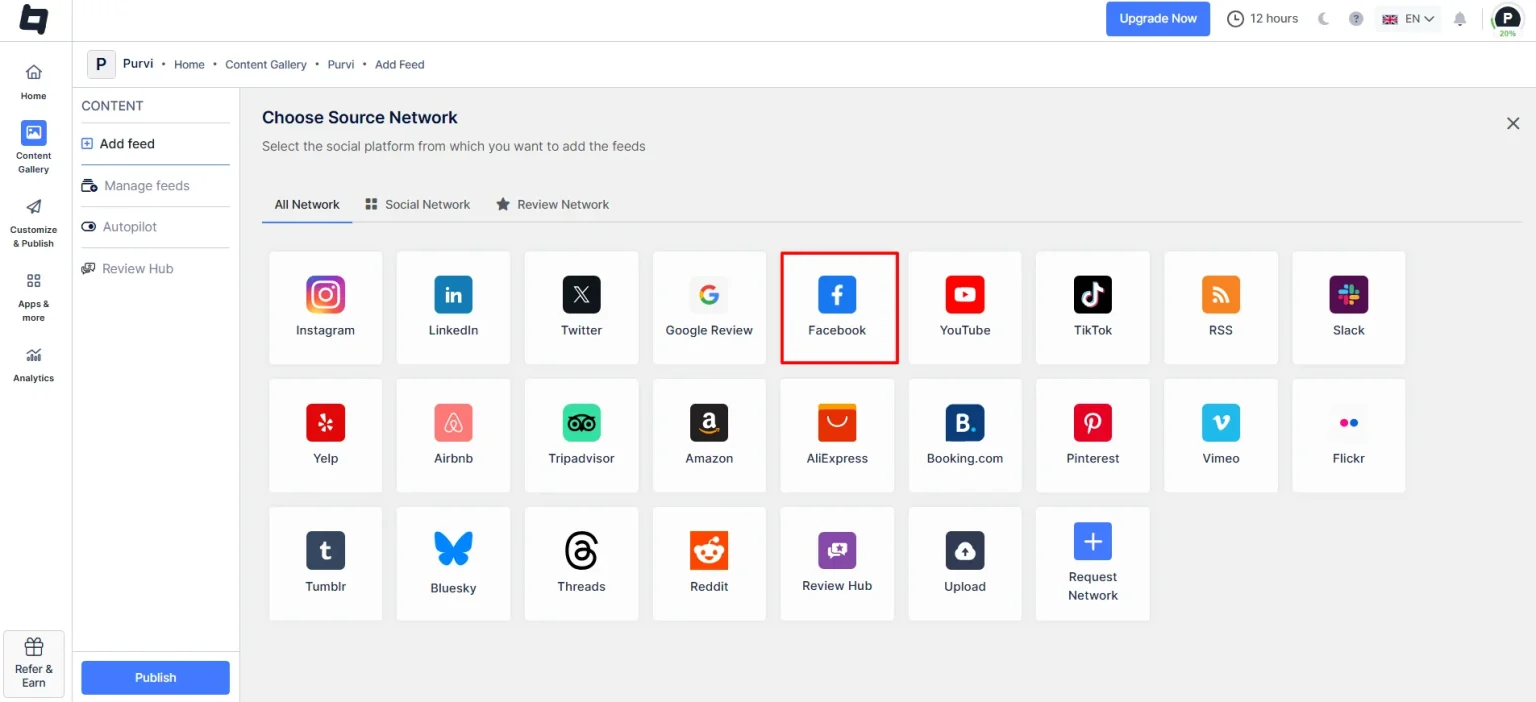
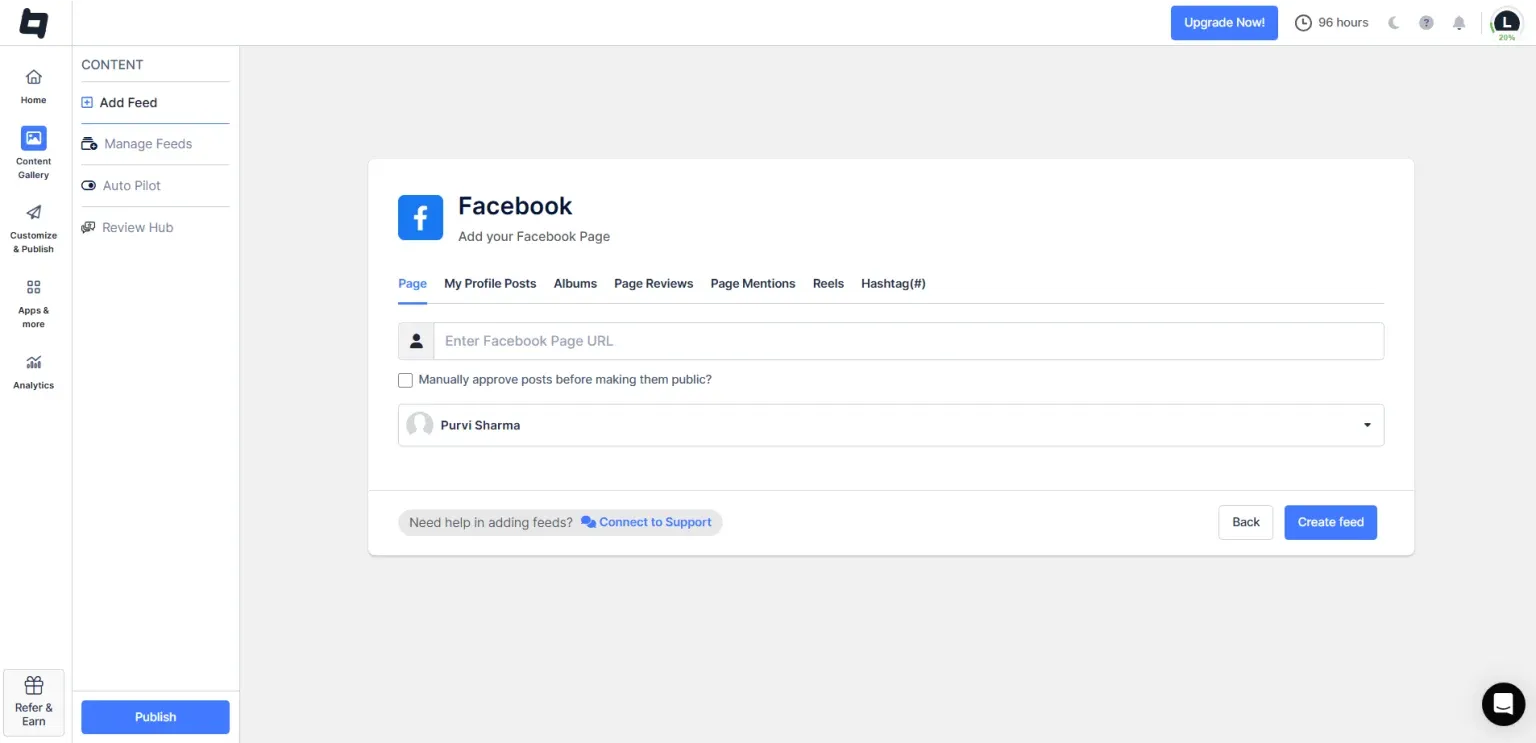
- Add content by selecting your feed type: Page, My Profile Posts, Albums, Page Reviews, Page Mentions, Reels, and Hashtag.
- Once done, click on ‘Create Feed,’
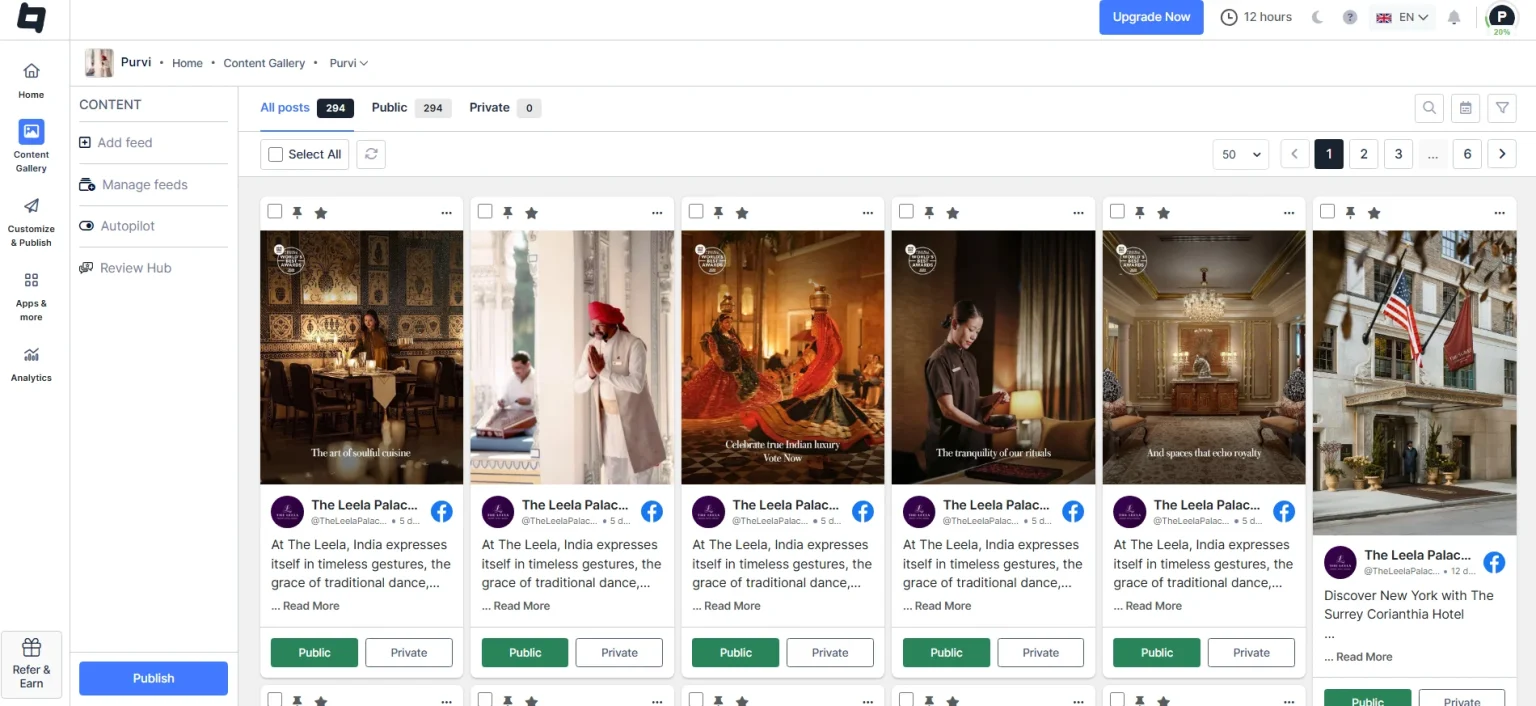
- Your Facebook Gallery appears in the ‘Content Gallery’ dashboard.
- Moderate your Facebook feed by removing unwanted or irrelevant content, either manually or using the auto-pilot feature.
- Go to ‘Customize & Publish’ and then ‘Add Channel’. Enter the channel name and click ‘Save’.
- Next, customize your Facebook feed by selecting your preferred theme, layout, background, font, CTAs, and more.
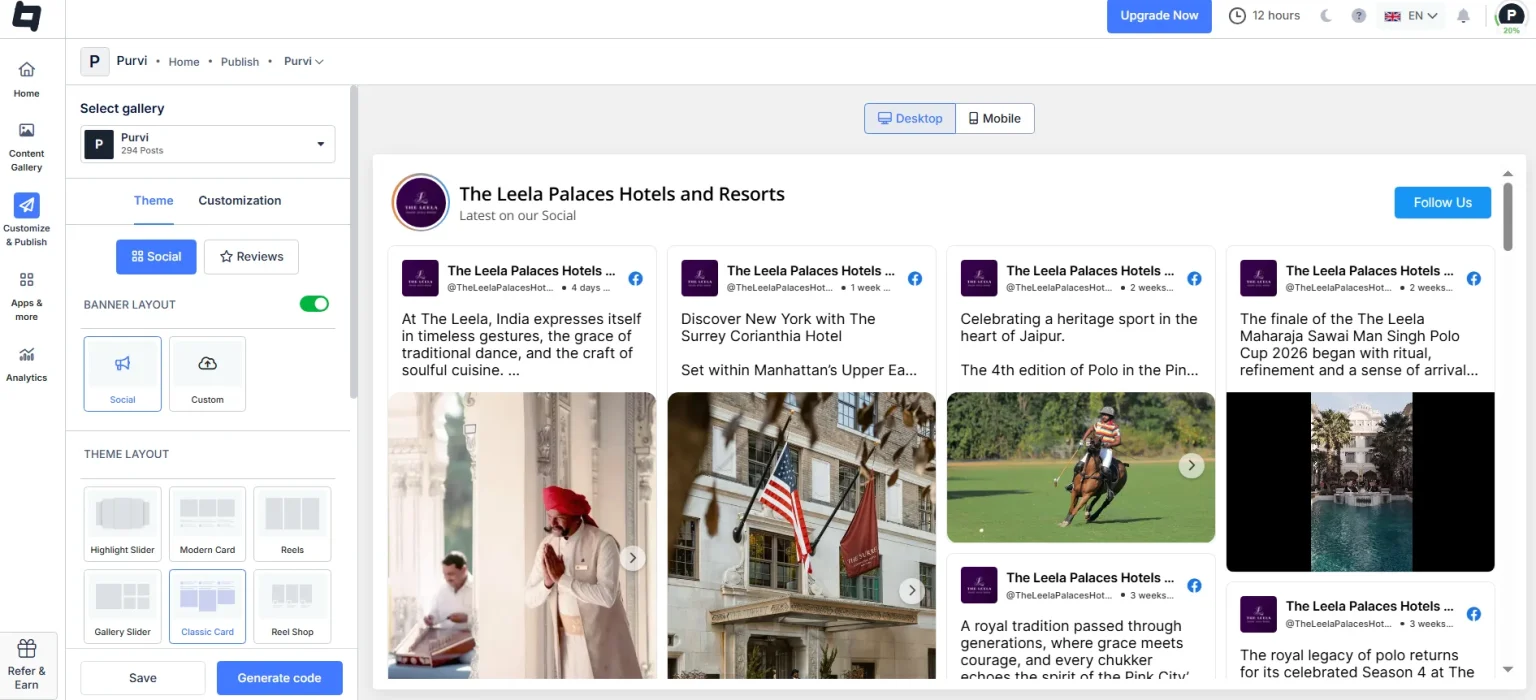
- Once done, click on the ‘Generate Code’ option below.
#3 – Generate Code and Embed
- Select ‘Wix’ as your CMS platform, adjust the width and height of the Facebook gallery, and copy the embed code.
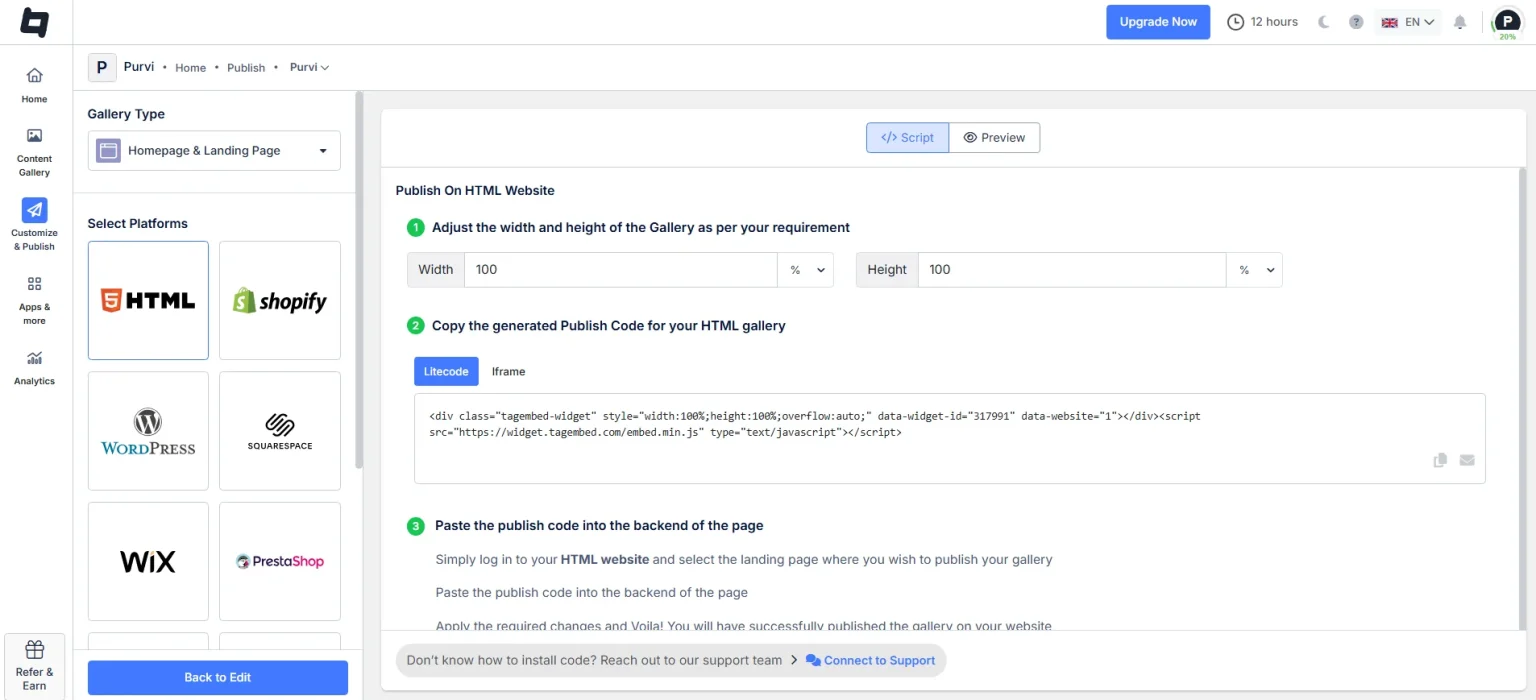
- Log in to your Wix website and click the ‘+’ button from the main pages section.
- Click the ‘Add Page’ button.
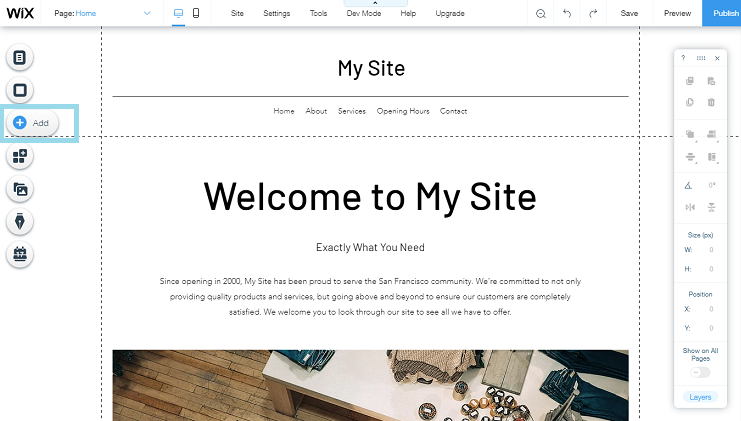
- Name your page and then click ‘Add element’.
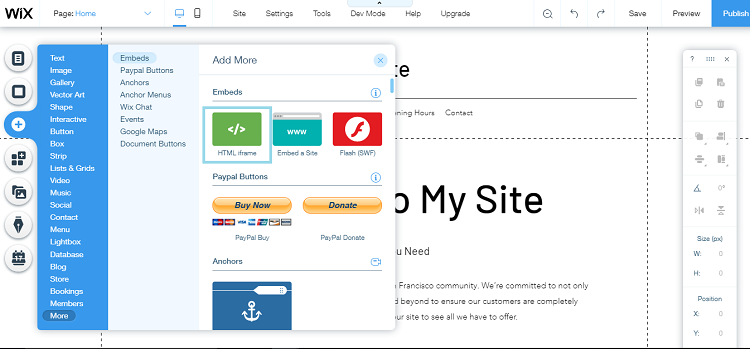
- Find and click ‘Embed code’and select the Embed HTML option.
- Paste your Facebook embed code, and you’re done.
This way, you have successfully added your Facebook feed to your Wix website using Tagembed.
Show your Facebook posts, reels, and videos on your website to engage visitors.
Benefits of Adding a Facebook Feed to a Wix Website
Here are the top-notch benefits of adding a Facebook feed to your Wix website:
1. Your Website Finally Looks Alive
Adding a Facebook feed keeps fresh posts, photos, and updates showing automatically, so your site still looks active. Even on the days you forget to update it (which happens more than we admit), your website won’t feel abandoned or outdated.
2. Less Work For You
Natively embedding Facebook feed on your Wix website sounds simple, unless you realize you’ve opened 7 tabs and are adding each post manually. With the Facebook widget code, you automate this task, resulting in less manual work and more engagement.
3. Visitors Stay Around For Longer
People love scrolling on social media, blogs, shopping sites, basically anywhere there’s interesting content. When you add a Facebook feed to your Wix website, visitors have more to explore than just your static pages. They can browse posts, view photos, or catch up on the latest updates without leaving the site.
The result? They naturally spend more time on your website, leading to lower bounce rates and higher dwell time.
4. Instant Social Proof
Let’s be honest, people trust people. When visitors land on your Wix website and see genuine Facebook content, likes, and comments, it instantly makes the brand more authentic. It shows that real people are interacting with your website and like your brand. This enhances your social proof and credibility, which is way more powerful for your conversions.
Different Facebook Feed Types to Add to Wix
Here are different types of Facebook feeds that you can add to your Wix account:
a. Facebook Page Timeline Feed
This is the most common type of feed that you see on any website. It displays posts directly from your Facebook page, including texts, updates, images, videos, and more. It’s perfect if you want visitors to see everything your brand is posting in one place.
b. Facebook Photo Gallery
If your brand is more about visuals, such as product photos, UGC, and other content, then this Facebook photo gallery will work best for you. It showcases your latest images and posts that instantly make your website more visually appealing.
c. Facebook Reels
Adding Facebook Reels to your Wix website lets you add engaging Facebook video content, enhancing its engagement. This works best if you want to add tutorials, product demos, product reviews, and other highlights.
d. Facebook Review Feed
Want to build trust quickly? Highlighting Facebook reviews on your website lets visitors see real customer feedback. It’s a simple yet powerful way to strengthen credibility and encourage new customers to trust your brand.
Conclusion
Adding a Facebook feed to your Wix website is one of those small things that quietly makes a big difference. It makes your website look fresh, dynamic, and engaging, bringing next-level engagement. Using tools like Tagembed, you get engaging themes, layouts, backgrounds, and other customization options. Visitors get something interesting to scroll through, your brand feels more authentic, and you enhance your brand’s credibility.
Embed social feed from Facebook, YouTube, Instagram, Twitter on your website, like a PRO
Invalid Email Address Multiple Themes
