Instagram Shadowban: What It Is, Why It Happens & How to Fix It
Have your Instagram posts suddenly stopped reaching new people? Are your Reels getting far fewer views than usual? Or maybe your posts no longer appear in hashtag searches despite using relevant tags.
If you’ve noticed a sudden decline in reach, engagement, or discoverability, you might think you’ve been hit by an Instagram shadowban.
What is it? How to get rid of it and, more importantly, how to avoid it? The guide covers it all.
Quick Answer: What is an Instagram Shadowban?
An Instagram shadowban is an unofficial term used to describe a significant reduction in the visibility of your posts, Reels, hashtags, or account without a formal suspension. Rather than banning your account outright, Instagram may reduce how often your content appears on Explore, hashtag pages, recommendations, or in front of non-followers if it determines your content or activity doesn’t meet its Community Guidelines or Recommendation Guidelines.
Fortunately, these restrictions are often temporary and can usually be resolved by identifying the cause, correcting policy violations, and returning to authentic engagement practices.
TL;DR
- An Instagram shadowban refers to reduced visibility rather than an account suspension.
- Instagram doesn’t officially use the term “shadowban,” but it does limit recommendation eligibility for certain content.
- Common signs include declining reach, lower non-follower impressions, disappearing hashtag visibility, and reduced Reel performance.
- The most common causes include violating Instagram Community Guidelines, using banned hashtags, spam-like activity, automation tools, and fake engagement.
- You can perform an Instagram shadowban test using Account Status, Instagram Insights, and hashtag visibility checks.
- Recovery typically takes anywhere from a few days to several weeks, depending on the reason.
- The best prevention strategy is creating original content, following Instagram’s new rules and restrictions, using relevant hashtags responsibly, and engaging authentically.
Is Instagram Shadowban Real?
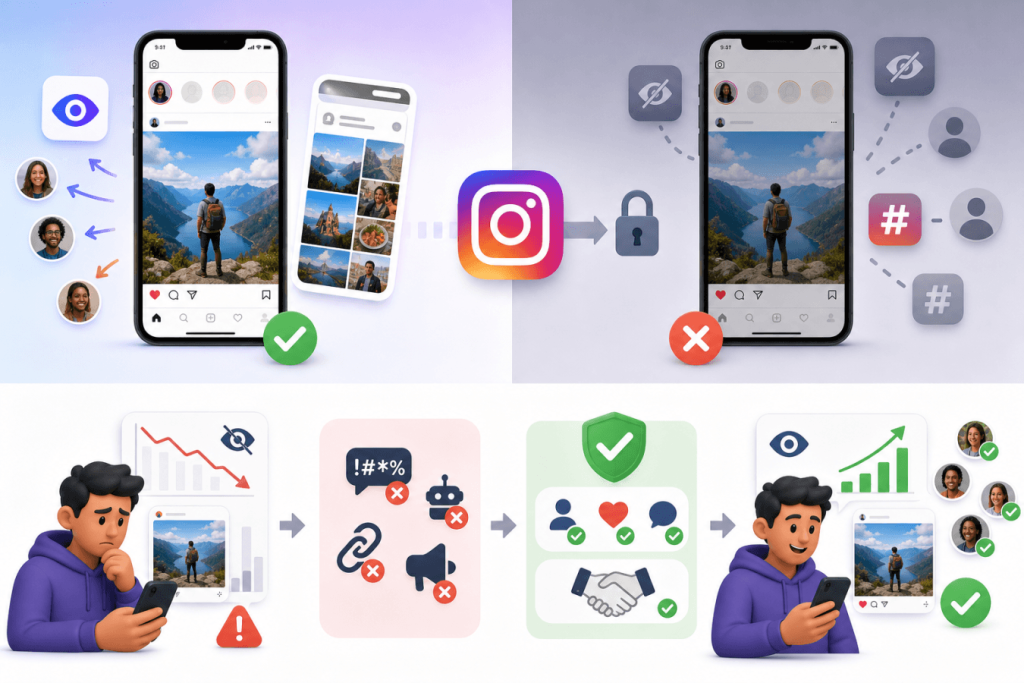
This is one of the biggest misconceptions surrounding Instagram.
The answer is yes, but not in the way many people believe.
Instagram has repeatedly stated that it doesn’t intentionally “shadowban” users simply because they post frequently or use hashtags. However, Instagram does limit the distribution of content that violates its policies or isn’t considered suitable for recommendations.
That’s why many creators experience what feels like a shadowban.
Instead of calling it a shadowban, Instagram refers to concepts like:
- Recommendation eligibility
- Content distribution
- Account Status
- Community Guidelines
- Recommendation Guidelines
If your content isn’t eligible for recommendation, it becomes much harder for non-followers to discover your account even if your followers continue seeing your posts.
This distinction is important because not every decline in engagement indicates a hidden penalty.
According to Meta, Instagram actually runs on two separate sets of rules that shape what happens to your content.
The first, Community Guidelines, decides whether your post can even stay on the platform. Break these (think hate speech, scams, or explicit illegal content), and Instagram can pull the post down or suspend your account entirely.
The second set, Recommendation Guidelines, is a bit different: it decides whether your content gets pushed out to new people through Explore, Reels, Suggested Posts, and recommendations for non-followers. So you can follow every Community Guideline to the letter and still get quietly cut off from recommendations if Instagram decides your content is low-quality, misleading, or just not right for wider distribution.
This is basically why so many creators swear they’ve been shadowbanned. Their followers still see their posts just fine, but the algorithm simply stops handing that content to anyone new.
How an Instagram Shadowban Affects Reach
If your account loses recommendation eligibility, you may notice several changes.
a). Explore Page Visibility
The Explore page is one of Instagram’s biggest discovery channels. When your content isn’t recommended, your posts are far less likely to appear there, significantly reducing opportunities to reach new audiences.
b). Reduced Hashtag Visibility
Many creators first suspect a shadowban when their posts stop appearing under hashtags. Instead of ranking in Recent or Top Posts, your content may disappear entirely from hashtag searches, making organic discovery much more difficult.
c). Lower Non-Follower Reach
One of the strongest indicators of reduced visibility is a sharp decline in impressions from people who don’t already follow you. If your content consistently reaches followers but almost no one new, your recommendation eligibility may be affected.
d). Declining Engagement
Lower visibility naturally leads to lower engagement.
You may notice:
- fewer likes
- fewer comments
- fewer saves
- fewer shares
- Lower Reel views
- slower follower growth
Since Instagram’s algorithm relies heavily on engagement signals, reduced visibility can create a cycle where declining engagement further limits discoverability.
Instagram Shadowban vs. Normal Algorithm Changes
Many users mistake normal fluctuations in performance for a shadowban.
| Instagram Shadowban | Algorithm Changes |
| Sudden drop in non-follower reach | Gradual fluctuations in reach |
| Hashtags may stop showing posts | Hashtags continue working normally |
| Explore visibility decreases dramatically | Explore performance varies naturally |
| Account Status may show recommendation issues | Account Status remains clear |
| Often linked to policy or behavioural issues | Usually caused by audience behaviour and competition |
A temporary drop in reach doesn’t always indicate a shadowban. Instagram’s ranking systems evaluate every post individually using engagement and quality signals. If your recent content receives fewer meaningful interactions, it may naturally be shown to fewer people without any policy violation. Understanding how Instagram ranks reels and posts helps distinguish normal algorithm fluctuations from actual recommendation restrictions.
Before assuming you’re shadowbanned, it’s important to rule out normal algorithm updates, seasonal engagement changes, or changes in audience interests.
Don’t Let Instagram Limit Your Reach
Embed your Instagram feed on your website to increase engagement & build trust.
Try It For FreeCommon Signs of an Instagram Shadowban:
Here are the most common symptoms creators report.
1. Sudden Drop in Reach
If your Instagram posts consistently reach thousands of people but suddenly reach only a fraction of that audience, it could indicate reduced distribution. Look for a sharp decline rather than a gradual decrease.
2. Reels Stop Reaching New Audiences
Reels are designed to reach users beyond your followers. If your Instagram Reels previously gained strong discovery but now receive almost all their views from existing followers, your recommendation eligibility may have changed.
3. Hashtags Stop Bringing Traffic
Hashtag impressions suddenly dropping to zero or close to it is another warning sign. If multiple posts experience this issue despite using relevant hashtags, investigate further.
4. Engagement Drops Across Multiple Posts
One underperforming post isn’t unusual. However, if five to ten consecutive posts perform significantly worse than your historical average, it’s worth examining your account status
5. Follower Growth Stalls
Reduced recommendations mean fewer new people discover your profile. As a result, follower growth often slows dramatically, even when you’re posting consistently.
6. Check Your Instagram Insights
Instagram Insights provides one of the clearest ways to understand whether your reach has changed.
Instead of focusing only on likes, pay attention to these metrics:
- Reach
- Impressions
- Accounts Reached
- Non-Follower Reach
- Profile Visits
- Explore Traffic
- Reel Plays
- Shares
- Saves
Compare your latest ten posts with your previous ten.
If you notice a consistent decline across multiple metrics, not just one post—it may indicate reduced visibility rather than random performance fluctuations.
7. Review Your Account Status First
Before searching for third-party tools, check the source that matters most: Instagram itself.
Instagram’s Account Status feature shows whether your account or content has issues affecting recommendation eligibility.
To check it:
- Open Instagram.
- Go to Profile.
- Tap the menu.
- Open Settings and Activity.
- Select Account Status.
Here you may see whether:
- Your content follows Community Guidelines
- Your posts are eligible for recommendations
- Removed content requires review
- Policy violations exist
If Instagram identifies a problem, it often explains which content is affected and may allow you to request a review.
Checking Account Status should always be your first step before assuming you’ve been shadowbanned.
Instagram Shadowban Test: How to Check If You’re Shadowbanned?
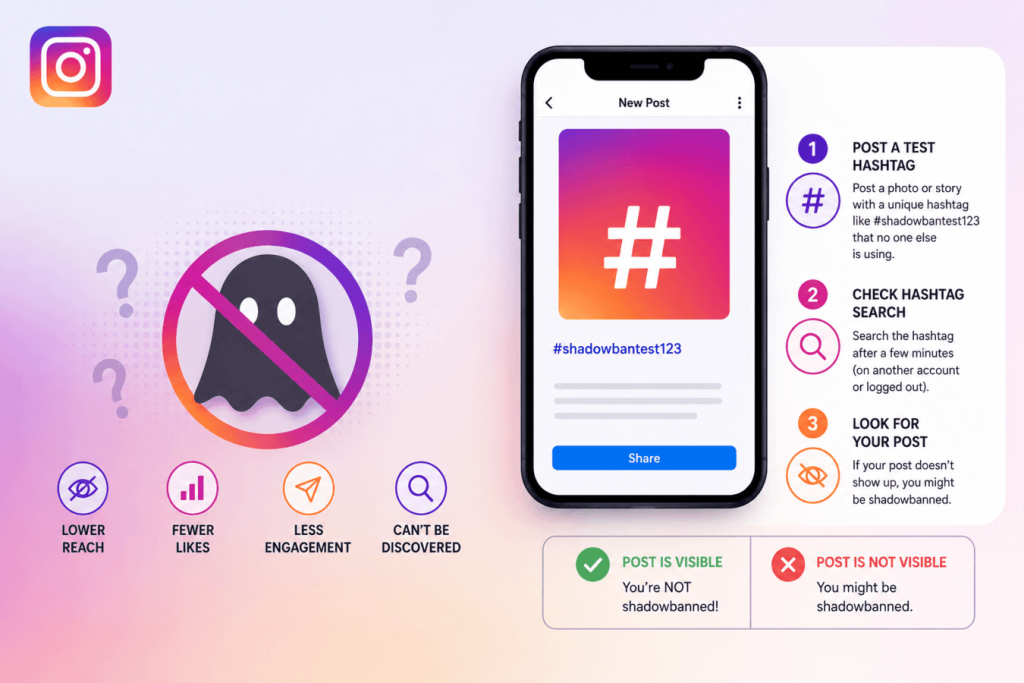
There isn’t an official “Instagram shadowban checker” provided by Instagram. However, you can use several reliable methods to determine whether your account’s visibility has been restricted.
Rather than relying on a single indicator, combine the following checks to get a clearer picture.
1. Perform a Hashtag Visibility Test
One of the simplest ways to test for a potential shadowban is by checking whether your posts appear under the hashtags you’ve used.
How to do it:
- Publish a post using a niche, low-competition hashtag.
- Ask someone who doesn’t follow your account to search for that hashtag.
- Check whether your post appears under the Recent or Top results.
If your post consistently fails to appear under multiple relevant hashtags while similar accounts do, it could indicate reduced visibility.
Note: One missing hashtag result doesn’t automatically mean you’re shadowbanned. Instagram personalizes search results, and hashtags themselves may have reduced visibility.
2. Compare Reach from Non-Followers
Open Instagram Insights and compare your recent posts with older ones.
Pay particular attention to:
- Non-follower reach
- Explore impressions
- Hashtag impressions
- Reel recommendations
If these metrics suddenly drop while follower engagement remains relatively stable, your recommendation eligibility may have been affected.
3. Check Your Account Status
Instagram’s Account Status is the most reliable place to identify recommendation issues.
Review whether Instagram reports that:
- Your content isn’t eligible for recommendations.
- A post has violated Community Guidelines.
- Certain content has limited distribution.
- Your account has pending review requests.
If everything is marked as eligible, your lower reach may be due to normal algorithm changes rather than a shadowban.
4. Look for Consistent Performance Changes
Avoid judging your account based on a single post.
Instead, review the last 10–20 posts and look for patterns such as:
- A sharp drop in impressions.
- Reels no longer reach non-followers.
- Fewer profile visits.
- Declining follower growth.
- Reduced Explore traffic.
Consistency matters more than isolated performance dips.
What Causes an Instagram Shadowban?
Several behaviors can reduce your content’s visibility. Some involve policy violations, while others simply signal low-quality or spam-like activity.
| Cause | Risk Level |
| Violating Community Guidelines | High |
| Using banned hashtags | High |
| Spam-like activity | High |
| Automation tools and bots | High |
| Copyright violations | Medium |
| Buying followers or engagement | High |
| Repeated misinformation | High |
Let’s look at each one.
1. Violating Instagram Community Guidelines
Instagram prioritises creating a safe environment for users.
Content that violates its Community Guidelines may lose recommendation eligibility or even be removed.
Examples include:
- Hate speech
- Harassment
- Graphic violence
- Adult content
- Dangerous misinformation
- Copyright infringement
- Impersonation
- Scam content
Even if a post isn’t removed, Instagram may reduce its distribution if it considers the content unsuitable for wider recommendations.
2. Using Instagram Banned Hashtags
Not all hashtags remain searchable forever.
Some hashtags become restricted because they’re repeatedly associated with spam, inappropriate content, or policy violations.
Using several banned hashtags doesn’t automatically trigger a shadowban, but it may reduce your post’s discoverability.
Examples of problematic hashtags include those that have been abused for explicit content, spam campaigns, or misleading promotions.
Before publishing, always verify that a hashtag still displays recent posts and active content.
3. Excessive Follow-Unfollow Activity
Rapidly performing repetitive actions can appear unnatural.
Examples include:
- Following hundreds of accounts in a short period
- Unfollowing large numbers daily
- Mass liking posts
- Posting identical comments repeatedly
- Excessive direct messaging
Instagram may interpret these behaviours as spam and temporarily limit your account’s visibility or actions.
4. Using Automation Tools and Bots
Automation tools that artificially increase engagement violate Instagram’s policies.
High-risk behaviours include:
- Auto-following users
- Auto-liking posts
- Automated commenting
- Artificial direct messaging
- Engagement pods
If Instagram detects inauthentic activity, it may reduce recommendation eligibility even if your content itself doesn’t violate any guidelines.
If you’re using Instagram automation tools, ensure they comply with Instagram’s API policies and avoid any activity that mimics spam.
5. Buying Followers and Engagement
Purchasing followers, likes, comments, or views may temporarily inflate your metrics, but it often harms long-term reach.
Why?
Instagram values authentic engagement.
Fake followers rarely interact with your content, lowering overall engagement rates and sending poor-quality signals to the algorithm.
Growing an audience organically almost always produces better long-term visibility.
6. Low-Quality or Recycled Content
Instagram’s Recommendation Guidelines discourage content that offers little original value. Examples include heavily recycled videos, repeated reposts from other creators without meaningful edits, misleading clickbait, and content designed primarily to manipulate engagement. While this content may not violate Community Guidelines, it may become ineligible for recommendation, significantly reducing its reach among non-followers.
Keep Your Instagram Content Working for You
Display your Instagram feed on your website and turn social content into lasting engagement.
Start Embedding for FreeHow to Get Unshadowbanned on Instagram?
If your account has lost visibility, don’t panic.
Most recommendation restrictions are temporary and can be improved by following Instagram’s best practices.
1. Remove Problematic Hashtags
Review recent posts and remove hashtags that:
- Are banned
- Are irrelevant
- Encourage spam
- Repeat excessively across every post
Focus on quality over quantity.
2. Delete or Edit Content That Violates Guidelines
If Account Status identifies problematic content, remove or edit it where possible. Addressing violations promptly can help restore recommendation eligibility faster.
3. Disconnect Unauthorized Apps
Review any third-party apps connected to your Instagram account.
Remove apps that:
- Promise rapid growth
- Automate engagement
- Request unnecessary permissions
Only use trusted tools that comply with Instagram’s policies.
4. Stop Spam-Like Activity
For several days:
If you’ve recently performed excessive liking, following, commenting, or used automation tools, consider taking a short break from aggressive activity. Returning to normal, authentic usage patterns can help restore trust in your account over time. While there is no officially confirmed recovery period, many creators notice improvements after reducing suspicious activity and focusing on genuine engagement.
- Avoid mass following.
- Limit excessive commenting.
- Don’t rapidly like hundreds of posts.
- Engage naturally.
Giving your account time to return to normal behaviour often helps.
5. Request a Review
If Instagram incorrectly flags your content, use Account Status to request a review.
While approval isn’t guaranteed, legitimate mistakes are sometimes reversed.
6. Focus on Authentic Engagement
Instead of trying to “beat” the algorithm:
- Reply to comments.
- Encourage meaningful conversations.
- Create original Reels.
- Post consistently.
- Share valuable content.
Authentic engagement remains one of the strongest long-term ranking signals.
How to Prevent an Instagram Shadowban?
To avoid shadowbans, follow these best practices:
- Follow Instagram’s Community Guidelines.
- Create original, high-quality content.
- Avoid reposting content with visible watermarks.
- Use relevant hashtags naturally.
- Use tools powered by the official Instagram Graph API
- Don’t purchase followers or engagement.
- Avoid spam-like behaviour.
- Check your Account Status regularly.
- Prioritize meaningful conversations over vanity metrics.
- Post consistently instead of excessively.
- Create original content instead of reposting videos with visible third-party watermarks.
- Regularly review your Account Status to ensure your content remains eligible for recommendations.
Remember, Instagram rewards creators who provide value, not those who try to manipulate the algorithm.
Conclusion
An Instagram shadowban isn’t necessarily a hidden punishment; it’s often the result of reduced recommendation eligibility caused by policy violations, spam-like behaviour, or content that doesn’t meet Instagram’s standards for broader distribution.
The good news is that now you know everything about it, from reasons to ways to avoid it. So follow the guidelines and
Frequently Asked Questions About Instagram Shadowbans
An Instagram shadowban is an unofficial term used to describe reduced visibility of posts or accounts, particularly among non-followers. It usually refers to decreased recommendation rather than a formal account ban.
Review your Account Status, compare Instagram Insights, perform a hashtag visibility test, and monitor whether your content is still reaching non-followers.
Depending on the cause, recovery can take anywhere from a few days to several weeks.
Repeatedly using restricted or spam-associated hashtags may reduce your content’s discoverability, although hashtags alone don’t automatically trigger a shadowban.
Yes. Once recommendation eligibility is restored or policy issues are resolved, content visibility often returns gradually.
Instagram doesn’t send “shadowban” notifications. However, Account Status may notify users about policy violations or recommendation restrictions.
No third-party checker can confirm a shadowban. They’re useful for identifying potential issues but cannot access Instagram’s internal systems.
Reels can lose recommendation eligibility if they violate Recommendation Guidelines, contain low-quality or unoriginal content, use misleading engagement tactics, or breach Instagram’s policies.
Embed social feed from Facebook, YouTube, Instagram, Twitter on your website, like a PRO
Invalid Email Address Multiple Themes