How To Add Facebook Feed to HTML Website in 2026? ( A Complete Guide )
If you are wondering how to add a Facebook feed to an HTML website, you are not alone. Many businesses and website owners want to display their latest Facebook posts directly on their websites to keep their content fresh and engaging.
Embedding a Facebook feed on your HTML website allows you to showcase real-time updates, customer interactions, and social proof in one place. Since Facebook remains one of the most widely used social media platforms, adding its feed to your website can help increase engagement, build trust, and keep visitors connected with your brand.
This blog will guide you through the 2 best methods of adding a Facebook Widget on your HTML website.


2 Methods to Add Facebook Feed on HTML Website
- Method 1 – Facebook Widget for HTML by Tagembed
- Method 2 – Official Manual adding by Facebook
Method 1 – Facebook Widget for HTML by Tagembed
If you’re wondering why Tagembed, take a minute to read this section before we get on with the embedding process.
Ever since its inception, Tagembed has managed to become a big name in the world of social media aggregators.
Known as one of the most responsive tools, Tagembed lets you aggregate and embed content from various social media networks, including Facebook. Moreover, the users can leverage the tool’s features like customization, content moderation, advanced analytics, detailed insights, and take assistance from the support team for assistance.
Simply follow the steps mentioned below to seamlessly complete the process:
Step 1: Create a Free Account
- Create a free new Tagembed account or if you already have an account, then just log in.

- Select “Social Feeds on Website” from the given options.
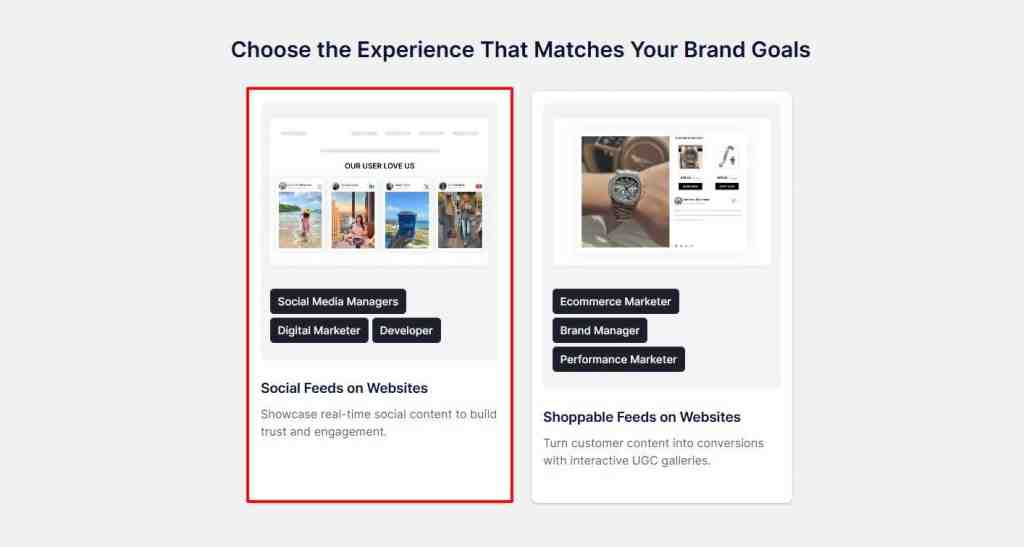
- Select industry type and click on “Submit” to verify your email ID.

Step 2: Make a Facebook Feed & Customize it.
- Choose “Facebook” as your source network.

- Select any preferred connection type and connect your Facebook account with it, then click on “Create Feed“

- Your Facebook feed gallery is created. Moderate the content in the feed according to your preferences by making posts public or private, then click “Customize & Publish.”
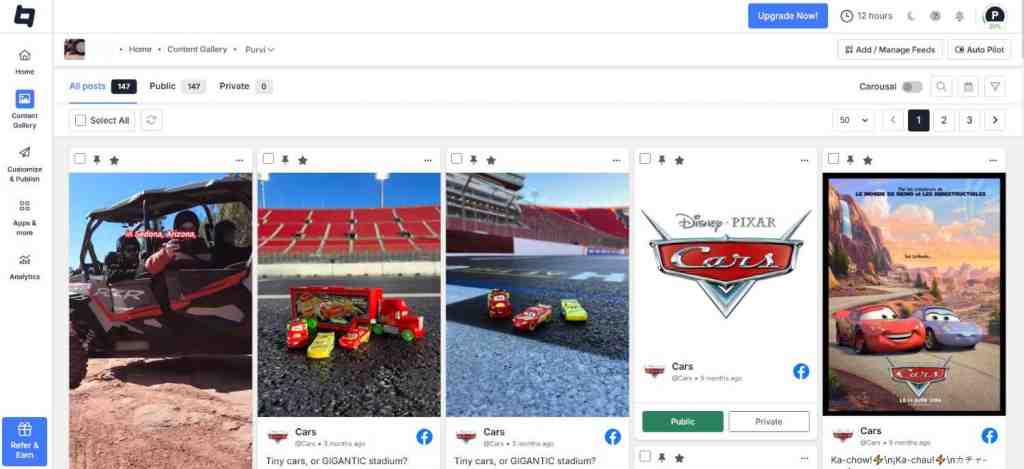
- Select Website as your channel.

8. You will be redirected to a window, where you can customize your Facebook feed gallery. After customizing your feed, click on “Generate Code“.

Steps 3: Generate Facebook Feed HTML Embed Code
Your Facebook Feeds are now successfully collected as the facebook widget and are ready to show Facebook Feed on an HTML website. However, you need to generate a Facebook Feed HTML embed code first.
- Choose HTML as your CMS platform.
- Copy the provided code.

Steps to Embed Facebook Feed on an HTML Website
- Log in to your HTML account.
- Go to the webpage or section where you want to embed Facebook feed in HTML site.
- Paste the embed code in the backend section of the section or page.
- Save the changes made to successfully add the Facebook feed in HTML
Voila! You have embedded Facebook feeds in HTML website.
Showcase your latest updates directly on your site – Start now!
Method 2 – Official Manual Embedding by Facebook
The second method to add a Facebook feed in an HTML website is by leveraging the official embedding option offered by Facebook itself.
Facebook users can select the post they want to add and click on the embed option to generate the embed code and paste it into their website’s backend section.
However, this process can be quite tedious and time-consuming as it allows users to embed only one post at a time.
On the other hand, Tagembed can help you add multiple Facebook feeds in one go, which makes it a much better and more efficient option.
Why Should You Add a Facebook Feed to a HTML Website?
Thinking about why to adopt this strategy and still confused about whether to leverage it or not? Simply make your way till the end of this section to get better clarity.
#1 Increase the amount of time your visitors spend on your website
Visitors become fascinated and begin interacting with your website when they see it filled with the liveliness of Facebook. It has a significant impact on user engagement on your website, as real content attracts a lot of attention. You can also go through the Facebook Feed Example for websites.
#2 Reduce the bounce rate
When you include a Facebook photo album on your html website, it is more interesting for visitors. It also allows your visitors to browse your website with greater curiosity, lowering the bounce rate significantly.
#3 Increase income and sales
When visitors begin to spend more time on your website after seeing the interesting Facebook post integrated into it, you have the opportunity to persuade them to become prospective clients. As a result, incorporating Facebook feed on your site significantly boosts your sales.
#4 Build brand loyalty and trust
Displaying user-generated content on your website gives you the chance to earn public trust by demonstrating your brand’s transparency. It assists your brand in getting a large number of visitors and allowing your business to flourish rapidly.
Wrapping It Up!
With all of the things discussed above in this guide, you may grow your business and increase traffic to your website. Tagembed is always willing to assist you with your business needs!
All you need to do is create a free account and start the process to add a Facebook feed to an HTML website!
Embed social feed from Facebook, YouTube, Instagram, Twitter on your website, like a PRO
Invalid Email Address Multiple Themes
