How To Build Credibility Using Google Reviews HTML Code?
While running a business, customer satisfaction should be the priority. Google reviews, which have emerged as the most trusted online review, have helped businesses understand their customers. And using these platforms, customers are now more vocal about their thoughts on any particular brand.
Reviews work as the business’s word of mouth, proving their credibility in the market. And to increase the reach of their reviews, brands are actively adding Google reviews on HTML websites. Considering that most websites built in today’s world use HTML platforms. Hence, in this blog, we have mentioned the simplest way by which you can show Google reviews in HTML website.
Adding Google Reviews HTML code to the website works as social proof for the business, which not only helps them build reliability but also helps consumers make their purchase decisions. However adding Google reviews can be considered as a later step; first, it is important to understand Google reviews, why it is essential, and how you can get more reviews for your business. So without any further ado, this blog has much to offer.


Ethical Ways To Get More Google Reviews For Your Business
The more reviews, the better they are for the brand. But gathering more customer reviews can be a task; hence, to ease your work, we have listed the 5 simplest and most ethical ways to get more reviews for your consumers.
- Ask the customer for reviews after completing the service – Often, businesses feel scared or shy to ask for reviews from their customers. But one needs to understand asking for reviews is essential while running a business. So, just after completing the service, ask your customers for the review then and there.
- Revert to reviews – consumers feel valued when a brand responds to their feedback. And when you revert to the feedback, it not only encourages others to post the reviews but also improves your reputation in the marketplace.
- Google reviews embed in HTML website – Replying to reviews can encourage others and improve reputation; imagine the impact of adding them to the website. It will inspire others to write reviews and get the limelight on the website while showcasing your brand’s transparency.
- Send follow–up emails – Your customer might forget to write reviews for your business. So you can send follow-up emails to remind them and expect some reviews on the Google platform.
- Incentivize reviews – you can organize giveaways for the customers who are writing reviews for your brand. But make sure that you run the contest to all types of reviews, which means either positive Google reviews or negative Google reviews. The review must qualify for the contest.
These are some of the simplest and most ethical ways by which you increase more Google reviews for your business. And once you have reviews for your brand, you can easily flaunt them in front of your website, and visitors.
Display your customer reviews directly on your site – Get started now!
Simple Steps – How to Show Google Reviews on HTML website
Tagembed is one of the most phenomenal review aggregator platforms that provides diverse social media widget, review widget, album widget and stories widget that can ease the whole process of embedding social media content, making this strategy more functional and relevant.
The tool helps users collect social media feeds from various platforms, including Google reviews in a widget known as the Google review widget. It also enables you to curate and customize the collected feed and eventually assists in displaying them on your website easily. Add Google reviews to the HTML website, you just need to follow the steps mentioned below.
Step 1: Log in to your Tagembed account.
- Sign up to Tagembed or log in to your account using your credentials if you are an existing user.

- For new users, you will see 2 options after entering credentials. Choose “Social Feeds on Website”

- Select your industry type.
- Verify your email address.
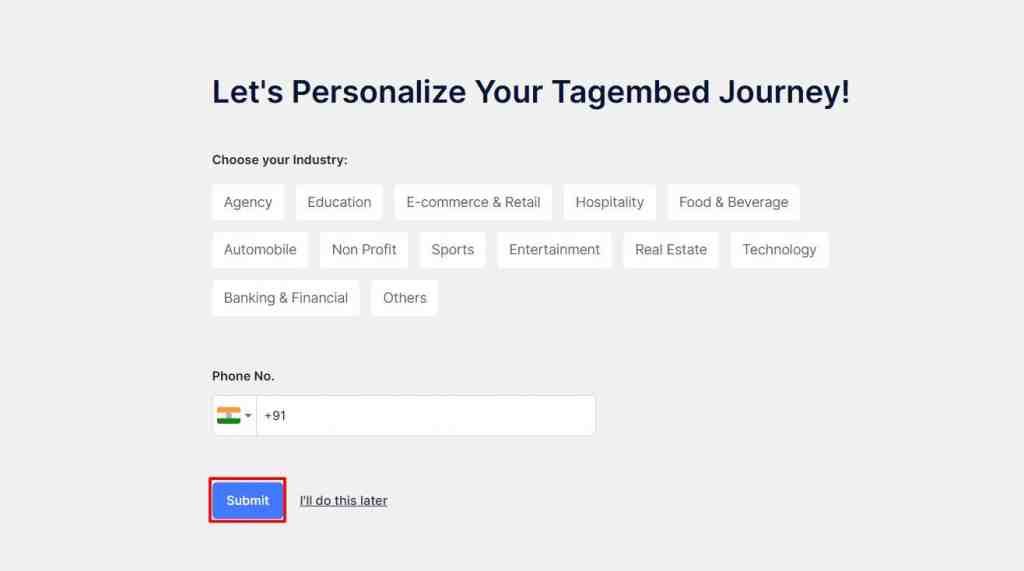
Step 2: Create Google Review Gallery
- Now, pick ‘Google Review‘ as your source network.

- Tagembed allows you to collect reviews using 2 connection types which are explained below:
i) My Places – With the My Places tab, you can embed Business reviews related to your business, as it allows you to display all the reviews related to your Google My Business,
ii) Other Places – It is suggested to embed places’ reviews. This connection type enables you to retrieve the five most useful reviews.
- Choose address or connect your GMB account and click on ‘Create Feed‘

- Your Google review gallery is created. You will be redirected to a window, where you can moderate your google reviews.
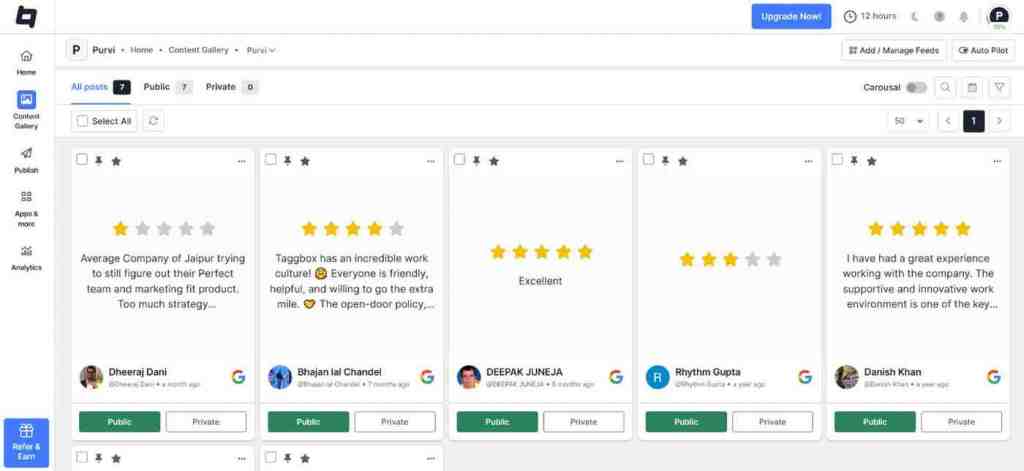
Step 3: Customize & get the Google review HTML code
- Now, click on ‘Customize & Publish‘. Select Website as your Channel list.
- A new window will open, utilize the other customization feature to modify the appearance of your Google Reviews gallery. Then, click on ‘Generate Code‘.
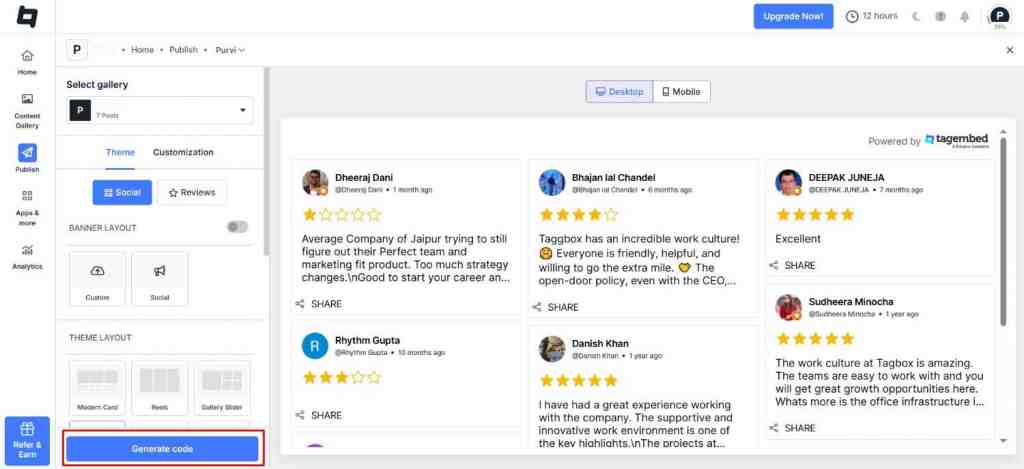
Step 4 : How To Display Google Reviews in HTML Website
- Once you have generated the embed code, select the type of gallery you want to use.
- Select HTML as your preferred content management system (CMS) platform.

- Simply log in to your HTML website and select the landing page where you wish to publish your gallery.
- Paste the publish code into the backend of the page.
Show what customers are saying – it’s quick and easy!


Why Should You Embed Google Reviews in HTML Website?
As you are well aware of how simple the whole process is, now must be wondering how it can be a game changer for your business, right? Don’t wear. We have you covered on this as well. Here are some major benefits of adding Google reviews on HTML websites.
1. Builds Credibility For Your Brand
When you flaunt all your positive reviews on your website, you will likely build credibility for your brand. Simply put, whenever your consumers visit your website and read the reviews from past consumers that project positive feedback for your brand, it might also make a positive lookout for readers. And eventually can help your brand in building credibility.
2. Makes Your Website More Informative
While having a website, having just a one-dimensional approach might backfire. It is advised that your website should have other elements that grab consumers’ attention and hold them on the website. Providing information can be considered one of those factors, and we all know that before making a purchase, consumers like to read reviews and gather as much information as possible. By showcasing reviews, you can provide the consumers’ perception of the information that can help them make a purchase decision.
3. Holds Consumers On Your Website
We all know that consumers would like to explore more about reviews and know more about the product they are purchasing. When your website provides everything they need, why would they leave it, right? In normal case scenarios, what do consumers need to make a purchase? Information about the product, reviews, and buying options, right?
4. Construct a Review Cycle
The point we have discussed before, more reviews are better for the brand. So, showcasing feedback from consumers on your website might inspire others to write reviews for you and enjoy the limelight on your website. It can transform into a review cycle – helping you get more Google reviews and eventually showcasing them on the website.
5. Builds A Robust Consumer-Brand Relationship
Consumers feel valued when a brand showcases its reviews on its website. It shows that the brand cares about the consumers and considers their feedback. It eventually brings your brand in a positive light and helps build a strong brand-customer relationship.
Places You Can Embed HTML Code For Google Reviews:
When you are opting to add Google reviews in HTML website, it is crucial to place them strategically to capture the visitor’s attention and eventually help you in the long run. And here are the 3 best places on your website to display Google reviews.
- Sidebar – The sidebar occupies the spaces on the sides of your webpage. That means there is more room for you to display your content and products and simultaneously display reviews to your visitors.
- On-Page as a Slider – Sliders take up less space on the webpage. Adding Google reviews on the slider allows visitors to read reviews to decide and know about your brand and product.
- Contact Us Page – You can showcase Google reviews on your ‘Contact Us page. People tend to visit the Contact Us page to learn more about the brand, and hence, there are chances that they can read reviews.
- Home Page – The home page will be the most likely first page that your consumers will visit on your website. With testimonials on the home page, you can win the trust at the initial level and plant a favorable impression of your brands’ products and services in their minds.
Conclusion
Embedding Google reviews on your HTML website builds credibility, improves customer trust, and in the end boosts your conversions. Hence, it is a simple yet powerful strategy that can enhance your brand’s performance.
We hope this blog has made it clear to you about the simple steps of embedding Google reviews on your HTML website. Now you are ready to shine those star reviews on your website? Get started and let your customers do the talking, and enhance your branding.
Frequently Asked Questions
Go to Tagembed, choose Google reviews as your source network, moderate and customize your feed. Then choose ‘HTML’ as your CMS platform, copy and paste the code on the website backend.
To showcase Google reviews on HTML website, you just need Google review widget. Google review widget works as the functional block on the website to help in displaying Google reviews. You can get Google review widget from Tagembed. You just need to create your account, aggregate review and paste the provided embedding code on the backend of the website.
- Sign in to Tagembed.
- Aggregate Google reviews for your Google customer review widget using Tagembed.
- Customize, moderate, and curate the content if you want.
- Click embed widget button and copy the embedding code.
- Paste the embedding code on the backend of website.
Sign in to your Tagembed account. Collect Google reviews using the tool. Tagembed will provide you with the embedding code, copy the embedding code and paste it into the backend of your website.
No coding knowledge is required to embed Google reviews on your website. Simply copy the code and paste it into your website.
Embed social feed from Facebook, YouTube, Instagram, Twitter on your website, like a PRO
Invalid Email Address Multiple Themes
