Google’s New Platform Properties Update: Instagram, TikTok, X & YouTube Explained
For years, Search Console had one blind spot every social-first creator and brand ran into eventually: it could tell you exactly how your website performed in Google Search, but the moment your content lived on Instagram, TikTok, X, or YouTube instead of a domain you owned, that visibility disappeared entirely. You could see likes and follower counts from the platform itself, but not whether Google Search was actually sending anyone your way.
On July 7, 2026, Google closed that gap. Search Console introduced a new property type called Google Search Console Platform Properties, letting creators and brands connect a supported social or video account directly, no website or domain verification required, and see exactly how that content performs in Google Search, Discover, and News. At launch, it supports four platforms: Instagram, TikTok, X, and YouTube.
What is this new Platform properties update? How will it benefit you? Read the blog till the end to learn all about it.
TL;DR
- Google Search Console now goes beyond websites: With the new Platform Properties update, brands and creators can measure how their social content performs across Google Search, Discover, and News.
- Four platforms are supported at launch: You can connect Instagram, TikTok, X, and YouTube directly to Search Console without owning or verifying a website domain.
- It brings SEO data to social content: Users can track clicks, impressions, CTR, average position, and search queries for individual posts, Reels, and videos appearing on Google.
- Search Queries could be the biggest advantage: Brands and creators can see the actual Google searches that surface their social content, helping them understand audience intent and discover new content opportunities.
- It connects social SEO with traditional SEO: Instead of treating websites and social channels separately, businesses can use search data to build a more connected, cross-platform content and SEO strategy.
- It does not directly improve rankings: Connecting a Platform Property won’t automatically boost Google rankings or guarantee AI Overview visibility. It primarily gives you better data to understand and optimize your search presence.
- It signals where Google Search is heading: The update reflects Google’s broader shift toward entity-first and multi-platform discovery, where a brand or creator’s overall presence matters beyond just their website.
What Are Google Search Console Platform Properties?
A platform property is a new type of property inside Search Console that tracks how a connected social or video account’s content performs in Google’s search surfaces, separately from your website’s own performance data.
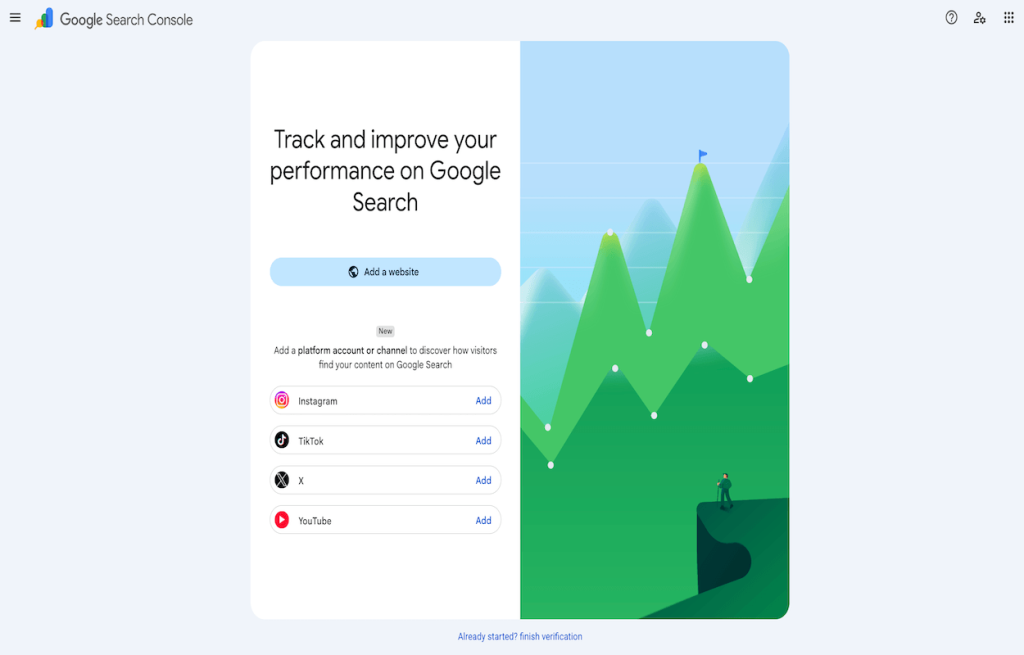
The distinction from a standard website property is fundamental, not cosmetic. A website property requires proving ownership of a domain, through DNS verification, an HTML file upload, or a similar method, and it reports on your web pages. A platform property skips domain ownership entirely. You authorize a supported social account directly, and Search Console pulls performance data straight from Google’s index of that account’s content.
| Attribute | Website Property | Platform Property |
| Tracks | Website pages | Social profile / content |
| Requires website ownership | Yes | No |
| Verification method | Domain or file-based | Account authorization |
| Supported content | Any indexed web page | Instagram, TikTok, X, YouTube content |
| Search Queries report | Yes | Yes |
| Clicks & Impressions | Yes | Yes |
| Discover / News data | Yes | Yes, if content is eligible |
Google introduced Google Search Console Platform Properties because a growing share of the content people search for and click on never touches a traditional website at all. A brand’s Instagram Reel or a creator’s YouTube video can rank in Google Search and Discover just as a blog post can, and until this update, there was no way to see that performance data unless you owned the domain the content happened to be hosted on. You also have third-party social media aggregator tools like Tagembed or Taggbox that provide you with Instagram widgets, TikTok widgets, X widgets, and more, these social media widgets help you make the most of these platforms and updates.


Youtube


TikTok
Why Did Google Introduce Platform Properties?
The reasoning behind this update tracks a few converging trends in how people actually search now.
Social search has grown into a parallel discovery engine
A meaningful share of users, particularly younger demographics, now search directly for creators, products, and brands the way they’d search for anything else, and increasingly land on a social profile or video rather than a website as the top result.
AI-powered search is becoming entity-focused rather than page-focused
Google’s AI Overviews and similar experiences increasingly reason about brands and creators as entities with a presence across multiple social media platforms, not just a single website with a single URL. Measuring performance at the entity level, across platforms, is a natural extension of that shift.
Creators have become primary publishers in their own right
A significant portion of online content now originates from creators who publish natively on social and video platforms rather than maintaining a traditional website, and those creators had effectively no way to measure their Google Search visibility before this update.
Cross-platform discovery is now the norm, not the exception
Someone might discover a business through a YouTube video, follow up with an Instagram search, and eventually land on a website, all within Google’s ecosystem. Platform properties give a clearer picture of where in that journey Google Search is actually contributing.
Which Platforms Are Supported in Google Search Console Platform Properties?
At launch, Search Console’s platform properties support exactly four platforms.
| Platform | Content Type | Who Benefits |
| Posts, Reels | Brands & creators | |
| TikTok | Short-form videos | Creators, brands |
| YouTube | Videos | Businesses & creators |
| X | Posts | News outlets & brands |
Instagram reporting covers posts and Reels, giving brands and creators visibility into which specific pieces of visual content are actually being surfaced by Google Search and Discover.
TikTok support extends the same reporting to short-form video, an increasingly dominant content format for search-driven discovery, particularly among younger audiences searching directly on TikTok and Google alike.
YouTube benefits from this the most directly, given how much of YouTube’s traffic already originates from Google Search. Platform properties give a query-level view of exactly what’s driving that traffic.
X reporting focuses on posts, which is particularly relevant for news organizations and brands whose real-time updates are frequently surfaced in Google’s News and Search results.
Notably absent from this list, at least for now: Facebook, LinkedIn, and Threads. Google has described the current four-platform lineup as an initial rollout, with the door open to expanding it, but as of this update, Facebook Pages and LinkedIn profiles are not supported as platform properties.
How Platform Properties Work
The reporting flow behind platform properties follows a simple path:
Search Query
↓
Google Search
↓
Social Platform Content
↓
Platform Property (in Search Console)
↓
Search Console Data
↓
Performance Reports
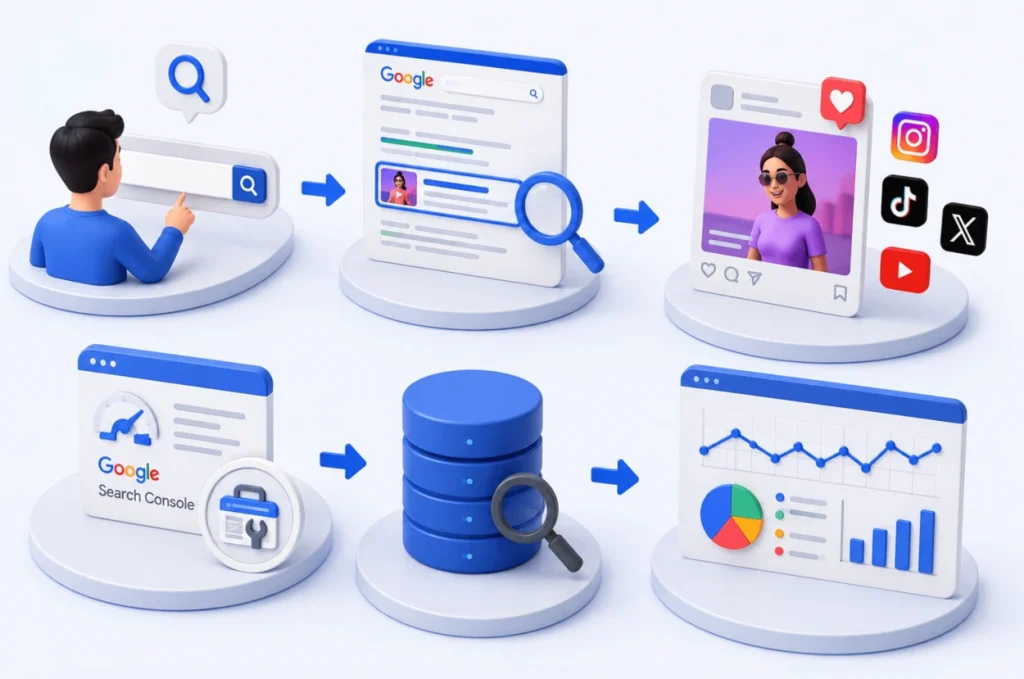
In plain terms: someone searches on Google, Google surfaces a piece of your Instagram, TikTok, X, or YouTube content in response, and that interaction, whether it results in a click or just an impression, gets logged and reported back to you through the connected platform property.
What Data Can You See in Platform Properties?
Performance Report
This is the core report, and it mirrors what a standard website property shows, adapted for social content. It covers clicks, impressions, click-through rate, and average position, all broken down by individual post or video, along with which of your content is performing best in Google’s search results.
Search Queries
This report shows the actual search terms responsible for surfacing your content. This is arguably the most useful piece of the entire feature: it tells you exactly what people were searching for when Google served up your Instagram post, TikTok video, or YouTube upload, which is direct insight into demand you weren’t previously able to see at all.
Insights
Where available, the Insights report surfaces engagement patterns, trending content, and performance trends over time, giving a broader view beyond raw click and impression numbers.
Achievements
This section highlights specific milestones Google identifies in your platform property’s performance, giving a lightweight way to track meaningful growth points without digging through raw data yourself.
It’s worth being clear about what platform properties do not show: followers, likes, comments, shares, saves, reach, or audience demographics. Those remain the job of each platform’s own native analytics, like Instagram Insights, YouTube Studio, or TikTok Analytics. Platform properties are exclusively about Google Search visibility, not social engagement.
How to Set Up Google Search Console Platform Properties
Step 1: Open Google Search Console
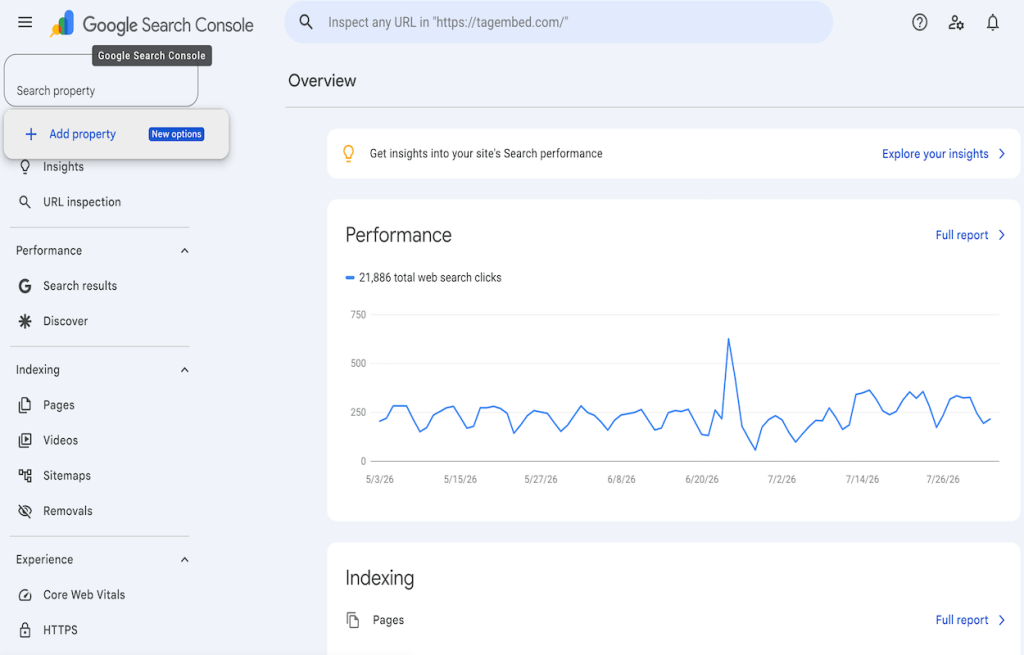
Open Google Search Console and go to the property selector dropdown, or the welcome screen if you’re setting up a new account.
Step 2: Add a Platform Property
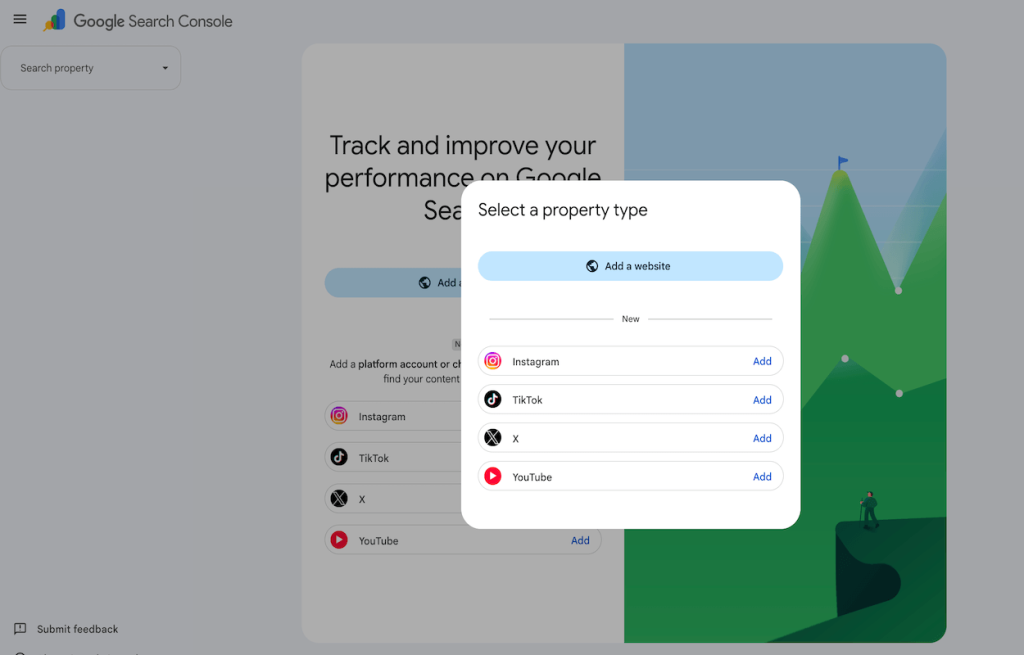
Select “Add property” and choose the platform you want to connect from the supported list: Instagram, TikTok, X, or YouTube.
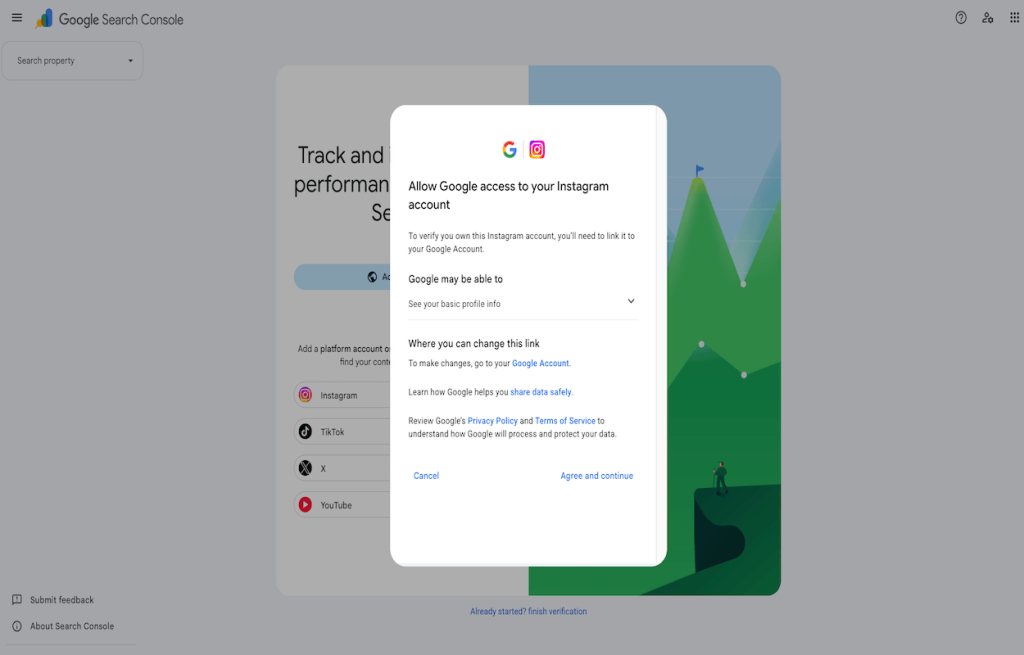
Step 3: Authorize the Connection
You’ll be prompted to log into the relevant platform and grant Search Console permission to access performance data for that account.
Step 4: Verify the Platform Property
Confirm verification under Settings, where you’ll see the property listed along with the date it was added and which team members have access.
Step 5: Wait for Performance Data
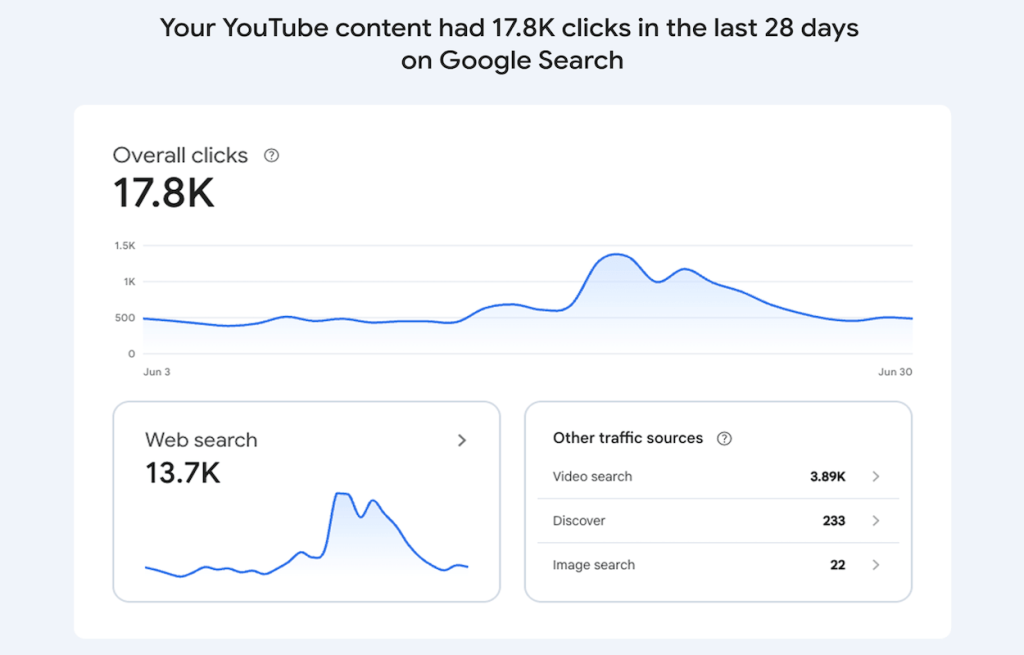
Wait for data to populate. Google states that historical performance data can take up to 48 hours to appear after the initial connection, so an empty or partial chart immediately after setup is expected, not a sign something’s wrong.

Step 6: Analyze Your Performance Reports
Start analyzing performance through the Performance and Insights reports once data begins showing, focusing first on the search queries report to understand what’s actually driving discovery.
Step 7: Keep the Connection Active
Ownership of the connection is periodically re-verified by Google. If the connection lapses, for instance if login credentials to the connected platform change, the property pauses until you re-authorize it, at which point reporting resumes without needing to wait for historical data to rebuild.
Why Platform Properties Matter for SEO
Better search visibility
For any brand or creator whose content lives partly or entirely on social platforms, this is the first real window into how that content performs specifically within Google’s search ecosystem, separate from platform-native engagement metrics that say nothing about search discovery.
Entity SEO
Google increasingly organizes search results around entities, recognizable brands, creators, and organizations, rather than isolated web pages. Consistent, verified profiles across platforms help reinforce that entity recognition, which plays into how confidently Google associates content across different platforms with the same underlying brand or creator.
Content discoverability
Search queries data makes it possible to see, in concrete terms, which of your videos, posts, or Reels are actually being found through Google Search, which is a very different signal than what shows up in a platform’s own internal analytics focused on in-app discovery.
AI Search
As AI Overviews and similar generative search experiences continue to rely on strong entity recognition and trusted, consistent content, having verified platform properties contributes to a clearer, more consistent picture of a brand’s identity across the platforms it operates on. It’s worth being precise here: connecting a platform property does not directly improve rankings or guarantee inclusion in AI Overviews. It’s a measurement and visibility tool, not a ranking lever in itself.
Want to Boost Engagement & Traffic?
How Businesses Can Use Platform Properties
- Measure which social posts are actually appearing in Google Search, rather than assuming reach based on in-platform engagement alone.
- Identify high-performing search queries tied to specific posts or videos, surfacing content opportunities that weren’t visible before.
- Refine content strategy based on what’s demonstrably working in search, rather than what simply performs well within the platform’s own feed algorithm.
- Understand audience search intent at a level of specificity that platform-native analytics don’t provide.
- Repurpose high-performing content across formats once it’s clear a particular topic or format is consistently driving search traffic.
How Content Creators Can Benefit
For creators specifically, this closes a gap that’s existed for as long as creators have operated primarily on social and video platforms rather than owned websites.
- Better keyword research, grounded in actual search queries that led to real clicks, rather than guesswork or third-party keyword tools built for traditional web SEO.
- Clearer audience intent signals, since search queries often reveal what people are trying to learn or accomplish, distinct from what they’re simply scrolling past.
- Sharper content optimization, informed by which specific videos or posts are already resonating in Google Search.
- Organic visibility growth without needing to build or maintain a separate website purely to access this kind of search performance data.
Best Practices for Optimizing Platform Properties
Branding
- Use consistent usernames across every platform you’re active on.
- Keep the same logo and visual identity everywhere.
- Update bios regularly, and keep them accurate.
- Include a working website link in every profile.
- Brands can also embed an Instagram feed on their website to connect their social and web presence.
Content
- Write keyword-rich, natural-sounding captions rather than keyword-stuffed ones.
- Use descriptive, specific video titles instead of vague or purely stylistic ones.
- Optimize thumbnails for clarity, not just visual appeal.
- Add alt text where the platform supports it.
- Publish consistently rather than in unpredictable bursts.
Technical optimization
- Implement Organization schema on your website to reinforce entity signals.
- Use sameAs links in your structured data to connect your website to your verified social profiles.
- Maintain strong internal linking across your own content.
- Keep structured data accurate and up to date.
- Ensure your website is genuinely mobile-friendly, since a meaningful share of social-to-search traffic arrives on mobile.
Common Mistakes to Avoid When Using Platform Properties
Don’t Ignore the Search Queries Report
Ignoring the search queries report. This is the single most useful piece of data platform properties provide, and it’s the one most likely to go unused if teams only glance at top-line clicks and impressions.
Do Keyword Research Before You Publish
Posting without any keyword research. Captions and titles written purely for platform-native engagement often miss the language people actually search for on Google.
Maintain Consistent Branding Across Platforms
Inconsistent branding across platforms. Different usernames, outdated bios, or mismatched visual identity across platforms weakens the entity signals that help Google associate content across accounts.
Complete Every Social Media Profile
Leaving profiles incomplete. A bio without a website link, or a profile missing basic information, gives both users and Google less to work with when trying to understand what a brand or creator actually represents.
Keep Your Social Accounts Active
Letting accounts go inactive. A platform property connected to a dormant account won’t generate much useful data, regardless of how well it’s set up.
Align Your Website and Social SEO Strategy
Treating website SEO and social SEO as separate disciplines. The brands getting the most out of this update are the ones treating their website and their social presence as one connected entity, not two separate strategies running in parallel.
Platform Properties vs. Website Properties
| Feature | Website Property | Platform Property |
| Tracks web pages | Yes | No |
| Tracks social content | No | Yes |
| Keyword reports | Yes | Yes |
| Search clicks | Yes | Yes |
| Impressions | Yes | Yes |
| Platform-specific insights | No | Yes |
| Requires domain ownership | Yes | No |
How This Update Fits Into Google’s Future Search Strategy
Platform properties don’t exist in isolation. They sit alongside a broader set of changes Google has been rolling out through 2026, including “Search profiles,” a separate, public-facing feature for qualified creators and publishers introduced earlier in the year, and an ongoing shift toward entity-first search that treats brands and creators as consistent identities across whatever platforms they operate on.
Taken together, these updates point toward a search experience that’s increasingly multi-platform by default: indexing and surfacing content regardless of where it’s hosted, reasoning about entities rather than isolated pages, and giving both creators and brands more direct visibility into how their presence, in whatever form it takes, is actually performing in Google’s ecosystem. Building brand authority is no longer just a website exercise; it’s happening simultaneously across every platform Google can see.
Conclusion
Platform properties represent a real shift in how Google measures search performance, extending Search Console’s reporting beyond websites to the social and video platforms where a growing share of content actually lives. For creators and brands active on Instagram, TikTok, X, or YouTube, it’s the first real window into how that content performs in Google Search specifically, separate from the engagement metrics each platform already provides.
The most effective approach going forward combines a well-optimized website with a genuinely active, consistent social presence, using the search query data this update provides to keep refining both. Platform properties tell you how your social content is doing in Google Search; making sure that same content shows up clearly on your own website, through a consistent, up-to-date embedded feed, is what turns that visibility into an actual, connected brand presence.
Frequently Asked Questions
A new Search Console property type, launched July 2026, that lets creators and brands connect a supported social or video account and see how that content performs in Google Search, Discover, and News, without needing to own a website.
At launch, platform properties support Instagram, TikTok, X, and YouTube. Facebook, LinkedIn, and Threads are not currently supported, though Google has described the initial lineup as a starting point.
No. They’re a measurement and visibility tool showing how your content performs in Google Search, not a feature that directly boosts rankings or guarantees inclusion in AI Overviews.
A website property requires verified domain ownership and reports on your web pages. A platform property requires only account authorization and reports on a connected social or video account’s content instead.
Businesses can use it just as easily as individual creators, provided the connected account is eligible and properly authorized. It’s particularly useful for brands whose content performs well on social platforms but who previously had no visibility into its Google Search performance.
No. This is one of the more significant aspects of the update: platform properties work for creators and brands with no website at all, as long as they have an eligible, supported social account to connect.
Focus on consistent branding across platforms, keyword-aware but natural captions and titles, complete and accurate profiles, and reviewing your search queries report regularly to understand what’s actually driving discovery.
Historical data can take up to 48 hours to populate after initially connecting an account, and ongoing reporting continues to update similarly to a standard Search Console property from that point forward.
Embed social feed from Facebook, YouTube, Instagram, Twitter on your website, like a PRO
Invalid Email Address Multiple Themes