How To Embed Instagram Reels On Website (Auto-Update)
Do you want to bring the excitement of Instagram Reels to your website and enhance engagement? One fantastic way is to embed Instagram Reels directly onto your website to share dynamic content, display your creativity, and keep visitors glued. For the brand’s marketing efforts, Instagram Reels have become a major marketing touchpoint.
Instagram Reels are most effective for users aged 18-34. With reel ads, you can reach 726.8 million people on Instagram.
With these easy-to-follow steps, you can embed the Instagram Widget on your website within a few minutes. Without any further ado, let’s get started!


| Multiple Themes |
Two Amazing Ways To Embed Instagram Reels On Your Website:
We have covered two methods to embed Instagram Reels on a website for free in this blog. Let’s take a look at them:
- Embed Instagram Reels manually,
- Embed Instagram Reels by using Tagembed
#1 Manually Embed Instagram Reels
Instagram offers the option to embed reels on its website manually. However, using this method, users can only embed a single post at a time. Follow these steps to embed reels on a website:
- On your desktop, open Instagram.com and log in to your account.
- Tap on the reel you want to embed.
- Tap on the three dots (…) available at the post’s top right corner.
- Select ‘embed’ from the list that appears.
- Copy the reel code and paste it on your website.
#2 Embed Instagram Reels by Using Tagembed
Step-1: Log in to your Tagembed account.
Log in to your Tagembed account. If you are a new user, sign up for a for free and verify your email.

Step-2: Go To Content Gallery
- If you are a new user, you will see an already-created feed.
- For existing users with no default feed, click the “Add New Gallery” button and name your Gallery.
- Pick Instagram as your source network.
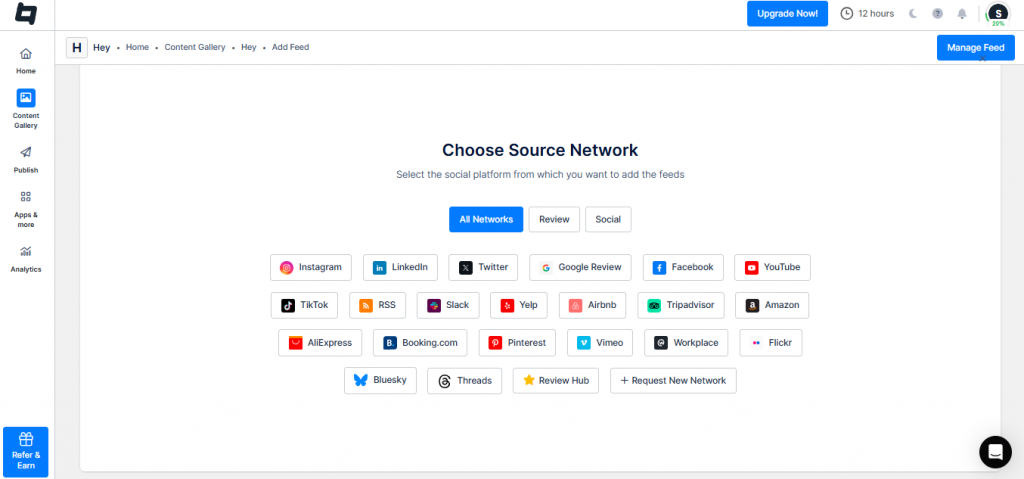
- Pick Reels as your connection type.
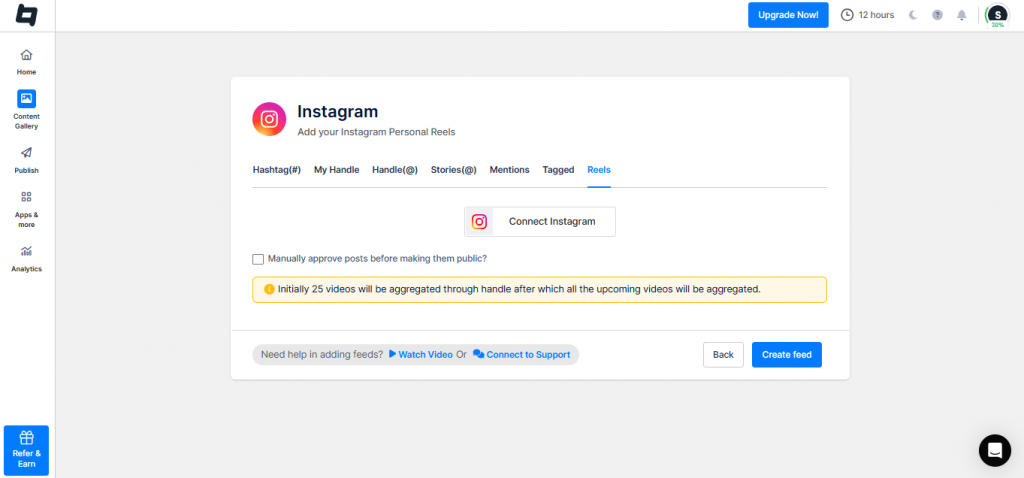
- Connect your Instagram account.
Step-3: Go To the Publish Section
- Click on Create Feed.
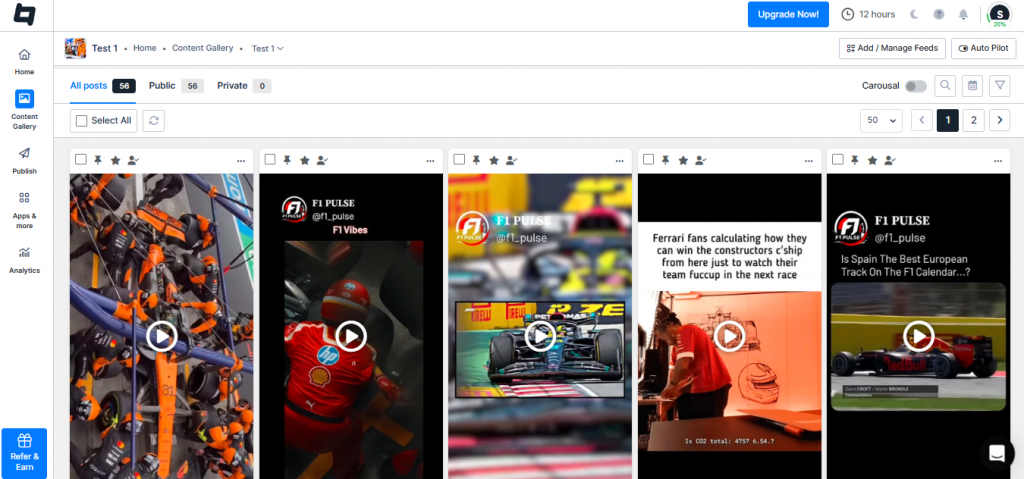
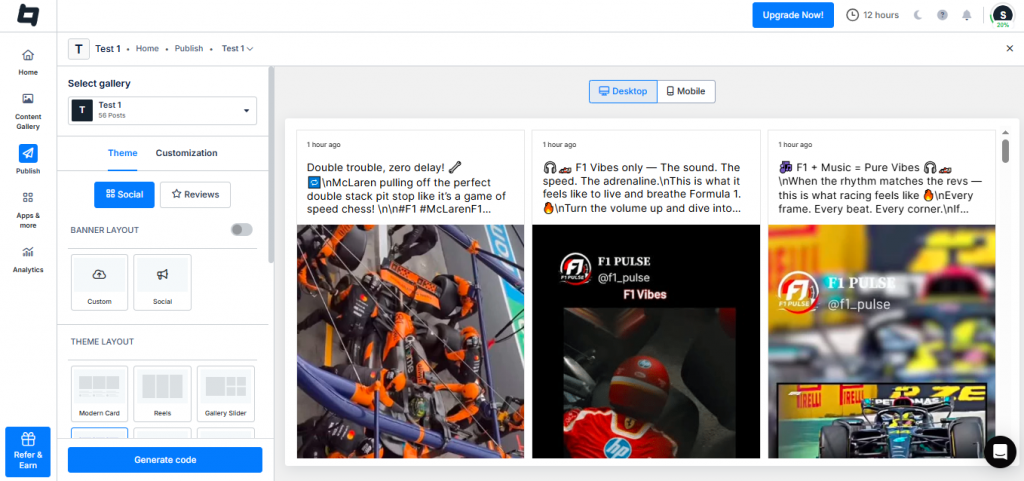
- Click “Publish” on the left sidebar. Select Website as your Channel list.
- Change the themes and layouts. Utilize the other customization feature to modify the appearance of your Instagram Reels gallery. Then, click on Generate Code.
Step-4: Generate Code
- Once you have generated the embed code, select the type of gallery you want to use.
- Select HTML as your preferred content management system (CMS) platform.
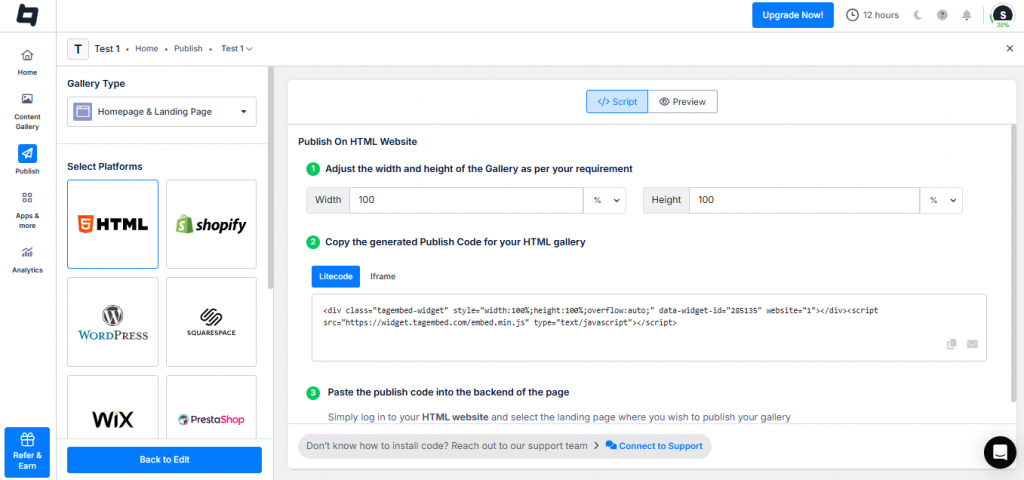
- Log in to your HTML website and select the landing page where you wish to publish your gallery.
- Paste the publish code into the backend of the page
- Apply the required changes and Voila! You will have successfully published the Instagram Reels gallery on the website.
Embed Instagram Reels On Your Website
Collect, moderate, and publish Instagram reels on website
Try for freeEmbed Instagram Reels on Any Website
1. Embed Instagram Reels On HTML

- First, choose HTML as your website-building platform.
- Go to the webpage where you want to embed the widget.
- In the backend section of your website, paste the copied embed code and save the changes.
- Congratulations, the Instagram Reels are now embedded on your website successfully.
2. Embed Instagram Reels On WordPress

- Choose WordPress as your website-building platform and log into your WordPress admin account.
- Navigate to the webpage where you want to embed Instagram Reels on WordPress.
- Tap on the visual and text options on the right side of the webpage.
- Pick the text mode option.
- Into the backend section of your website, paste the copied embed code.
- To finish the process, tap on the Update tab.
- Voila! Your Instagram Reel is embedded on the WordPress website.
3. Add Instagram Reel to Shopify

- To embed Instagram Reels to Shopify, select Shopify as your preferred website-building platform.
- Tap on the online store’s option after logging in to the account and under the sales channel selection.
- Select themes in the drop-down section.
- Tap on the Action tab.
- Select the segment where you want to embed Instagram reels.
- After pasting the embed code, save the changes to complete the procedure.
- Refresh the webpage and check the Instagram Reels added to your Shopify website.
4. Integrate Instagram Reels On Squarespace

- After selecting Squarespace as your website-building platform, log into your account.
- Tap on the Add/Edit button.
- Tap on the ‘</>’ available on the pop-up on the right side of the page.
- In the given section, paste the copied embed code.
- Tap on the Finish, you have completed the process.
- Hurray, preview your added Instagram Reels on the Squarespace website.
5. Embed Instagram Reels On Wix

- Select Wix as your website-building platform and log into it.
- Tap on the + button on the left side of the menu.
- Choose HTML iFrames in embeds by tapping on More.
- After pasting the embedded code, press on the Apply tab to save changes.
- Voila, your Instagram Reels are embedded on the Wix website.
6. Integrate Instagram Reels On Weebly

- Log into your Weebly account after selecting it as your website-building platform.
- Use drag and drop to embed the widget after redirecting to the embed code section.
- Choose the HTML Box and select Edit Custom HTML.
- Paste the copied embed code in the given section.
- Save the changes and you complete the process.
- Congratulations, you’ve successfully added the Instagram Reels on the Weebly website.
7. Embed Instagram Reels On Jimdo

- Log into your Jimdo account and start the process.
- Tap on the More Elements option.
- Select the HTML option and paste the embed code where you want to add the Instagram Reels.
- To apply the changes, tap on the Save button.
- Now, you’ve successfully integrated Instagram Reels on the Jimdo website.
Embed Instagram Reels On Your Website
Collect, moderate, and embed Instagram reels on website.
Try for freeOther Options To Embed Instagram Reels On a Website Using Tagembed
1. Tagembed WordPress Plugin
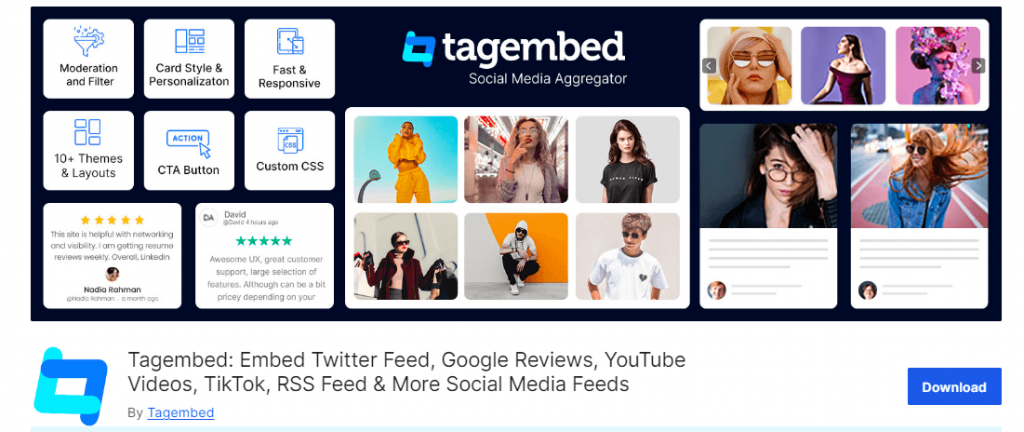
By leveraging the Tagembed social media feed WordPress plugin, users can embed Instagram videos designed for WordPress users. Without compromising the speed and responsiveness of the website, this WordPress plugin seamlessly integrates the content from Instagram. This plugin completes the process in a few clicks and is easy to use.
2. Tagembed Shopify App
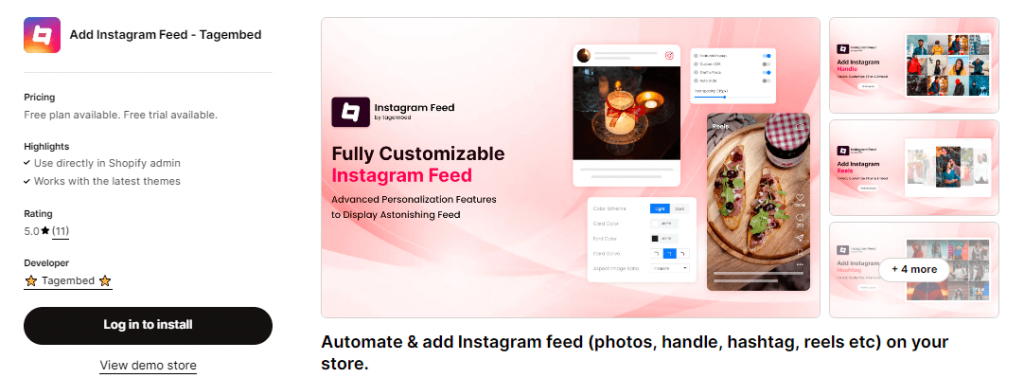
You can use the Shopify app by Tagembed to embed Instagram Reels on your Shopify website or store. Using Instagram Reels for e-commerce brands is a good trick; it increases user engagement, social proof, and builds brand presence. Overall, this will generate more sales and revenue. This tool will gather and embed Instagram feeds on the Shopify store within a few minutes.
Why Should Brands Embed Instagram Reels On Their Website?
To boost your engagement with your audience, adding Instagram Reels to your website is an excellent way. When you embed Instagram Reels on the website, you’ll get the following benefits:
1. More Visuals = More Engagement
When you leverage visuals or videos on the website, your website visitors will engage more with your content. When compared to texts, moving content has been proven to attract and engage prospects much more. Because visuals create a psychological connection and their impact lasts longer. As per the study conducted by Socialinsider, there was a 57.4% year-over-year increase in usage of Instagram Reels in 2023. This means users are spending more time on Instagram Reels when they find them relevant and engaging. By embedding Instagram reels on your website, you can increase the stay time of visitors, which leads to increased engagement levels.
2. Fresh Content
To keep your website modern and sophisticated, fresh and up-to-date, Instagram Reels are an ideal way. Apart from making your website pages more interesting and engaging, Instagram Reels provides your customers with a wide array of content to consume. Instagram Reels will enhance your website’s visual appeal and make your site stand out among competitors.
3. Display Your Products
By using Instagram Reels, Brands can easily showcase tutorials about the use cases of their products along with their other specifications. Instagram Reels will let your prospective customers connect with your product better. Whether it is a glance at a newly launched product or videos of your existing products. This will help your potential customers know the products’ after-effects and what to expect.
4. Improves Website SEO
Using high-quality Instagram Reels or integrating an Instagram feed into your website increases the time customers spend on your web pages. When evaluating the quality and authority of a website, this is one of the primary factors search engines like Google consider. Better rankings of your website depend on the longer duration of time customers spend.
5. Escalate Conversions & Sales
Instagram Reels hold enormous potential to tap into the emotional quotient of the viewers, which helps to connect more deeply with prospective customers. Posting before and after reels, tutorials, or reels of UGC will do magic for your business if you embed them on your website. This will escalate your conversion rate and sales.
Examples Of Embedded Instagram Reels On Website
Adding Instagram Reels to your site will make it look more engaging and provide a visual appeal that will attract more visitors. Have a look at some of these examples:
- E-commerce Website- A reel with behind-the-scenes glimpses or a quick outfit transition reel of a new collection can do wonders by catching the attention of visitors. For example, an Instagram reel of a famous fashion model or designer’s account can be added to an eCommerce website. Through this, you can show all clothing styles at once.
- For example, by showing all clothing styles at once on an e-commerce website, you can have a famous fashion model or designer’s Instagram account embedded.
- News Website- Reels are a great format for providing concise briefs of the latest events. Use Reels as a teaser for a long video story on news websites. Such information will always get visitors hooked and they come back to your site.
- Service-based Website- You can embed Instagram video that displays various forms of exercises accomplished at your gym and clients’ feedback for the fitness center business. This would enable potential clients to understand what they should expect when they come.
Brands can improve how they engage with customers, show their brand image, and meet different marketing objectives when they put Instagram Reels on their websites.
Embed Instagram Reels On Your Website
Collect, moderate, and publish Instagram reels on website.
Try for freeBest Practices of Instagram Reels to Boost Engagement
For boosting engagement and growing your audience on Instagram, Reels have become a powerful tool. You need to understand the Instagram Reels algorithm, but first, carry out these practices to make the most out of them:
1. Make High-Quality Content
Ensure that your Instagram Reels contain quality lighting and clear sound to look attractive. An Instagram reel may last for as long as ninety seconds, although keeping it within 15-30 seconds would help maintain viewer attention higher. In order not to allow the viewer’s fingers to scroll through, make sure you capture their interest within the first few seconds. Your Instagram Reels must have informative content that will help your customers.
2. Add A Compelling Call-to-Action (CTA)
Ask your audience for engagement CTAs by Liking, Commenting, Sharing, or following you. Additionally, use interactive CTAs such as “Guess what happens next,” “Watch till the end,” or “Share your thoughts in the comments.”
3. Add Relevant Hashtags
To increase discoverability, one of the best ideas for Instagram Reels is to add relevant hashtags. This includes a mix of popular and niche hashtags. To develop a community and encourage user-generated content, you can create and utilize branded hashtags.
4. Do Cross-Promotion of Reels
Enhance your reel visibility by promoting them in your Instagram stories and main feed. After posting on the story for a maximum of 24 hours, you will get early views and engagement. This way, you can reach out to more people out there, beyond what the Instagram algorithm offers.
5. Use Reels To Show Behind-the-Scenes And Tutorials
Share tutorials, behind-the-scenes content, bloopers, etc., relating to your niche if you want to establish a deeper connection with your audience. Let them see how you have made your brand human.
Customizing Embed Instagram Reels
It’s very easy for users to customize their embedded Instagram Reels by using the Tagembed widget. The tool permits you to choose from various customization options such as themes, layouts, and other features. Read below:
1. Advanced Customizations
Users can easily customize the widget and apply several themes such as Classic Carousel, Story, etc. for their Instagram Reels.
a). Classic Carousel- When you embed Instagram Reels and apply the Classic Carousel theme, your reels will appear in the rectangular box along with the caption. Your reels will appear in right-to-left scrolling mode, making it eye-catching.
b). Story- The story theme is perfect for showing embedded Instagram Reels in a dynamic way to website visitors. Your Instagram Reel will appear in the captivating Story format where users can scroll from one reel to the next one.
2. Responsiveness And Mobile Friendliness
The Tagembed widget will effortlessly make your Instagram Reels mobile-friendly by adapting to all screen sizes. Your embedded Instagram Reels look stunning whether your audience is on a smartphone, tablet, or desktop. It will create an engaging experience for customers.
This tool will ensure that your Instagram Reels load swiftly on mobile devices, making it highly responsive.
Final Note!
Now, you can know how to add Instagram Reels widgets to your website seamlessly. Instagram has evolved into an enormous social media site and has presented brands and potential customers with new marketing opportunities. Integrating Instagram Reels into your website is a compelling way to boost user engagement and maintain a dynamic online presence.
If you want to start embedding Instagram posts on your website, choose Tagembed as your Instagram aggregator tool. The Tagembed widget streamlines the process and incorporates real-time content without any coding requirements. Sign up for your free Tagembed account today and enjoy the amazing benefits.
Embed social feed from Facebook, YouTube, Instagram, Twitter on your website, like a PRO
Invalid Email Address Multiple Themes
