How To Embed Social Media Feeds on Website? (Complete Guide in 2026)
TL;DR
- Embed social media feeds by connecting your social accounts, customizing the feed, generating the code, and adding it to your website.
- Aggregate content from Instagram, Facebook, X, LinkedIn, YouTube, TikTok, Pinterest, and other platforms in one feed.
- Use native embeds for individual posts and social media widgets for live, multi-post, or multi-platform feeds.
- Add social proof and fresh audience content through UGC, mentions, reviews, videos, campaigns, and events.
- Customize and moderate feeds to control their layout, branding, and displayed content.
- Embed feeds across major platforms including WordPress, Shopify, Wix, Squarespace, Webflow, HTML, and more.
Social Media Feeds can make a plain website feel like an active part of your brand. After all, your best Instagram posts, latest tweets, and TikTok videos already show what your audience cares about. So why leave that content locked inside social platforms when you can bring it to your website?
Instead, you can add social media posts to your website without complicated coding. There are several ways to make it happen, and this guide walks you through how to embed social media feeds on websites step by step.
Quick Answer:
To embed a live social media feed on your website, use a social aggregator to connect your target platform (like Instagram or LinkedIn), aggregate content by profile or hashtag, and copy the generated widget code. Then, paste the snippet directly into an HTML or Embed block inside your website builder. Scroll down for step-by-step instructions across 14 major CMS platforms.
This guide covers what embedding a social media feed actually involves, why the “just use the native embed” advice runs out of road fast, and exactly how to set one up across every major website platform.
What Does “Embed Social Media Feeds” Mean?
Embedding social media feeds on websites means pulling live posts, reviews, or updates from one or more social platforms and displaying them directly on your website, in a widget that keeps itself current as new content comes in.
This is different from screenshotting a post or manually copying a testimonial, offering a far better way to add social media posts to website layouts. A proper embedded feed:
- Pulls new content automatically, without anyone touching the website again
- Can combine multiple platforms into one widget, sometimes called a social wall
- Lets you filter, moderate, and style what actually gets shown
- Stays live and current for as long as it’s connected, not frozen at the moment you set it up
The “feed” part matters. A single embedded post is a snapshot. A feed is a living piece of your website.


Youtube


TikTok
Types Of Social Media Feeds
Before diving into the setup process, it helps to understand which platforms you can actually draw from. Tagembed aggregates content from popular feeds social media platforms directly into your website’s interface by pulling real-time posts, media, and user engagement into seamless social media feeds:
- Instagram Feed: Aggregate visual user-generated content, customer reviews, social media reels and campaign media directly onto your site using custom hashtags, handle mentions, profile tags, and single post URLs.
- LinkedIn Feed: Display corporate updates, thought leadership articles, and employee advocate posts automatically using your company page URL or individual post links.
- Facebook Feed: Create a feed of live social media updates with latest features on website pages that include photo galleries, video updates, reviews, and community posts from public Facebook pages, specific photo albums, or those mentioned by a user.
- Twitter (X) Feed: Select real-time conversations, current industry talk, and references to your brand by having posts streamed based on targeted hashtags, user handles, favorite lists, or mentions of your account.
- YouTube Feed: Showcase high-converting video content such as product reviews, tutorials, or channel uploads filtered by channel URL, specific playlists, video keywords, or location.
- TikTok Feed: Add social media feed to website pages by embedding trending short-form video content using targeted hashtags or specific creator handles onto your CMS platform (WordPress, Webflow, Shopify, HTML). This also means you can add social media stories and reels.
- Pinterest Feed: Integrate social media into website galleries to your site by aggregating high-resolution Pins, specific Pinterest boards, or user handles directly into an interactive gallery. Using these sources, you can easily combine social media feeds into one dynamic social wall for your visitors.
- Yammer Feed: Display internal communications, company updates, and team discussions on internal sites like SharePoint or corporate portals using group IDs and specific topic IDs.
Why Embed Social Media Feeds On Your Website?
Embedding social media feeds to WordPress or any platform can make your website more current, credible, and content-rich. The biggest benefits include:
- Builds Trust: Display UGC, mentions, and reviews to show visitors how real customers experience your brand.
- Updated Content: Displaying live social media feeds on website sections automatically pulls new social posts without requiring manual updates.
- Showcase Social Proof: Place customer posts and reviews on product, service, or landing pages where visitors are evaluating your offer. A review widget can also display customer reviews directly on your website.
- Hook Visitors to Websites: Give visitors access to relevant social content without sending them to another platform.
- Combining Content Sources: Effortlessly combine social media feeds from Instagram, Facebook, LinkedIn, YouTube, and X in a single widget.
- Support Campaigns and Events: Display hashtag posts, event updates, and audience content on dedicated pages while the campaign is active.
- Strengthen Website Pages: Match social content to each page’s purpose, such as UGC on product pages, LinkedIn content on careers pages, or brand posts on your homepage.
Why Native Embeds Aren’t Enough (And What Your Options Are)
Native embeds work well for individual posts, videos, or profiles but face challenges in social media aggregation. They become less practical when you want to maintain a live, customizable feed across your website.
- Manual Updates:
Individual embeds can require you to add new posts manually.
Fix – Use a live social media feed that automatically pulls new content as it is published.
- Limited Customization:
Native embeds follow the platform’s available display options.
Fix – Use free embed social feeds through a social media widget that lets you control layout, style, and presentation.
- Multiple Embed Codes:
Adding content from different platforms can mean managing separate embed codes.
Fix – Use a social media aggregator to bring content from multiple sources into one widget.
- Limited Moderation:
Native embeds provide limited control over which content appears in a broader feed.
Fix – Use a feed tool with moderation and filtering options to control what visitors see.
- Inconsistent Presentation:
Each platform uses its own embed format and visual style.
Fix – Display your social content through one customizable widget for a more consistent website experience.
- Ongoing Maintenance:
A collection of individual embeds can become outdated as your social content changes.
Fix – Use an auto-updating feed to reduce the need for regular manual changes.
Drive More Traffic and Conversions by Adding a Live Social Media Posts To Your Website.


Native Embed vs. Social Media Feed Widget
| Feature | Native Platform Embed | Feed Widget (Tagembed) |
| Shows a live, multi-post feed | No, one post at a time | Yes |
| Combines multiple platforms | No | Yes, into a single social wall |
| Auto-updates | No | Yes |
| Customizable design | Minimal or none | Full theme, layout, and filtering control |
| Setup effort | Repeated for every post | One-time setup |
| Best for | Quoting a single post | Keeping a feed always current |
If you want live social media feeds on website pages that constantly update, using an aggregator like Tagembed is the most sensible choice. It links up with various social platforms, gathers their content in a single location, and allows you to customize, moderate, and embed the feed without having to write any code.
How to Add a Social Media Feed to Your Website (Step by Step)
Here’s the process from a blank dashboard to a live widget on your site.
Step 1: Create An Account With Tagembed
- Sign up for Tagembed to start your free account and embed social media feeds on the website free during your initial setup.

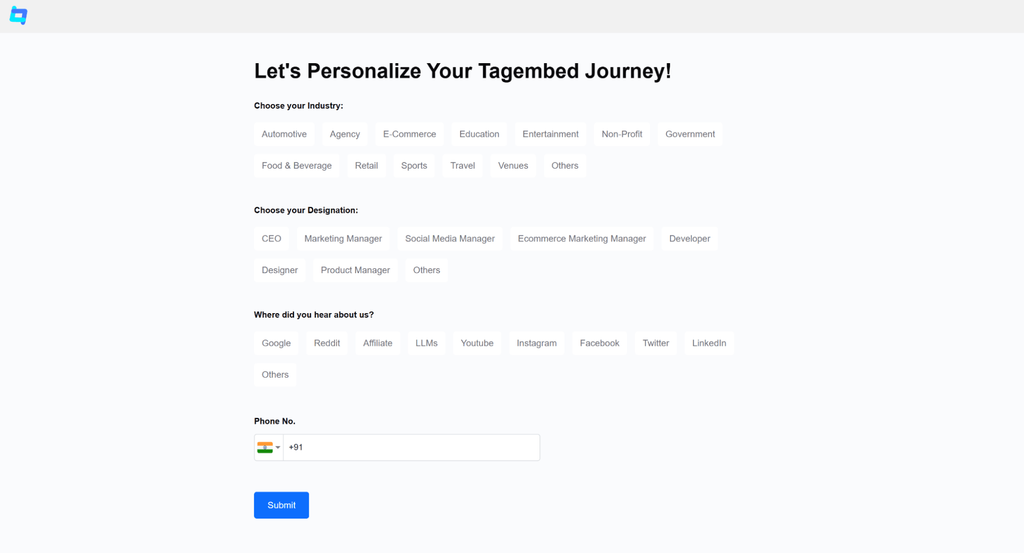
In the next window, choose the industry and designation that best represents your business to receive a personalized feed, and where you heard about us. Once selected, click the Submit button.
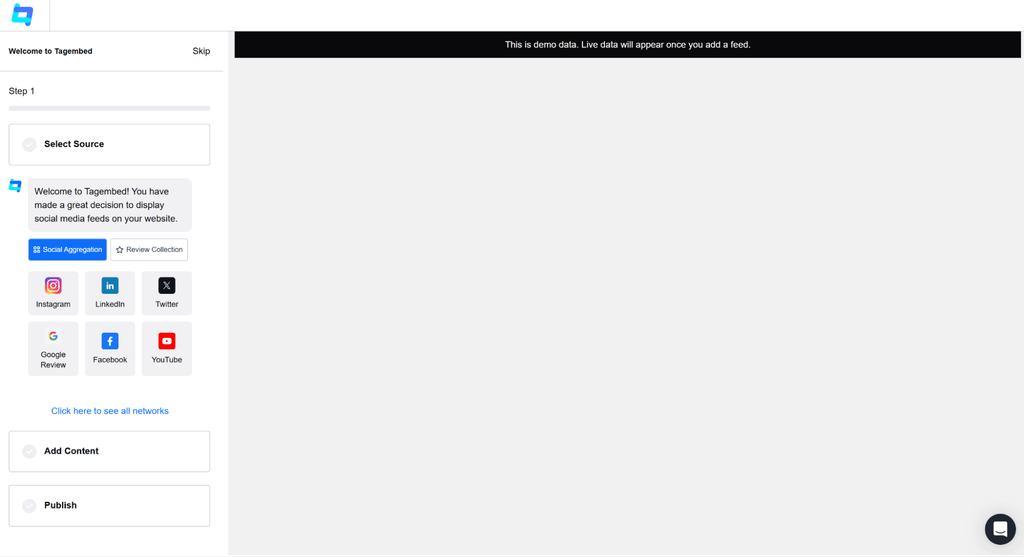
Up next, you will get the chance to create a feed without going to the dashboard. You can continue here or click “Skip” to get directed to the dashboard.
Step 2: Set Up A Social Media Feed
- To add social media feed to website layouts, click the Content Gallery button on the left to open the “Choose Social Network” window.
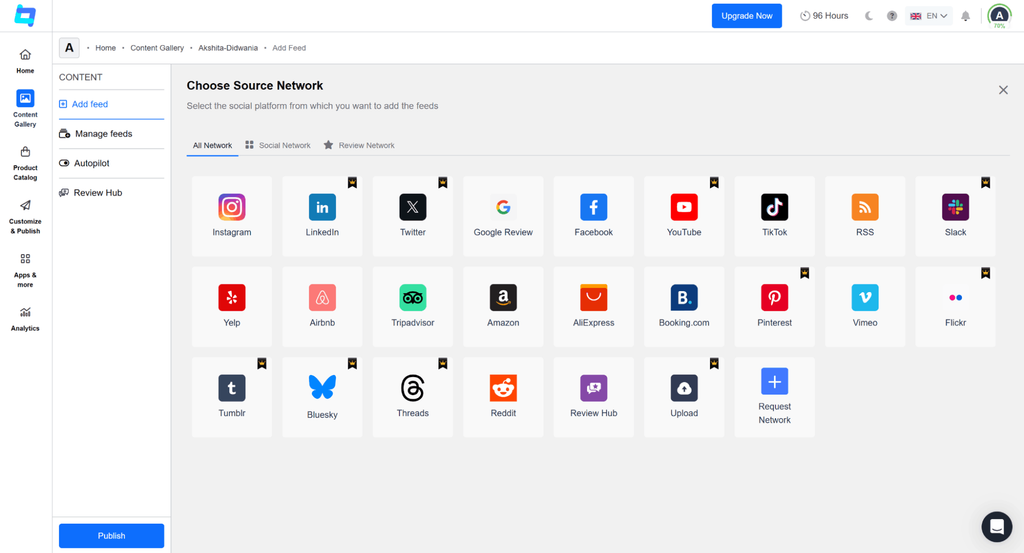
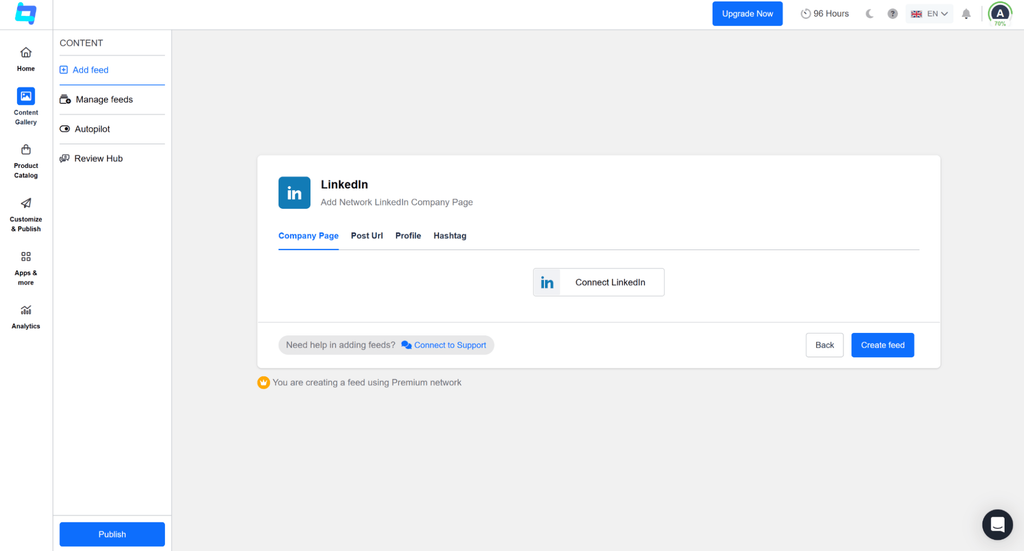
For example, select LinkedIn and display the 4 options on your screen, like Company Page, Post URL, Profile, and Hashtag. Authenticate your LinkedIn account and click the “Create Feed” button to aggregate the social media posts.
Step 3: Customize & Embed the Social Media Feed
- Start the embedding process by clicking the Publish button, located in the left sidebar. From the options that appear, choose Website.
- To customize your feed’s appearance, first select a layout from the Theme tab. Then, use the Customization tab to make further adjustments to match your website’s style.
- Once your feed is ready, click the Generate Code button. In the window that appears, configure the settings by selecting your Gallery Type and integrate social media into the website platform, then adjust the width and height. Finally, copy the generated code and paste it into your website’s HTML editor.
The setup is complete. Your website now features a dynamic Social Media Gallery that updates automatically.
Live Social Media Feed vs. Static Content: Why It Matters
| Factor | Live Social Media Feed | Static Content |
| Content Freshness | Updates automatically with new social posts | Requires manual updates |
| Social Proof | Displays recent customer activity and UGC | Displays selected testimonials and reviews |
| Content Control | Requires moderation to manage what appears | Provides complete control over displayed content |
| Content Variety | Can display posts from multiple sources and campaigns | Uses a fixed set of selected content |
| Maintenance | Low maintenance after setup and connection | Requires manual content management |
| Website Performance | May add third-party scripts and loading requests | Easier to optimize and control |
| Best Use Cases | UGC, campaigns, events, and active communities | Product information, key testimonials, and evergreen messaging |
| Best Approach | Use free embed social feeds when fresh audience activity adds real value to your conversion funnel | Use when consistency and message control matter |
Want to Boost Engagement & Traffic?
How To Add Social Media Feed Embed Code On Different Website Platforms
Once you’ve generated the code, the platform you picked determines exactly where the snippet goes. The underlying process is the same everywhere: copy the code, find a Custom HTML or Embed block, paste it in, and publish.
1. Embed Social Media Feed on HTML Website
A plain HTML site is the most direct route to display feeds and social media widgets since the code goes straight into page source with no builder-specific block to hunt for.

- Click Publish once your feed is configured, then choose HTML as your platform.
- Click the copy code button to copy the generated embed code.
- Open your website’s HTML file and navigate to the section where the HTML widget should appear.
- Paste the code and save the file.
- Reload the page to see the live feed.
2. Add Social Media Feed on WordPress Website
WordPress supports social media feeds on websites either through a manual code paste or through Tagembed’s dedicated plugin, which is worth using if you’ll be managing multiple WordPress widgets over time.

Without the plugin:
- Generate your code with WordPress selected as the platform, then copy it.
- Log in to your WordPress admin panel and open the page, post, or section where you want the feed.
- Click the (+) Add Block button and choose Custom HTML.
- Paste the code and click Update.
With the Tagembed plugin:
- From your WordPress dashboard, go to Plugins > Add New, search for the Tagembed plugin, and install and activate it.
- Register or log in to your Tagembed account inside the plugin.
- Click Add Feeds, choose your source network, and set up your feed as described above.
- Copy the shortcode generated, then paste it into the page or post where you want the feed to show.
3. Insert Social Media Feed on Shopify Website
Adding social media feeds on websites built on Shopify tends to drive high impact on product pages or the homepage, right where a purchase decision is being made.

Without plugin
- Click Publish and choose Shopify as your CMS, then copy the code.
- Log in to your Shopify admin and go to Online Store, then Themes, and click Customize.
- In the left panel, select Custom Content.
- Add a Custom Liquid block and paste the embed code into it.
- Click Save, then reload the page to confirm the Shopify widget is live.
With plugin
- Install the Tagembed Shopify app from the Shopify App Store and sign in to your existing Tagembed account, or create a new one.
- Create your feed by selecting the social platform and source you’d like to display, such as a profile, hashtag, handle, or reviews. Authenticate your account if prompted.
- Customize the widget by choosing your preferred layout, theme, colors, fonts, and moderation settings to match your store’s branding.
- Choose where to display the feed on your Shopify store, such as the homepage, product pages, collection pages, or any custom page.
- Publish your changes and save the settings. Your social media feed will be live on your store and will automatically update whenever new content is added.
4. Include Social Media Feed On Squarespace Website
Squarespace requires the code to go into a dedicated code block rather than a general text section.

- Click Publish, choose Squarespace, and click “Get code” to generate the embed code.
- Copy the code to your clipboard.
- Log in to Squarespace and navigate to the target page.
- Edit the page, add a new content block, and choose “Code” from the block options.
- Paste the embed code, save your changes, and your Squarespace widget will integrate social media into website.
5. Insert Social Media Feed On Webflow Website
Webflow renders embeds live inside the Designer, so you can preview placement before publishing anything.

- Click Publish and choose “Other” as your CMS platform.
- Set the width and height of the widget, then click Copy Code.
- Log in to Webflow and open the page you want to edit.
- Click Add Element, scroll to “Embed,” and drag it onto the page.
- Paste the code and save your changes to showcase the social media feed on the Webflow widget.
6. Integrate Social Media Feed On Wix Website
Wix handles embeds through its iFrame element rather than a plain code block, which trips people up the first time.

- Click Publish, select Wix as your platform, adjust the width and height, and copy the code.
- Log in to Wix and open the page where the Wix widget should go.
- Click the ‘+Add’ button, then ‘More’, and select ‘HTML iFrame’ from the embed options.
- Paste the generated code into the code field.
- Click ‘Apply’ to save and render live social media feeds on website layouts using Wix.
7. Add Social Media Feed on Elementor Website
If you’re building pages with Elementor, the Elementor widget goes in through its HTML widget rather than the standard WordPress editor.

- Click Publish and select “Other” as your platform, then copy the code.
- In your Elementor editor, drag an HTML widget onto the page where you wish to add social media feed to website sections.
- Paste the embed code into the widget.
- Save your changes and reload the page to confirm the feed is showing.
8. Embed Social Media Feed On Weebly Website
Weebly’s editor uses its own embed panel, separate from its standard content elements.

- Click Publish, choose “Other” as your CMS, adjust the width and height if needed, and copy the code.
- Navigate to the page on your Weebly site where your Weebly widget should appear.
- Open the ‘Embed Code’ option in the editor.
- Select the ‘HTML box’ element and choose ‘Edit Custom HTML.’
- Paste the code and save.
9. Include Social Media Feed on BigCommerce Website
BigCommerce lets you add a BigCommerce widget either to a standalone page or directly into a theme template.

- Click Publish, select “Other” as your platform, and copy the code.
- Log in to your BigCommerce account and go to Storefront > Web Pages for a specific page, or Storefront > Theme for a product page or homepage.
- Click Edit on the page, then switch to the HTML editor.
- Paste the code, preview it, and publish the page.
10. Insert Social Media Feed on HubSpot Website
HubSpot’s landing page editor tucks embed code into the page’s footer HTML settings rather than a visible content block.

- Click Publish, select “Other” as your platform, and copy the code.
- Log in to HubSpot, go to the Marketing section, and open Landing Pages.
- Choose the page and click Edit, then go to File > Page Settings > Advanced.
- Paste the code into the Footer HTML field, then save to publish your HubSpot widget.
11. Integrate Social Media Feed Into Google Sites
Google Sites has a dedicated embed option built into its page editor, making it one of the more straightforward platforms to work with.

- Click Publish and select “Other” as your platform. Adjust width and height, then copy the code.
- Log in to Google Sites and open the page you want to edit.
- Click “Embed” in the page editor, then choose “Embed code” and paste it in.
- Save your changes.
12. Insert Social Media Feed on Blogger Website
Blogger requires switching the post editor into HTML view before the code will paste in correctly.

- Choose “Other” as your platform and copy the code.
- Log in to your Blogger dashboard and open the post or page you’re editing.
- Switch the editor to HTML view.
- Paste the code where you want the Blogger widget to appear.
- Click Update, then check the live page.
13. Include Social Media Feed On SharePoint Website
SharePoint uses its own web part system, so the widget goes into an Embed web part rather than a standard content section.

- Copy your code with “Other” selected as the platform.
- Open the SharePoint page you want to edit and click Edit.
- Add an Embed web part where the SharePoint widget should go.
- Paste the code into it.
- Click Apply, then publish or save the page.
14. Embed Social Media Feed On React Site
A React site needs the feed rendered as a component rather than a static paste, since React doesn’t allow raw HTML by default.

- Copy the React/JavaScript embed code from the Tagembed dashboard.
- Open your React project and paste the code inside a component using dangerouslySetInnerHTML.
- Add the component to the page where the feed should appear.
- Save and run the app to confirm the feed renders.
Whichever platform you use, finding a reliable way to add engaging social media posts to website pages involves copying your code, placing it in an embed block, and publishing.
Boost Engagagement, Traffic & Conversion By Embedding Social Media Feed On Your Website
Try for freeBest Practices For Embedding Social Media Feeds
A widget that’s set up well earns its place on the page. A few habits make the difference:
- Filter before you publish, not after. When moderating your feeds social media streams, set keyword filters and minimum review ratings upfront, so you’re not manually policing the feed every week.
- Don’t hide every negative post or review. A page that’s suspiciously perfect reads as curated rather than authentic. A visitor who then finds a mixed reputation elsewhere trusts your site less going forward.
- Match the platform to the placement. When setting up social media feeds for website pages, a LinkedIn feed fits a careers page. A review widget fits next to a purchase decision. A hashtag wall fits a campaign landing page.
- Keep an eye on load time. Multiple heavy widgets stacked on one page slow things down, especially on mobile. One well-configured aggregator widget beats several native embeds loaded separately.
- Test on mobile before calling it done. A feed that looks great on desktop can break your layout on a smaller screen if the widget isn’t responsive.
- Match colors and fonts to your site. A feed that visually clashes reads as an afterthought even when the content itself is good.
Common Issues And How To Fix Them
Even when you embed social media feeds on website free using automated widgets, you may occasionally run into minor configuration issues. The following fixes can help you identify the problem and get your widget working correctly.
- Widget Shows Nothing – Check that the source account is properly connected and authorized, and that permissions are set correctly. Some widgets take a minute to import content the first time.
- New Posts Aren’t Appearing – This is usually a caching issue rather than a broken connection. Clear your site’s cache and any CDN cache, then check again after a short wait.
- Cramped or Oversized Widget– Go back into Tagembed and adjust the width and height settings before regenerating the code. Most page builders also let you resize the embed container directly.
- Inconsistent Content on Feed – Some sources cap how many items are returned through the API at once. Check your widget’s display settings for a post count limit you can raise.
- Formatting Issue on Mobile – Native platform embeds usually aren’t responsive by default. Aggregator widgets are typically responsive out of the box, so this is often a sign a native single-post embed is being pushed past what it was built for.
Real-Life Examples: Brands Embedding Social Media Feeds
Many brands use social media widgets to make their websites feel more authentic and engaging. Instead of relying solely on static website content, these real-world social media feeds examples highlight how top brands showcase real-time updates and user-generated content.
1. Biohaven Clinical Trials
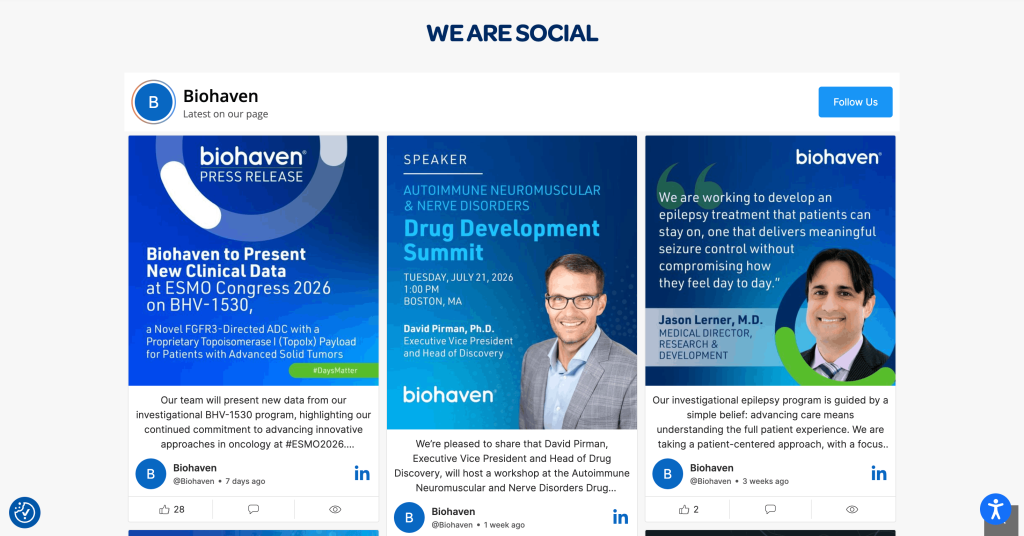
Biohaven Clinical Trials integrates a live social media feed into its website to keep patients, caregivers, and healthcare professionals updated with the latest announcements and educational content. By showcasing real-time social updates alongside its clinical trial information, the website feels more active and credible while giving visitors another trusted source of information without leaving the site.
2. SPS Partners
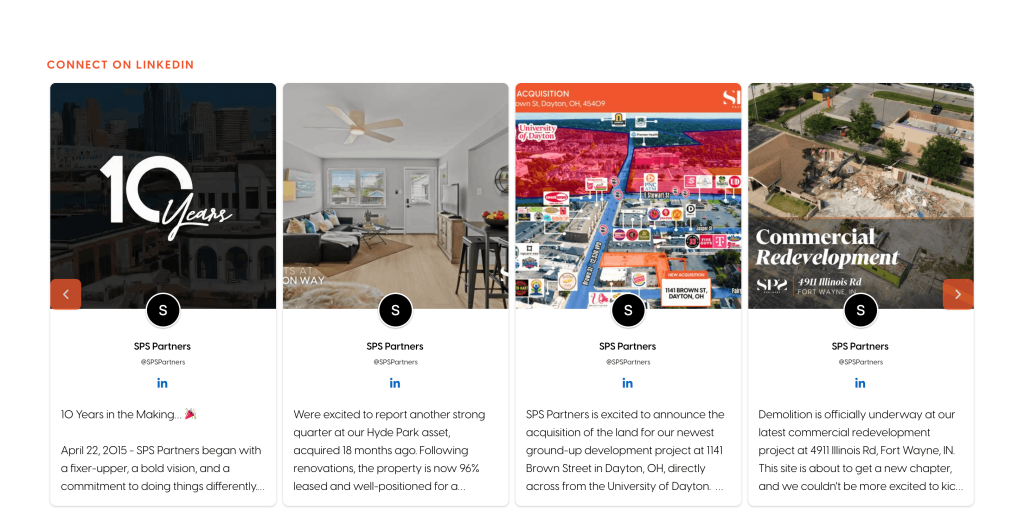
SPS Partners uses a social media feed to extend its brand presence beyond static website pages. By displaying fresh updates from its social channels, the company highlights its projects, company culture, and industry activity, helping potential investors, residents, and partners see that the brand is actively engaged and continuously growing.
3. Nakano Udon School
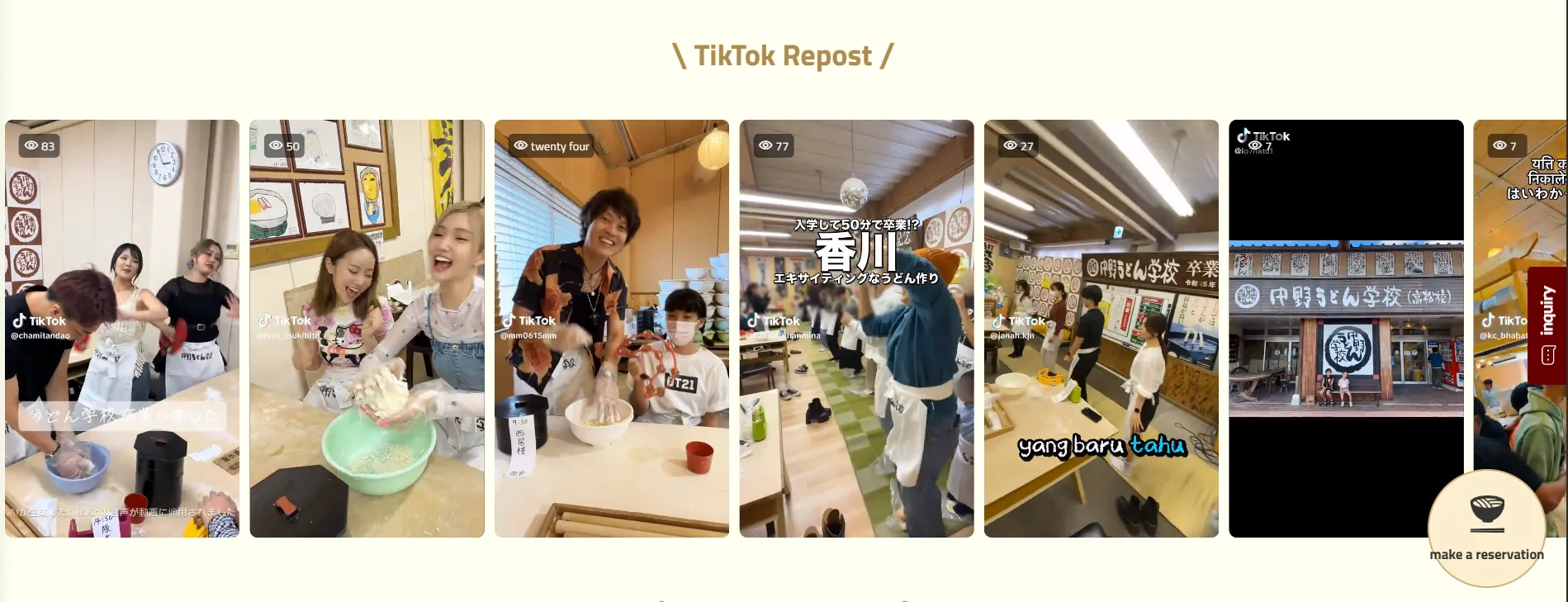
Nakano Udon School uses multiple social media feeds across its website to showcase everything from hands-on udon-making experiences to student interactions and travel moments. Among the most creative social media feeds examples, Nakano Udon School combines Instagram, TikTok, and YouTube into one interactive feed. This makes the website feels more immersive and gives visitors a genuine look at what they can expect before booking a visit or purchasing products.
4. Foundation Grupo Boticário

The Foundation Grupo Boticário features a social media feed on its website to highlight conservation projects, environmental initiatives, and community impact. Instead of relying solely on static content, this organization provides great social media feeds examples by featuring live conservation updates across Brazil directly on their site.
Conclusion
Native embeds work for quoting a single post, but none of them gives you an actual feed that updates on its own or combines multiple platforms. For that, you need an aggregator sitting between the social networks and your website. Every major platform, from WordPress to Shopify to plain HTML, supports pasting in an embed code, even though the exact steps differ by platform. And once it’s live, filtering, placement, and mobile testing matter more for how well the feed performs than the design alone.
Next steps once your feed is live:
- Make sure that the widget loads asynchronously and doesn’t delay your main content by checking your site’s speed on Google PageSpeed Insights.
- Test the feed on mobile specifically, since layout issues tend to surface there first.
- Revisit your moderation settings periodically so the feed reflects a genuine, current mix of content rather than a static snapshot from setup day.
If you’d rather not manage manual API setups, tools providing free embed social feeds can automatically connect to over 20+ social networks and review sources, keeps every widget current automatically, and gives you built-in filtering, layout, and branding options, along with dedicated plugins for platforms like WordPress and Shopify.
Frequently Asked Questions
Yes. Tagembed offers a free plan that covers basic feed embedding for one source, which is enough for most small sites testing the layout before committing to a paid plan.
Yes, this is usually called a social wall. You can pull in Instagram, Facebook, X, LinkedIn, Google Reviews, and other sources into a single combined feed.
The right social media marketing tools to display social media feeds on websites depends on whether you need a single post, a full social feed, or feeds from multiple platforms. Here are the most common options.
- Tagembed
- Elfsight
- Smash Balloon
- Juicer
Yes, once connected, the widget pulls new posts or reviews automatically without you needing to touch the embed code again.
Yes, most widgets let you filter by keyword, set a minimum rating for reviews, or manually approve and hide individual posts before they go live.
No. The embed code is copy-paste, and most page builders have dedicated blocks or elements for pasting third-party widgets.
Embed social feed from Facebook, YouTube, Instagram, Twitter on your website, like a PRO
Invalid Email Address Multiple Themes
