How to Embed Customer Reviews on Your Website
TL;DR
- Customer reviews are feedback and ratings shared by real customers on platforms such as Google, Facebook, Amazon, Yelp, and Tripadvisor. Using a widget to show customer reviews on website gives visitors social proof without making them leave the page to find out what other customers think.
- Steps: Choose a customer review aggregator that fits your needs, connect it to a review widget, customize the look, generate the embed code, and add it to your website. With auto-sync enabled, new reviews can appear without having to update the page manually.
- The homepage is a natural place to start, but it isn’t the only option. Product, service, pricing, landing, and checkout pages can all benefit from reviews that match what visitors are deciding at that point.
- Keep the display simple and believable. Show the review source, use ratings where they make sense, make the widget mobile-friendly, and highlight feedback that is relevant to the page.
- Reviews need maintenance too. Old feeds, slow widgets, fake testimonials, missing sources, and overly selective displays can make a website look less trustworthy rather than more credible.
A first-time visitor doesn’t know your team or your product, and nothing on the page tells them whether past customers walked away happy. Customer reviews on a website close that gap. As you display customer reviews on website pages, you hand the job of building trust over to the people visitors actually believe, like other customers.
Keeping that proof on your own domain, instead of scattered across Google, Yelp, or Facebook, puts it exactly where buying decisions happen. A review hub makes this possible without writing code, pulling feedback from one or more platforms into a single display block.

TripAdvisor
Reviews

Facebook
Reviews

Google
Reviews

Amazon
Reviews

AliExpress
Reviews
What Is a Customer Review Widget?
A customer review widget is an embeddable tool that displays customer reviews, ratings, and feedback from platforms such as Google, Facebook, Yelp, Amazon, and Tripadvisor directly on a website. It lets businesses collect and show customer reviews from one or multiple sources in formats like grids, carousels, or review cards without manually adding each review to a webpage.

Most customer review widgets also let you customize the display and automatically update the feed as new reviews are published. This helps businesses keep customer reviews on their website current while adding social proof near important conversion points, such as product pages, service pages, pricing pages, and checkout. Tagembed is one option for adding customer feedback in four simple steps. For more ideas, explore these website widget examples.
One distinction that trips up a lot of website owners is the difference between reviews, testimonials, and ratings. They look similar but come from different places and serve different purposes.
| Term | What It Is | Who Controls It |
| Customer Review | Feedback left directly by a customer on a platform like Google or Yelp | The customer |
| Testimonial | A quote or endorsement selected and published by the business | The business |
| Rating | A numerical or star-based score attached to a review | The customer, aggregated by the platform |
How to Embed Customer Reviews on Website Without Coding
Manually adding customer reviews to a website takes time and becomes harder to manage as new feedback comes in. A customer feedback widget simplifies the process by letting you collect reviews, customize the display, and add them to your website with an embed code.
Here’s a step-by-step guide to add a customer review widget by using a social media aggregator tool like Tagembed and complete the process smoothly without coding.
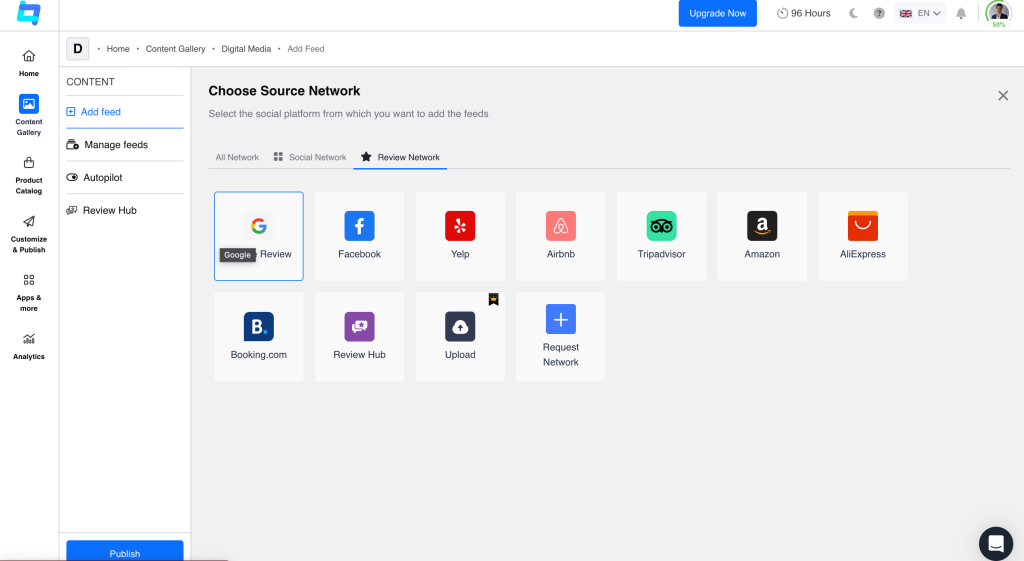
Step 1: Choose Your Review Sources
- Choose the platforms you use to collect customer feedback.
- Local businesses can focus on Google reviews on website pages, while ecommerce stores may use Amazon or Etsy.
- Display one source or combine multiple feeds.
Step 2: Connect Your Review Sources
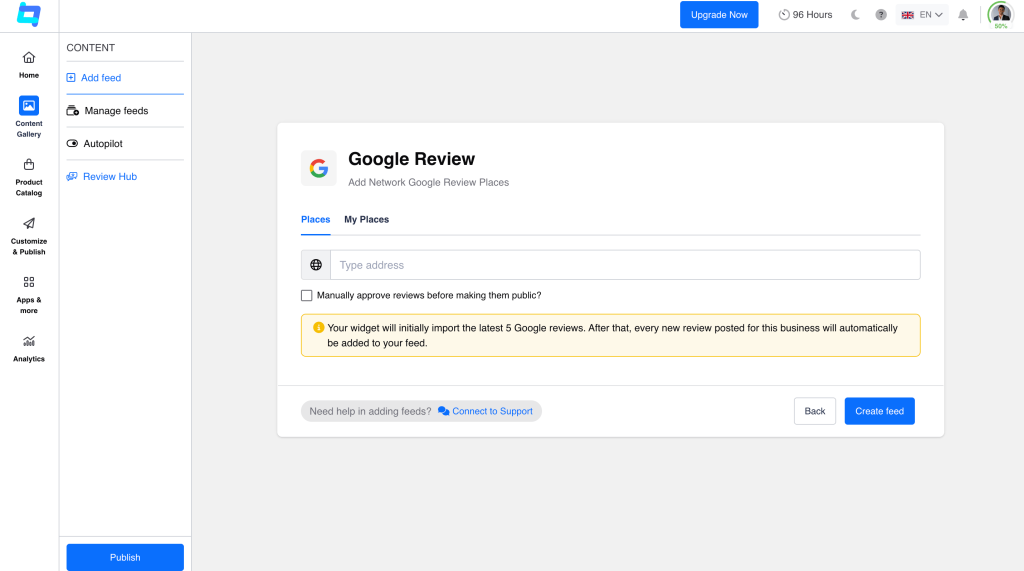
- Connect your review sources, such as a Google Reviews Widget with your Google Business Profile, Facebook Page, or Yelp listing.
- Once connected, the widget imports existing reviews and automatically syncs new ones.
- This keeps your review feed fresh without manual updates.
Step 3: Customize Your Review Widget
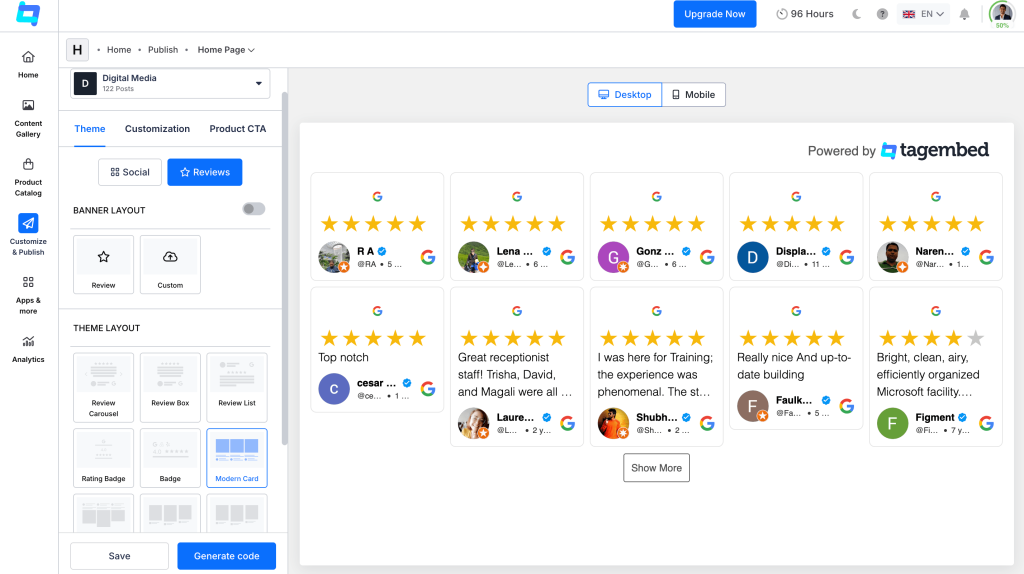
- Customize your customer feedback widget to match your website’s fonts, colors, spacing, layout, and review card style.
- Display star ratings and choose how many reviews appear at once.
- Filter reviews to highlight the most recent, relevant, or detailed feedback.
Step 4: Generate the Embed Code
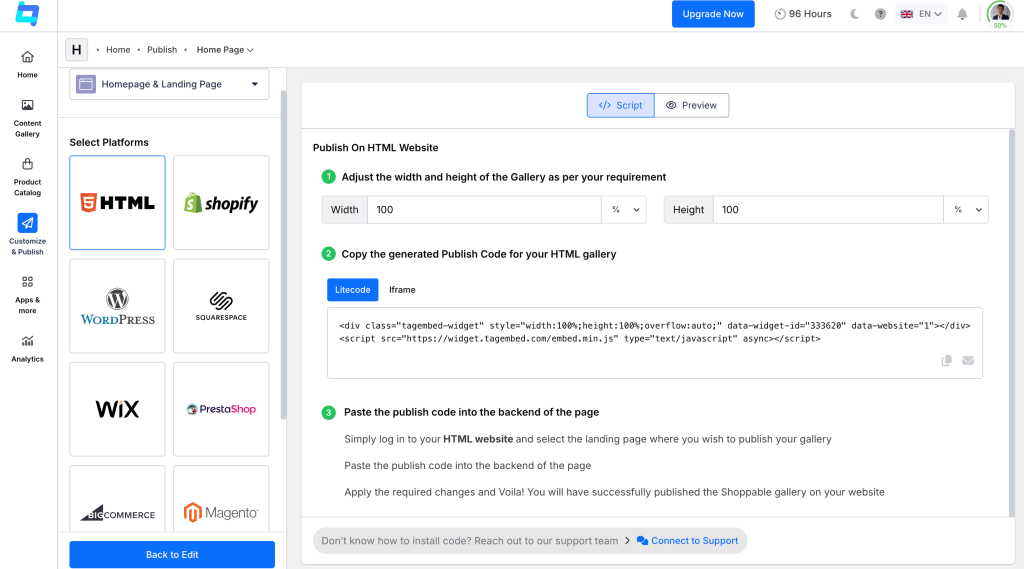
- Save your changes and click “Generate Code” to generate the embed code for your customer review widgets.
- No coding expertise is required, as the generated code is ready to be added to your website.
Step 5: Add the Customer Review Widget to Your Website
- Copy the generated code when you’re ready to add testimonials to the website.
- WordPress: Add the code to a Custom HTML block.
- Shopify: Add it through a custom theme section.
- Wix and Webflow: Use the available Embed or Code element.
- HTML sites: Paste the code into the page body.
Step 6: Publish and Monitor Customer Feedback
- Check the widget on desktop, tablet, and mobile to make sure the reviews display properly.
- New reviews can appear automatically every 15 to 30 minutes, based on your plan.
- This keeps the reviews on your website current without regular manual updates.
Major Sources of Customer Reviews You Can Embed
Most businesses collect customer feedback across multiple different platforms. Customers might leave feedback on Google Business Profile, Facebook, Yelp, Amazon, Airbnb or another platform depending on where they interact with the business.
Instead of sending visitors to each platform separately, you can bring relevant reviews into one display on your website.
| Review Source | Best For | Type of Reviews | What It Showcases | Widget |
| Local businesses | Business reviews & ratings | Star ratings and written feedback from a Google Business Profile, ideal for putting Google reviews on website pages | Google Reviews Widget | |
| Brands & businesses | Recommendations & reviews | Recommendations and customer experiences shared on a Facebook Page | Facebook Review Widget | |
| Airbnb | Hotels, vacation rentals, property managers | Guest reviews | Guest experiences tied to hospitality quality | Airbnb Review Widget |
| Yelp | Restaurants and local businesses | Business reviews | Ratings and experiences from one of the most-checked local review platforms | Yelp Review Widget |
| Amazon | Ecommerce and product-based businesses | Product reviews | Product feedback and star ratings from verified buyers | Amazon Review Widget |
| Tripadvisor | Hotels, restaurants, travel agencies, tour operators | Traveler reviews | Traveler experiences that carry weight with future guests | Tripadvisor Review Widget |
| Etsy | Etsy sellers, independent creators, handmade-product businesses | Product/customer reviews | Product and customer feedback from the marketplace | Etsy Review Widget |
Collect reviews from every platform in one widget and build trust fast.
Why Should You Embed Customer Reviews on Your Website?
Reviews do more than fill an empty section on a webpage. They give visitors information about the experience that your own marketing copy can’t provide. Here are some of the main reasons businesses actively collect customer feedback and embed it live.
- Trust and Credibility: Embedding customer testimonials on website pages builds immediate trust and credibility. Customers tend to put more weight on experiences shared by other customers than on claims made by a business about itself.
- Social Proof: A visitor who sees recommendations via a Facebook Widget or Google feed has immediate context for making their own decision.
- Direct Answers: Reviews often mention things a product description doesn’t, such as quality, delivery, customer service, or how something works in everyday use.
- Support Conversions: When reviews appear near a purchase, booking, or sign-up decision, they can give hesitant visitors another reason to continue.
- Updated Content: Easily collect and display reviews to keep your website content fresh automatically. An auto-synced feed can bring new customer feedback to your site without requiring someone to update the page manually.
- Show Real Customer Experiences: A review can explain how a product or service worked for someone in a way that polished marketing copy usually can’t.
- Reduce Uncertainty: Visitors may still have doubts after reading your product or service information. Seeing similar customers describe their experience can help answer some of those doubts.
The important part is not simply having reviews somewhere on the site. Where and how you display them matters too.
Where Should You Display Customer Reviews on a Website?
Placement matters as much as the reviews themselves. Knowing where to display customer reviews only works if it sits where visitors are actually making decisions.
| Page | Why Reviews Help Here | What to Show | Best Review Type |
| Homepage | First impression, builds overall brand trust | A broad mix of recent, high-rated reviews from across your sources | Aggregated reviews pulled from multiple platforms |
| Product Pages | Answers buyer questions before purchase | Reviews tied to that specific product, ideally with photos or verified purchase tags | Product reviews from Amazon, Etsy, or on-site verified buyers |
| Service Pages | Reassures visitors comparing providers | Detailed reviews that describe the actual service experience, not just a star rating | Google or Yelp reviews with written detail |
| Landing Pages | Supports a specific campaign’s conversion goal | Short, punchy reviews that echo the campaign’s core message or offer | Handpicked testimonials matched to the campaign |
| Pricing Pages | Justifies cost with proof of value | Reviews that mention results, ROI, or value for the price paid | Reviews highlighting measurable outcomes |
| Checkout or Sign-Up Pages | Reduces last-minute drop-off | Brief, reassuring reviews placed close to the final CTA | Star ratings paired with short, confidence-building quotes |
For B2B providers and service pages, pairing client reviews with professional proof from a LinkedIn Widget reassures prospective clients right before they book a call.
Best Practices for Displaying Customer Reviews
When you add testimonials to website layouts, placement alone doesn’t make them persuasive, but presentation matters. A few simple rules can keep the section useful rather than turning your website review section into another block visitors skip.
- Genuine Reviews: Don’t rewrite or remove parts of a review to make it sound more positive. Keep the customer’s original meaning intact.
- Avoid Cherry-Picking: Don’t fill your feed with five-star reviews while hiding every critical comment. A balanced mix of original, believable experiences is more credible.
- Relevance: Match reviews to the page. Product pages should feature product feedback, while service pages should highlight experiences related to that service.
- Show The Source: When you show customer reviews, make their origin clear. For Google reviews on website pages, for example, identify Google as the source and include the reviewer, rating, or date when available.
- Ask For Honest Feedback: Ask customers to share their actual experience rather than requesting positive reviews. Avoid offering incentives specifically in exchange for favorable feedback.
- Prioritize Recent Reviews: Older reviews can still be useful, but newer feedback should take priority when your products, services, pricing, or customer experience have changed.
- Keep Display Balanced: Don’t turn the page into a wall of reviews. Show enough feedback to support the visitor’s decision without burying your main content or CTA. You can also add visual UGC with an Instagram Widget to give the section more variety.
- Check Before Publishing: Review the widget on different screens like desktop and mobile. Make sure names, sources, ratings and review text display correctly, and check that new reviews continue to sync.
- Follow Review Rules: Follow the policies of the review platform and applicable advertising rules. In the US, the FTC’s Consumer Review Rule covers deceptive practices involving reviews and testimonials.
Common Mistakes When Embedding Customer Reviews
If your reviews rely heavily on video testimonials, using a dedicated, lightweight YouTube Widget prevents scripts from slowing down page render times. A customer feedback widget isn’t something you add once and forget about. These are some of the problems worth checking before and after you publish.
1. Choosing the Wrong Source
Not every review platform will give you useful content. A source with very few reviews can leave your feed looking thin or repetitive.
Fix: Connect the platforms where your customers actually leave feedback.
2. Pasting the Code in the Wrong Place
The embed code needs to go into the right website element. Otherwise, your customer testimonials on website pages may appear in the wrong location or fail to load.
Fix: Use your site’s Custom HTML, Embed, or Code element and place the widget where you want it to appear.
3. Leaving the Default Layout
The default design may not suit your page. Large cards or excessive spacing can make the website review section feel out of place.
Fix: Before you publish, make the necessary adjustments to the layout, card size, spacing, and the number of reviews.
4. Forgetting Mobile
A widget might appear satisfactory on a desktop but can still lead to problems when used on a phone. Look for truncated text, excessively large cards, or the need for horizontal scrolling.
Fix: Open the live page on mobile and make adjustments before you publish.
5. Adding the Entire Feed
You don’t need to show customer reviews from every source and every date on every page. A long feed can push important content and CTAs too far down.
Fix: Limit the number of reviews to show so that the feed isn’t overcrowded and filtered as a result.
6. Not Checking the Source Connection
Installing the widget doesn’t guarantee that the feed will keep working. An expired connection or failed sync can leave you with an empty or outdated section.
Fix: Check the live feed after installation and occasionally confirm that new reviews are still coming through.
7. Skipping the Final Check
Don’t stop once the reviews appear. Check how the widget sits with the rest of the page, including the content around it and nearby buttons or forms.
Fix: Review the complete page on desktop and mobile before calling the setup finished.
Final Thoughts
Customer reviews on websites remain one of the most effective forms of social proof a website can offer, and a customer review widget makes collecting and displaying them effortless. The right setup depends on where your reviews live, your website platform, and how often your feed needs updating. Want to go beyond reviews? A Social Media Widget or Social Media Aggregator, including Instagram Widget, LinkedIn Widget, and YouTube Widget options, follows the same logic. To add customer reviews on website pages without touching code, Tagembed’s Review Widget makes it a quick, no-code process.
FAQs About Embedding Customer Reviews
The best option depends on which platforms your reviews come from and how much customization you need. A widget that aggregates multiple sources, like Google and Facebook together, generally offers the most flexibility for a growing business.
Yes, most review widgets support connecting several sources, such as Google, Facebook, and Amazon, and combining them into a single feed on your website.
Yes, layout, colors, fonts, spacing, and the number of reviews shown can usually be adjusted so the widget matches your site’s design.
Reviews should refresh regularly, ideally through an auto-synced widget, so the feed reflects recent feedback rather than reviews from months or years earlier.
Common sources include Google Business Profile, Facebook Pages, Yelp, Amazon, Etsy, Tripadvisor, and Airbnb, depending on the type of business.
Embed social feed from Facebook, YouTube, Instagram, Twitter on your website, like a PRO
Invalid Email Address Multiple Themes